


The Alienware AW3926QW turns one wide OLED panel into two very different gaming displays. Its main 5120 x 2160 mode favours detail and desktop space at 165Hz. A second 2560 x 1080 mode doubles the refresh ceiling to 330Hz. That flexibility is real, but it does not remove the graphics-card load, desk-space and local-support questions.
Quick Answer
The Alienware AW3926QW is a 38.9-inch, 21:9, 1500R curved OLED monitor using an RGB-stripe tandem panel. Dell lists 5120 x 2160 at 165Hz, 2560 x 1080 at 330Hz, a 0.03 ms grey-to-grey response time, adaptive-sync support and a $1,099.99 US price. That dollar figure is not a South African price. No matching AW3926QW listing appeared in the captured Evetech sample, where active Alienware and OLED monitors ranged from R4,999 to R12,999 among the first five results.
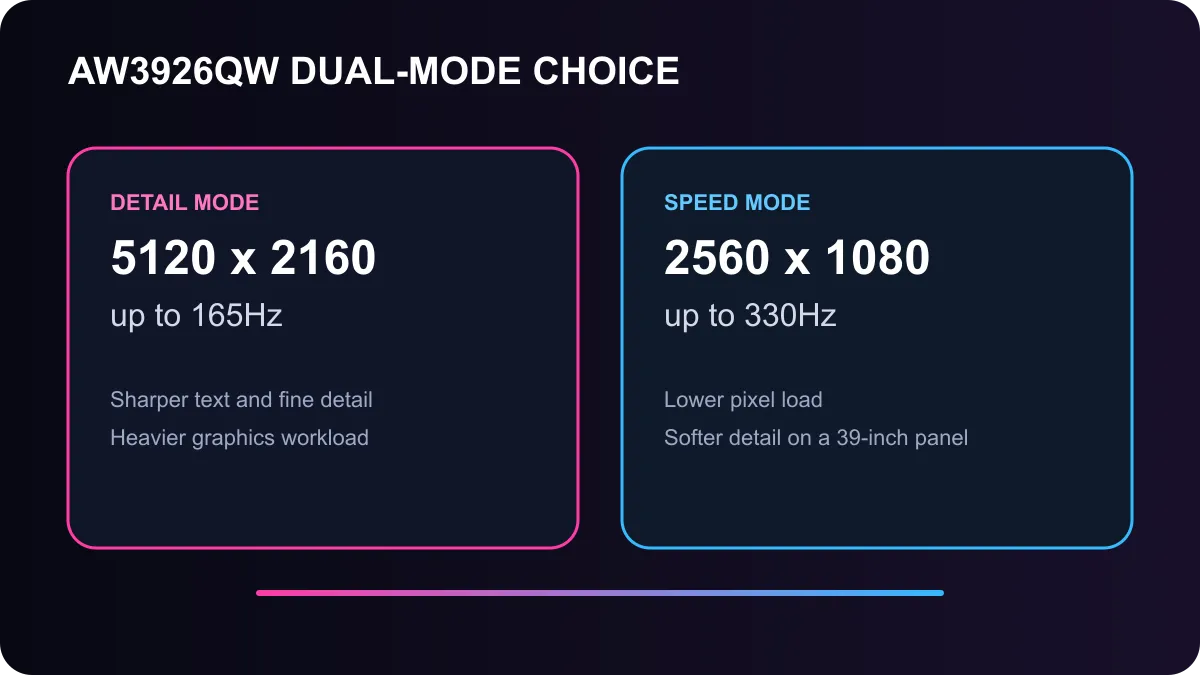
Two modes solve different problems
At 5120 x 2160, the monitor delivers a very wide 5K-class workspace with 143 pixels per inch. The 165Hz ceiling is already fast enough for fluid general play, while the extra horizontal room suits racing games, simulation titles, editing timelines and multiple application windows. The cost is graphics demand: rendering roughly 11 million pixels per frame asks far more from a graphics card than standard 1440p.
The 2560 x 1080 mode reduces the pixel load and raises the refresh ceiling to 330Hz. It suits competitive play where response and motion matter more than fine detail. The trade-off is lower sharpness across a physically large panel. Text, distant edges and interface elements cannot look as crisp as they do in the native mode.
This dual-mode approach works best when you plan to use both profiles. If every game will stay at 165Hz, compare the monitor mainly on OLED image quality, size and connections. If every game will use the 330Hz mode, decide whether the reduced resolution looks acceptable at normal viewing distance.
Panel, ports and desk checks
Dell lists RGB-stripe tandem OLED technology, which matters for both brightness and text rendering. The official page claims a peak brightness of 1,300 cd/m2, VESA DisplayHDR True Black 500, 99 percent DCI-P3 coverage and average Delta E below 2. Those are specification claims, not a substitute for checking brightness stability, near-black detail and screen coating in independent tests.
The monitor includes two HDMI 2.1 connections, DisplayPort 2.1 and a USB-C upstream connection with display input and up to 90W power delivery. It also includes USB data ports and a KVM feature. A notebook user can therefore connect display, data and charging through one cable when the notebook supports the required USB-C mode.
Physical scale needs equal attention. A 39-inch ultrawide occupies far more desk width than a 27-inch panel. Check viewing distance, stand depth and whether the curve suits work applications. The panel does not pivot, so portrait use is not part of the design.
South African buying context
Dell's captured US listing showed $1,099.99. It would be misleading to convert that number directly into rand because a local price depends on distribution, freight, tax, warranty and launch allocation. South African price and availability were not confirmed in the evidence used here.
The captured Evetech monitor sample did not include the AW3926QW. It did include an Alienware 25-inch 320Hz model at R4,999, an Alienware 34-inch 180Hz curved model at R7,499, and OLED models from R9,999. Those products are not direct replacements for a 39-inch 5K OLED, but they show the current local range and how much panel size, OLED technology and refresh rate affect price.
Browse the Alienware monitor range, compare current OLED monitors, and widen the search to all gaming monitors. Recheck live stock and price before ordering.
Match the monitor to the graphics card
Native 5120 x 2160 gaming demands a strong graphics card, especially with high-quality ray tracing. Upscaling can reduce the load, but performance varies by game and setting. For competitive titles, the 330Hz mode also needs a high and stable frame rate before its refresh ceiling becomes useful.
Choose the AW3926QW only if the two modes, wide workspace and OLED contrast fit how you use the PC. A smaller QHD OLED may offer a better balance for a shallower desk, while a high-refresh LCD can reduce the entry cost. The specification is impressive; the correct purchase still depends on room, workload and a confirmed local support path.
Frequently Asked Questions
What are the Alienware AW3926QW display modes?
It runs 5120 x 2160 at up to 165Hz or 2560 x 1080 at up to 330Hz.
Is the $1,099.99 price valid in South Africa?
No. It is the captured US price and should not be treated as a local quote or landed-cost estimate.
Does the monitor support USB-C charging?
Yes. Dell lists a USB-C upstream connection with display input and up to 90W power delivery.
Compare the current OLED range before deciding whether the larger dual-mode panel solves a real need.
Choose the mode you will actually use. Native detail and 330Hz speed pull the graphics card in different directions, so plan around your games first.











