



Gigabyte FO32U24G OLED: The SA Buyer Check
Gigabyte's FO32U24G pairs 4K 240Hz and FHD 480Hz modes on a 32-inch Tandem WOLED panel. SA buyers should compare the two use cases and wait for confirmed local pricing.
Read moreA South African price check found one 16GB DDR4 kit up 229% as memory and SSD costs lifted a midrange desktop basket. Buyers should compare complete upgrade paths, not one part.

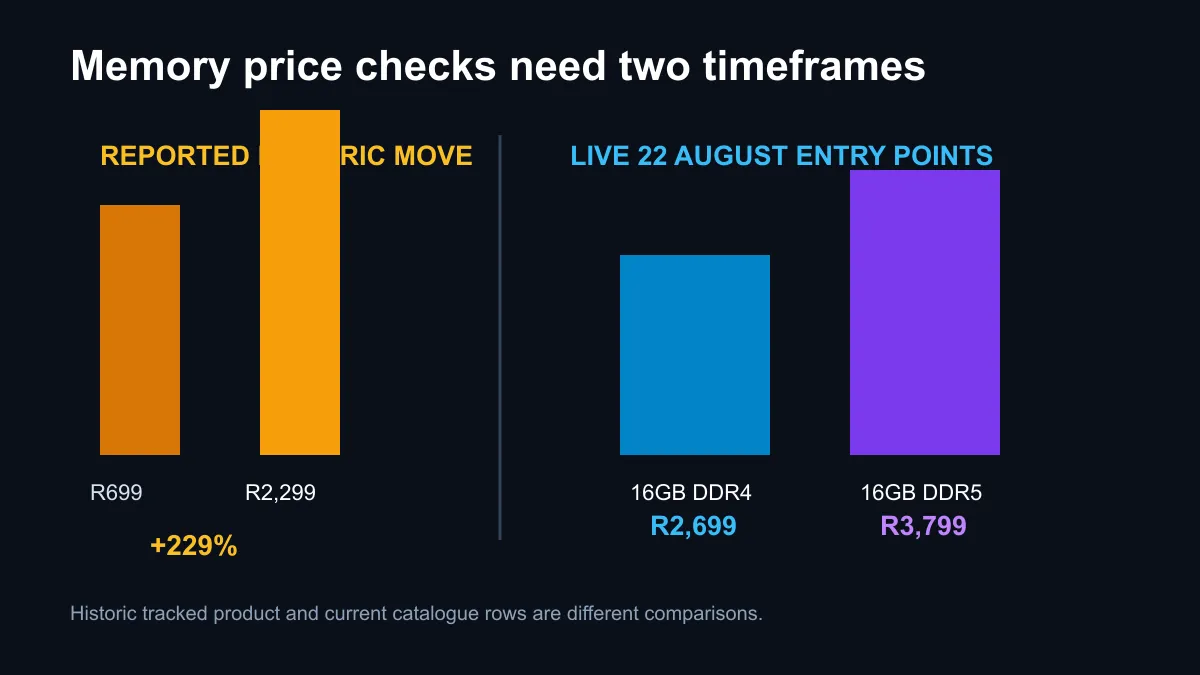
A tracked 16GB DDR4 kit has become the sharpest example of South Africa's changing PC component costs. Its price moved from R699 to R2,299, a 229% increase, while a comparable 1TB SSD rose by more than 150%. Those figures are real historic comparisons, but they should not push a buyer into replacing an entire platform without checking today's complete bill.
The comparable midrange desktop basket rose from R15,567 to R18,835, or about 21%, across roughly 500 days. In Evetech's exact 22 August snapshot, in-stock desktop DDR4 started at R1,599 for 8GB and R2,699 for 16GB, while 16GB DDR5 started at R3,799. Compare usable capacity and total platform cost before choosing.
The largest percentage belongs to one G.Skill 16GB DDR4 kit that moved from R699 to R2,299. It shows how an older component can become more expensive when supply tightens, even though the technology itself has not become newer. The tracked 1TB SSD moved from R1,199 to R2,999, and a Ryzen 5 5600 moved from R2,999 to R3,649.
Other parts in the basket were more stable or cheaper, which is why the overall desktop increased by about 21%, not 229%. A dramatic component headline should lead to a fresh bill of materials, not the assumption that every part changed by the same amount. Buyers can cut a basket by reusing a case, power supply, storage drive or graphics card when compatibility and condition allow.
The current DDR4 memory range is the right starting point for a compatible system. Compare exact capacity, number of modules, speed and warranty. A 16GB single module and a 16GB two-module kit are not the same configuration.
Memory purchases should solve a measured limit. If current workloads use less than the installed capacity and the system is stable, replacing RAM solely because market prices may rise can waste money. If applications are paging to storage, closing during heavy multitasking or preventing a game from running smoothly, capacity is the stronger signal.
Two matched modules can provide dual-channel bandwidth on supported platforms. A single larger module may preserve an easier upgrade path but can reduce bandwidth until a second module is installed. Buyers should check the motherboard manual, supported memory type and available slots before ordering. DDR4 and DDR5 are physically and electrically different and cannot be swapped into the same slot.
The exact local snapshot found 16GB DDR4 modules at R2,699 and a 16GB DDR4 kit at R3,499. It found 16GB DDR5 modules from R3,799. Those rows do not prove one generation is better value in isolation because the motherboard and processor costs remain outside the RAM price.
An existing DDR4 owner usually has three choices. Add compatible memory, replace the current kit with a larger DDR4 kit, or move to a newer platform using DDR5. The first two preserve the motherboard and processor. The third may require a new motherboard and CPU, and sometimes a cooler or operating-system preparation.
Build three totals before deciding. Include every required component, delivery and any labour. Then compare the gain in the actual workload. A modest RAM-only upgrade can be the best value for a working gaming PC even if DDR4 looks expensive beside its old price. A platform move becomes more sensible when the processor is already limiting performance or the motherboard lacks the features needed next.
The DDR5 memory range provides the other side of that calculation. Do not compare a bare DDR5 module with a DDR4 module while ignoring the new platform around it.
Component markets can move in either direction, and no article can promise the next price. A buyer with failing memory or a workload that clearly exceeds current capacity has a reason to act now. Someone with a stable machine and unused capacity can wait, track equivalent kits and keep cash available for a better complete upgrade.
Use current memory best sellers to compare stocked options, but confirm the motherboard qualified-vendor list and supported speed. If mixing modules, matching rated specifications does not guarantee identical memory chips or stable overclocked settings. A tested matched kit is the safer route for a performance build.
No. That percentage applies to one tracked 16GB kit. Current products and configurations have different prices.
Not in the exact entry comparison used here. A 16GB DDR4 module started at R2,699 and DDR5 at R3,799.
No. The memory generations use different slots and require a compatible motherboard and processor platform.
Buy for a verified capacity or stability need. A forecast alone is not a good reason to replace working hardware.
Planning a memory upgrade? Price the RAM-only fix and the complete platform change, then choose the option that solves the measured limit.
The reported G.Skill 16GB kit moved from R699 to R2,299, an increase of 229%.
No. The comparable midrange basket rose from R15,567 to R18,835, or about 21%.
The comparable 1TB SSD moved from R1,199 to R2,999, an increase of more than 150%.
The exact 22 August sample started at R1,599 for 8GB and R2,699 for a 16GB module.
The same in-stock snapshot started at R3,799 for a 16GB DDR5 module.
No. Compare the total cost of memory, motherboard and processor before replacing a compatible platform.
Gigabyte's FO32U24G pairs 4K 240Hz and FHD 480Hz modes on a 32-inch Tandem WOLED panel. SA buyers should compare the two use cases and wait for confirmed local pricing.
Read more
AULA's F87S combines 8kHz wired and 2.4GHz polling with hot-swap switches and tri-mode connectivity. SA buyers should wait for a confirmed local listing before judging its value.
Read more
Windows 11 update KB5121003 is linked to crashes in several multiplayer games on versions 24H2 and 25H2. Check the build, report the fault and avoid risky file or update changes unless the problem is confirmed on your PC.

Sennheiser's Momentum True Wireless 5 adds user-replaceable batteries, 12-hour playback and a $299.95 launch price. There is no confirmed South African date, so compare longevity with live earbuds from R199 to R2,999.

AVerMedia's GC531 and GC535 are professional HDMI capture devices for continuous streaming, with RGB24 capture up to 2K30 and 4K30. South African creators should compare them with live 4K capture cards from R2,099.

From 1 October 2026, WhatsApp Business Platform service replies in South Africa are expected to cost about $0.0076, or 12 cents, per delivered message.

CISA has added Windows IKE flaw CVE-2026-33824 to its actively exploited list. Supported Windows systems need the April 2026 security update or tightly limited IKE exposure.
Windows 11 update KB5121003 is linked to crashes in several multiplayer games on versions 24H2 and 25H2. Check the build, report the fault and avoid risky file or update changes unless the problem is confirmed on your PC.

Comsol's standalone 5G network covers about one million Gauteng homes and starts commercial ISP service in September. Early packages range from R275 to R875 a month, but coverage and fair-use rules still decide the real value.
Sennheiser's Momentum True Wireless 5 adds user-replaceable batteries, 12-hour playback and a $299.95 launch price. There is no confirmed South African date, so compare longevity with live earbuds from R199 to R2,999.

A 650W PSU is a risky ceiling for an RTX 5090 system if you want comfortable safety headroom. SA builders should check total platform draw, PSU age, cable support, case airflow, and upgrade plans before relying on it.

80+ Gold and 80+ Platinum affect 4K video editing through power efficiency and heat. The real-world difference is lower wasted energy, steadier PSU thermals, and quieter long renders for SA creator workstations with hungry CPUs and GPUs.

How to fix low FPS Windows 11 Ryzen 7 9800X3D starts with BIOS, chipset, thermals, and graphics settings. Use this SA checklist to confirm the build is boosting correctly before blaming the CPU, GPU, RAM, or display.

AM5 vs AM4 for Strategy and Sim Games comes down to CPU path, motherboard features, memory support, I/O needs, and upgrade timing. SA buyers should match the choice to their setup instead of assuming one option always wins.