



1000W PSU Planning for RTX 5090 Builds in SA
1000W for RTX 5090 needs a full-build check, not a simple yes. Review GPU guidance, CPU draw, transient load, connectors, PSU quality, and upgrade plans before deciding.
Read moreUse 45-degree lumbar rotation by testing how support follows posture changes without creating pressure. The HBADA X7 uses automated tracking and multi-directional adjustment; choose any required rotation angle separately.

Rotating lumbar support is useful only when movement preserves broad, comfortable contact instead of concentrating pressure. A 45 degree lumbar rotation setup should be tested through actual posture changes, not accepted from the number alone. Priced at R14,999, the HBADA X7 tracks lumbar contact automatically and adjusts support across directions, without carrying that exact angle.
The X7 does not use a 45-degree lumbar rotation; its lower-back assembly adjusts 50mm front to back, 45mm vertically and through 10 degrees of adaptive tilt.
Use a 45-degree lumbar rotation range by moving gradually, checking where support contacts the lower back, and repeating normal reach and turn movements. The X7's R14,999 configuration pairs automatic posture-following lumbar support with adjustment in several directions. Buyers who specifically require 45 degrees should verify that range on the exact chair before purchase.
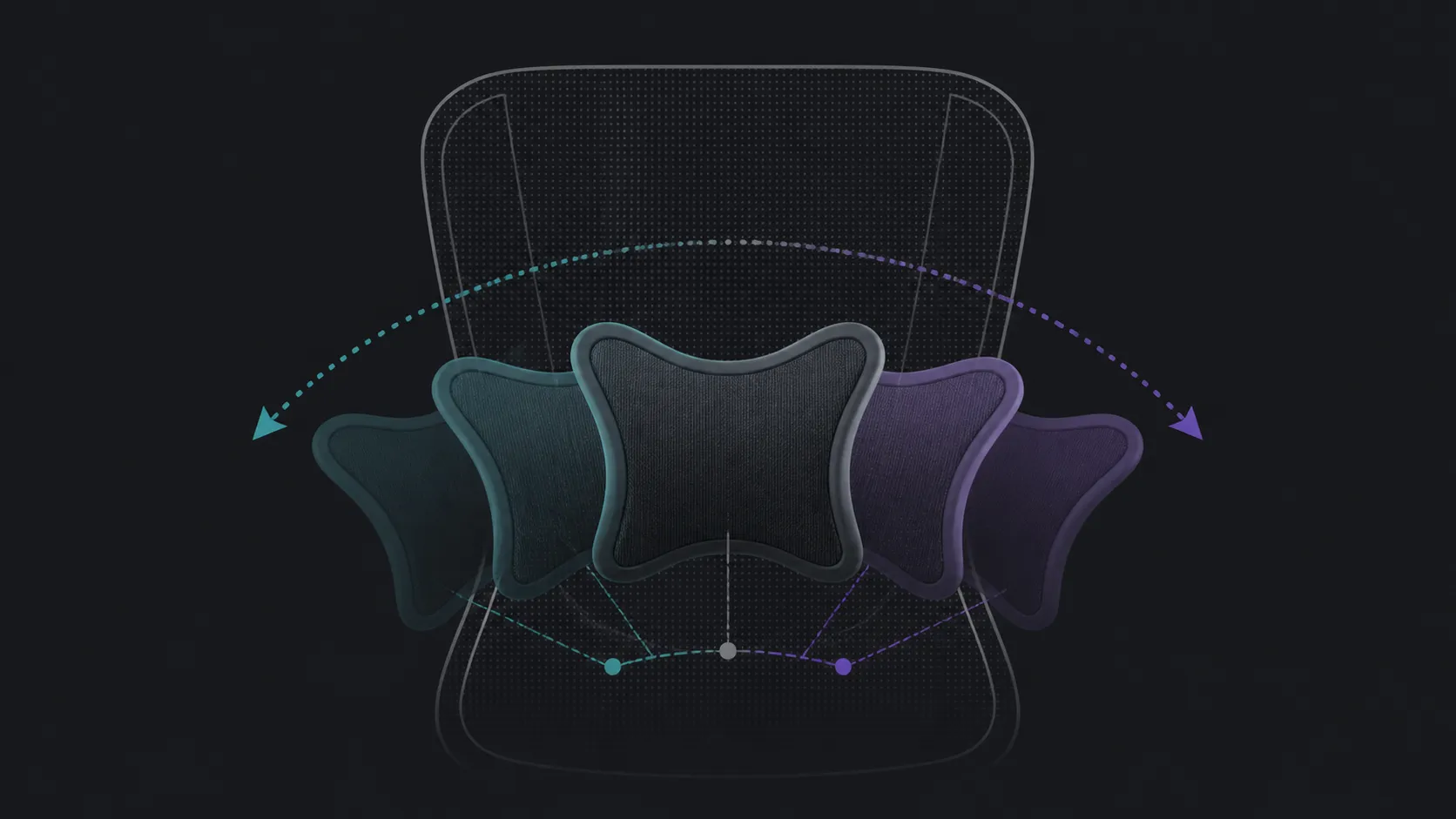
Lumbar rotation generally allows the support surface or assembly to follow a change in body position. The useful result is continued contact while the user turns toward another screen, reaches for a nearby item or settles into a less formal posture. The number does not reveal pressure, travel path or fit for a particular body.
Start near a neutral desk position, then rotate the torso only as far as a real task requires. Notice whether contact stays broad and whether the shoulders remain relaxed. Candidates in Evetech's HBADA office-chair range should be compared through the same movement rather than ranked by an isolated angle.
Automated tracking and rotation describe different ideas. The first lets a smart lumbar system respond as posture shifts; the second defines mechanical travel. The X7 supplies automatic following plus directional adjustment, not a reason to assume sensor layout or 45-degree movement.
Make one support change at a time. If the user also changes seat position, desk distance and backrest angle, the source of a new pressure point becomes difficult to identify. Recreate the original posture before testing another option.
Create three short trials: centred typing, a turn toward a second display and a relaxed reading position. Mark contact, pressure and ease of returning to centre for each one. The best range is the one that supports repeated movements without demanding constant correction.
Broaden the shortlist through Evetech office-chair options if a documented 45-degree mechanism is mandatory. Keep massage, heat and seat ventilation in separate rows so those X7 features do not distort the lumbar-movement decision.
Divide the turn into the centred position, the point used for a side task and the return. At each stage, note where contact moves and whether the pressure remains spread across a comfortable area. The user does not need to reach the maximum angle for this map to be useful.
Repeat the sequence with the desk item moved closer. If the required torso turn disappears, better workspace placement may solve the problem more simply than a larger lumbar range. If the movement remains central to the job, easy support recovery deserves more weight.
Keep this map with the candidate name and exact documented range. It prevents a result from one chair being transferred to the X7 or another model. It also shows whether 45 degrees is genuinely mandatory or merely an early shorthand for flexible support.
Those three movements provide the flexible contact relevant to this title. Set the vertical position first, change depth second and use the smaller tilt range last. Keeping the axes separate makes it easier to identify which adjustment improved contact without turning a millimetre figure into an angle.
It can let support follow a change in seated position. Usefulness depends on where the support contacts the user and how smoothly the posture returns to centre.
Move slowly through one real task, then hold the position long enough to notice pressure. Reset to neutral before trying another adjustment.
The X7 should not be assigned a 45-degree figure. It follows lumbar posture automatically and gives the user support adjustment across multiple directions.
No. Tracking describes adaptive support behaviour, while rotation describes a mechanical movement range that must be checked separately.
It cannot promise a medical outcome. Persistent pain or neurological symptoms need appropriate professional assessment rather than continued experimentation.
Name the exact chair, documented angle, desk task and pressure result. This keeps a successful 45-degree candidate separate from the X7 and makes the movement test reproducible.
Ready to test lumbar movement instead of comparing numbers alone? Browse Evetech chair choices with three real posture changes prepared for the comparison.
It can let support follow a change in seated position. Usefulness depends on where the support contacts the user and how smoothly the posture returns to centre.
Move slowly through one real task, then hold the position long enough to notice pressure. Reset to neutral before trying another adjustment.
The X7 should not be assigned a 45-degree figure. It follows lumbar posture automatically and gives the user support adjustment across multiple directions.
No. Tracking describes adaptive support behaviour, while rotation describes a mechanical movement range that must be checked separately.
It cannot promise a medical outcome. Persistent pain or neurological symptoms need appropriate professional assessment rather than continued experimentation.
Name the exact chair, documented angle, desk task and pressure result. This keeps a successful 45-degree candidate separate from the X7 and makes the movement test reproducible.
1000W for RTX 5090 needs a full-build check, not a simple yes. Review GPU guidance, CPU draw, transient load, connectors, PSU quality, and upgrade plans before deciding.
Read more
RTX 5080 Super with a 750W PSU is more comfortable than lower wattage if the unit is quality. SA builders should still confirm GPU guidance, CPU draw, connector type, airflow, and upgrade room.
Read more
How to fix FPS drops after a RX 9070 XT starts with driver cleanup, chipset updates, thermals, and power checks. For SA gaming PCs, confirm PCIe seating, monitor refresh, frame caps, and per-game graphics settings before replacing parts.
Read more
How to fix low FPS Windows 11 Wi-Fi 7 issues starts by checking whether the problem is frame rate or network lag. Test ping, drivers, power settings, Ethernet, and game FPS before adjusting visuals.
Read more
AM5 is smart for SA builders because it supports newer Ryzen CPUs, DDR5 memory, and a longer upgrade path. Compare board cost, cooling, gaming needs, and local part availability before choosing your next PC platform.
Read more
AM5 gives Randburg gaming builders a longer upgrade path. For SA buyers, DDR5 support, newer board features, and future CPU options can justify the platform. Weigh board cost, cooler support, BIOS maturity, and upgrade timing before choosing.
Read more
RTX 5090 on a 550W PSU leaves almost no practical room for OC plans. Treat the setup as constrained, with CPU draw, power spikes, cable quality, thermals, and stability checks more important than chasing extra clocks.

FPS drops on a Ryzen 9 9950X3D build often have a fixable cause. Check settings, drivers, thermals, background tasks, network conditions, and bottlenecks before assuming a part must be replaced.

The difference between PCIe 5.0 and PCIe 4.0 for SA gamers is mostly bandwidth headroom. Compare GPU slot needs, NVMe speed, motherboard support, and upgrade timing before paying extra for a newer platform.

Gaming PC stuck pixel checks in South Africa should confirm the monitor fault first. Use colour tests, screenshot comparison, cable swaps, display menu checks, and clear photos before deciding on support.

AMD's current driver now lists a Radeon RX 9050 4GB, while product coverage details a narrowed memory system. SA buyers should weigh the low VRAM ceiling against current local Radeon options.

Samsung Display has demonstrated a 16-inch 2.5K OLED laptop panel running at 300Hz. SA buyers should wait for a named notebook, full panel specifications and a local price before planning an upgrade.

Microsoft says some Windows 11 game crashes after recent updates are linked to RGB-related drivers. Affected SA gamers should confirm the update and driver before using the published registry workaround.

Thermalright's Fan Frame Vision-1 adds a 640x172 status screen to a standard 120mm fan. SA builders should check clearance, USB routing and local support before treating it as an easy upgrade.
1000W for RTX 5090 needs a full-build check, not a simple yes. Review GPU guidance, CPU draw, transient load, connectors, PSU quality, and upgrade plans before deciding.

Wi-Fi 6E vs Wi-Fi 6 matters for 4K video editing when files move across a network. The real-world difference between Wi-Fi 6E and Wi-Fi 6 for video editing in 4K depends on NAS access, cloud uploads, router range, and SA creator workflows.
RTX 5080 Super with a 750W PSU is more comfortable than lower wattage if the unit is quality. SA builders should still confirm GPU guidance, CPU draw, connector type, airflow, and upgrade room.

Wi-Fi 6E vs Wi-Fi 6 for Video Editing in 4K comes down to router support, latency, client devices, band support, and home network layout. SA buyers should match the choice to their setup instead of assuming one option always wins.