A glowing strip on the keyboard, a mouse that lights up from inside and a headset with its own soft glow can make a desk look planned, or they can clash like three different parties. If you are after matching RGB lighting across AULA gear, the honest starting point is how each device is controlled, because that decides how close a match you can get.
Quick Answer
Not as one linked system. None of the product pages for the AULA HERO keyboards, the SC620 Contour mouse or the G7 headset lists a shared lighting app, so each device is set on its own. Choose one colour and apply it to each: the HERO boards through AULA's browser driver, the SC620 Contour through its AULA driver, and the G7 with its own soft RGB. Evetech has the G7 at R299, the SC620 Contour at R349 and the HERO boards at R719 and R899.
🌈 Three kinds of light on one desk
The devices do not just differ in software. They light up in quite different ways.
The HERO light box. Both HERO boards crown their top edge with a 36-LED RGB light box, on top of south-facing per-key backlighting. On the HERO 84 HE page, AULA notes the light box runs its own modes, colours, speed and brightness separately from the keys. That separation is useful: you can keep the keys a plain white for typing and set the light box to the accent colour for the rest of the desk.
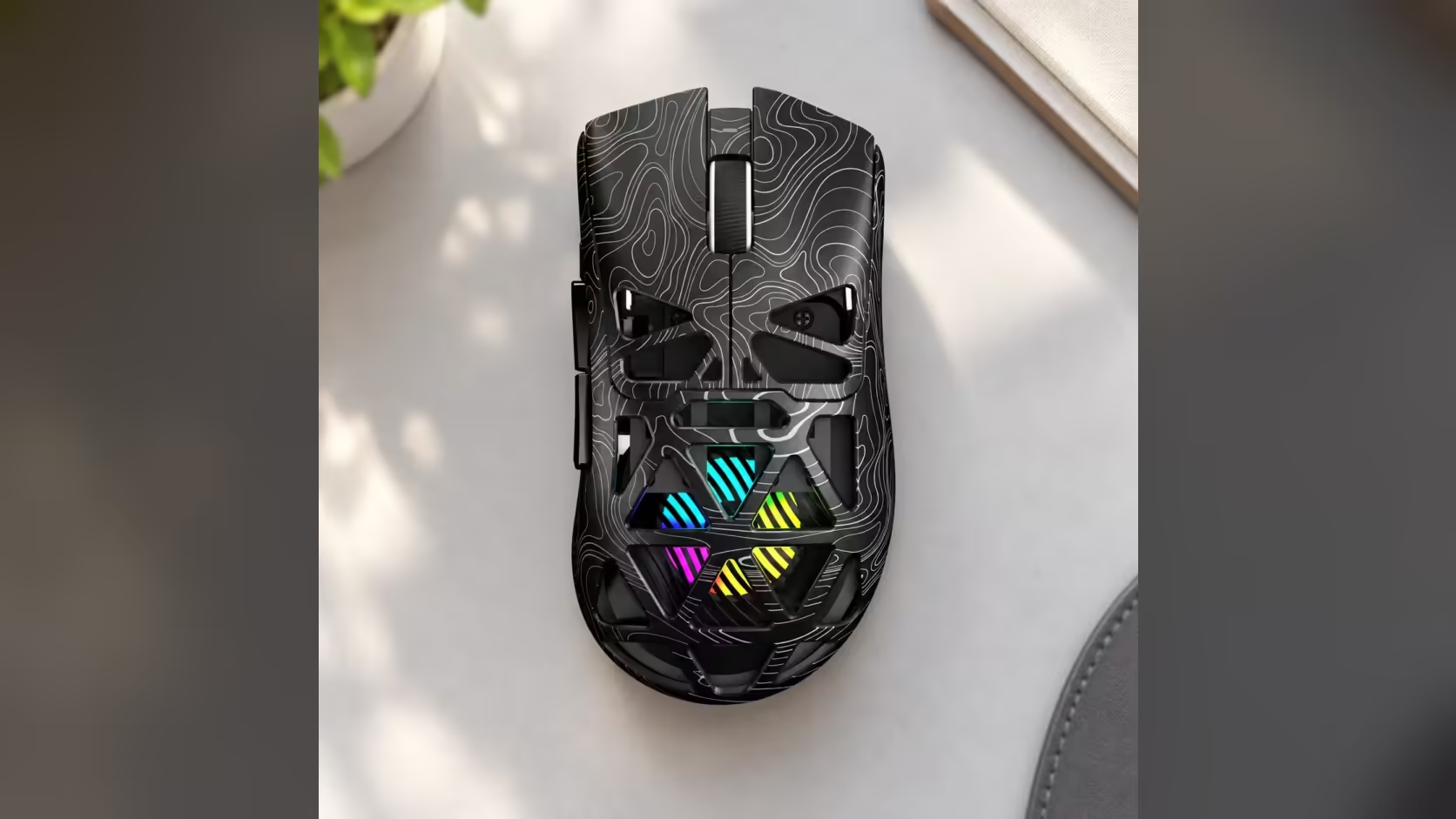
The honeycomb mouse. The SC620 Contour has a hollowed-out honeycomb shell, and its RGB shows through the body rather than from one small logo. At 67g it is light, and the glow is spread over the whole shape, so it reads as a large patch of colour next to the keyboard.
The headset glow. AULA describes the G7's lighting as soft RGB ambient lighting. It is the standard G7, with tri-mode wireless and an AI noise-cancelling mic.
🎛️ Where each device takes its settings
Since there is no single app, knowing where each setting lives saves time.
- HERO 75 HE: AULA's HUB web driver, opened in a browser.
- HERO 84 HE: AULA's web driver, which AULA says runs in a Chromium browser, handling key remaps, Mod-Tap and Dynamic Keystrokes alongside lighting.
- SC620 Contour: the AULA mouse driver, which sets RGB brightness and speed along with DPI, polling, button remaps and sleep time. AULA notes this driver works on Windows over the 2.4GHz receiver or the cable, not over Bluetooth, so switch modes before you adjust anything.
- G7: the product page lists the soft RGB and AULA's audio tuning software for EQ, but it does not describe lighting controls in detail, so check AULA's own guidance for that model.
🎨 Getting a close match by hand
A manual match is very achievable if you keep it simple.
- Pick a single static colour. Moving effects drift out of step between devices that are not linked, while a fixed colour looks deliberate.
- Use the keyboard light box as your reference. It is the biggest light source on the desk, so match the others to it.
- Adjust brightness, not just colour. A mouse glowing through a honeycomb shell can look stronger than a light box at the same setting. Drop the brighter one until they sit together.
- Leave the per-key backlight neutral if the colours fight. White or off keeps the focus on the light box and mouse.
Colour screens and LEDs never look quite identical, so judge the result by eye, in the room lighting you normally play in.
🖥️ Rounding out the look
A dark, plain surface under everything makes lit gear stand out, which is one reason extended mats are popular on RGB desks; Evetech's gaming mouse pads range covers the sizes. To see which lit keyboards, mice and headsets other buyers are choosing, the peripheral best sellers list at Evetech is a quick check. Warranty follows the product: 2 years on the HERO 75 HE and HERO 84 HE, 1 year on the SC620 Contour and G7.
Frequently Asked Questions
Can one app control every AULA light?
No shared app is listed on the product pages. Each device is set through its own driver or controls.
Can the HERO light box show a different colour from the keys?
Yes. On the HERO 84 HE, AULA gives the strip its own effect, colour, speed and brightness controls, apart from the keys.
Why won't the SC620 Contour driver change my lighting?
Check the connection. AULA notes the driver works on Windows in 2.4GHz and wired modes, not over Bluetooth.
Should I use animated effects across the desk?
Static colours match better. Effects on unlinked devices fall out of step with each other.
Does the G7 light up?
Yes, with soft RGB ambient lighting, according to AULA.
Ready to light up your desk in one colour?
Explore Evetech's RGB keyboards, mice and headsets and put together a setup that glows the way you want.