



1000W PSU Planning for RTX 5090 Builds in SA
1000W for RTX 5090 needs a full-build check, not a simple yes. Review GPU guidance, CPU draw, transient load, connectors, PSU quality, and upgrade plans before deciding.
Read moreSmart control knobs are now essential on creator microphones because one tactile dial adjusts gain, monitoring, mute and mix live without alt-tabbing. A single 4-in-1 knob replaces three menu dives, which matters when a live take has no second chance.
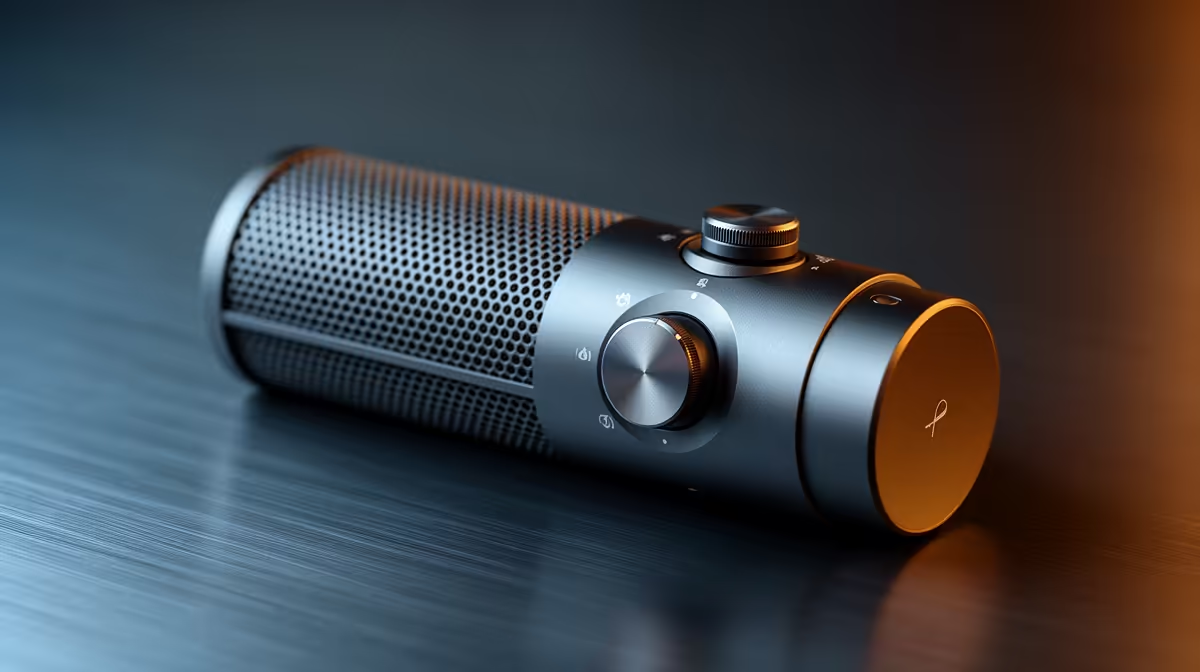
Software menus were fine when streaming meant a pre-recorded upload and a careful edit pass. Live content changed that calculus completely. A smart control knob on a creator microphone is not a cosmetic feature or a premium flourish. It is a physical interface that solves a real problem: reaching gain, mute and monitoring in under a second without breaking the take or alt-tabbing out of the stream. After one session with one, going back to an app menu mid-broadcast feels disruptive.
A smart control knob on a creator mic combines gain adjustment, headphone volume, mute and monitor mix into one physical dial. Clicking the knob cycles between modes while the ring LED confirms which function is active. Every adjustment takes under one second without leaving the stream, which software menus cannot match.
The basic control layout on most smart-knob creator mics works through a mode-click system. Each press of the dial advances to the next function: input gain, monitor mix, headphone output level, and mute. Turning the dial in the active mode makes the adjustment. Pressing again moves to the next function.
The LED ring around the knob changes colour or pattern to confirm which mode is active. A single press to mute, a recognisable colour change, and the audience hears nothing. Another press returns to gain mode, ready to adjust the level as the session continues.
This matters most for the functions that need to happen while something else is happening. A viewer triggers an awkward moment in the background of a stream. You need to mute instantly, handle it, then unmute. With a software mute that requires clicking into the streaming app and pressing a button on screen, the time cost is three to five seconds and a visible camera movement. With a hardware knob mute, the time cost is one press with no visible distraction.
Software audio control has real advantages when you have time to open a settings panel and make precise adjustments. Live content has none of those conditions.
During a session, your attention is on the camera, the audience, the game or the guest. Any menu interaction pulls focus. On a South African internet connection where OBS, Discord, a browser and the game itself are running simultaneously, alt-tabbing into an audio app can introduce a frame drop or a stutter that viewers see immediately.
A knob adjustment does not touch the software layer at all. The microphone's onboard processor handles the change directly. There is no command sent to the PC, no latency in the response, and no risk of the desktop flash appearing on camera.
For podcasters recording long sessions, the gain adjustment addresses the most common session problem: a guest who starts speaking louder or quieter as they relax or become animated. Adjusting the input gain in real time keeps the level consistent across the recording without stopping to re-record.
The monitor mix function is the least-discussed of the four modes and often the most appreciated once you have used it. It blends the direct microphone signal against the system audio from the PC. Turning the dial in monitor mode shifts the balance between hearing yourself and hearing everything else, such as a guest's voice, a game soundtrack, or a co-host in a Discord call.
Adjusting this mix during a live stream lets you keep your own voice audible through your headphones without software-routing overhead. The mic handles the blend at the hardware level. No virtual cables, no application-level mixer tabs to manage mid-stream.
For solo streamers this means you can push the game audio up during gameplay and pull it back when speaking directly to camera, all without touching the PC. The round trip from noticing the balance is off to fixing it takes under three seconds.
It consolidates four live-session adjustments into a single physical dial: input gain, headphone volume, direct monitor mix and hardware mute. Each press of the dial cycles to the next function mode, confirmed by a colour change in the surrounding LED ring. Turning the dial applies the adjustment instantly, without opening any software.
A physical knob produces the adjustment on the microphone's own processor without touching the PC software layer. There is no need to alt-tab, no risk of the desktop appearing on stream and no frame impact from switching applications. A software adjustment requires focus, a visible interface interaction and several seconds of attention away from the stream or camera.
Yes. Most hardware mute implementations trigger in under 50 to 100ms, below the threshold of human perception as a gap. The LED ring confirms the mute state visually. For a live broadcast where an unexpected sound needs cutting immediately, the hardware path is the more reliable option.
Yes. Clicking to the headphone mode lets you turn the dial to adjust monitoring level. This controls direct monitoring, the near-zero latency signal from the capsule, rather than the software output. For a podcaster or streamer who wants to hear themselves clearly through headphones without software-routing latency, this is the control to reach for.
Yes, at that price tier. A R2,500 creator mic with onboard smart controls delivers more practical session value than a R2,500 mic with only software-based control, assuming the capsule quality is comparable. The knob's value compounds over time and is felt most acutely on long sessions, live interviews and any stream format where real-time level management is a regular requirement.
Ready for a mic that keeps up with a live session? Browse the creator microphone range with built-in smart controls and find the setup that keeps every level adjustment at your fingertips.
It consolidates four live-session adjustments into a single physical dial: input gain, headphone volume, direct monitor mix and hardware mute. Each press of the dial cycles to the next function mode, confirmed by a colour change in the surrounding LED ring. Turning the dial applies the adjustment instantly, without opening any software.
A physical knob produces the adjustment on the microphone's own processor without touching the PC software layer. There is no need to alt-tab, no risk of the desktop appearing on stream and no frame impact from switching applications. A software adjustment requires focus, a visible interface interaction and several seconds of attention away from the stream or camera.
Yes. Most hardware mute implementations trigger in under 50 to 100ms, below the threshold of human perception as a gap. The LED ring confirms the mute state visually. For a live broadcast where an unexpected sound needs cutting immediately, the hardware path is the more reliable option.
Yes. Clicking to the headphone mode lets you turn the dial to adjust monitoring level. This controls direct monitoring, the near-zero latency signal from the capsule, rather than the software output. For a podcaster or streamer who wants to hear themselves clearly through headphones without software-routing latency, this is the control to reach for.
Yes, at that price tier. A R2,500 creator mic with onboard smart controls delivers more practical session value than a R2,500 mic with only software-based control, assuming the capsule quality is comparable. The knob's value compounds over time and is felt most acutely on long sessions, live interviews and any stream format where real-time level management is a regular requirement.
1000W for RTX 5090 needs a full-build check, not a simple yes. Review GPU guidance, CPU draw, transient load, connectors, PSU quality, and upgrade plans before deciding.
Read more
RTX 5080 Super with a 750W PSU is more comfortable than lower wattage if the unit is quality. SA builders should still confirm GPU guidance, CPU draw, connector type, airflow, and upgrade room.
Read more
How to fix FPS drops after a RX 9070 XT starts with driver cleanup, chipset updates, thermals, and power checks. For SA gaming PCs, confirm PCIe seating, monitor refresh, frame caps, and per-game graphics settings before replacing parts.
Read more
How to fix low FPS Windows 11 Wi-Fi 7 issues starts by checking whether the problem is frame rate or network lag. Test ping, drivers, power settings, Ethernet, and game FPS before adjusting visuals.
Read more
AM5 is smart for SA builders because it supports newer Ryzen CPUs, DDR5 memory, and a longer upgrade path. Compare board cost, cooling, gaming needs, and local part availability before choosing your next PC platform.
Read more
AM5 gives Randburg gaming builders a longer upgrade path. For SA buyers, DDR5 support, newer board features, and future CPU options can justify the platform. Weigh board cost, cooler support, BIOS maturity, and upgrade timing before choosing.
Read more
RTX 5090 on a 550W PSU leaves almost no practical room for OC plans. Treat the setup as constrained, with CPU draw, power spikes, cable quality, thermals, and stability checks more important than chasing extra clocks.

FPS drops on a Ryzen 9 9950X3D build often have a fixable cause. Check settings, drivers, thermals, background tasks, network conditions, and bottlenecks before assuming a part must be replaced.

The difference between PCIe 5.0 and PCIe 4.0 for SA gamers is mostly bandwidth headroom. Compare GPU slot needs, NVMe speed, motherboard support, and upgrade timing before paying extra for a newer platform.

Gaming PC stuck pixel checks in South Africa should confirm the monitor fault first. Use colour tests, screenshot comparison, cable swaps, display menu checks, and clear photos before deciding on support.

AMD's current driver now lists a Radeon RX 9050 4GB, while product coverage details a narrowed memory system. SA buyers should weigh the low VRAM ceiling against current local Radeon options.

Samsung Display has demonstrated a 16-inch 2.5K OLED laptop panel running at 300Hz. SA buyers should wait for a named notebook, full panel specifications and a local price before planning an upgrade.

Microsoft says some Windows 11 game crashes after recent updates are linked to RGB-related drivers. Affected SA gamers should confirm the update and driver before using the published registry workaround.

Thermalright's Fan Frame Vision-1 adds a 640x172 status screen to a standard 120mm fan. SA builders should check clearance, USB routing and local support before treating it as an easy upgrade.
1000W for RTX 5090 needs a full-build check, not a simple yes. Review GPU guidance, CPU draw, transient load, connectors, PSU quality, and upgrade plans before deciding.

Wi-Fi 6E vs Wi-Fi 6 matters for 4K video editing when files move across a network. The real-world difference between Wi-Fi 6E and Wi-Fi 6 for video editing in 4K depends on NAS access, cloud uploads, router range, and SA creator workflows.
RTX 5080 Super with a 750W PSU is more comfortable than lower wattage if the unit is quality. SA builders should still confirm GPU guidance, CPU draw, connector type, airflow, and upgrade room.

Wi-Fi 6E vs Wi-Fi 6 for Video Editing in 4K comes down to router support, latency, client devices, band support, and home network layout. SA buyers should match the choice to their setup instead of assuming one option always wins.