One keyboard for everything is a compromise. A board tuned for fast games, with a shallow actuation and Rapid Trigger, can be twitchy for a long email, while a comfortable typing board has none of the speed tricks a shooter rewards. A growing number of people simply keep two. If your desk does double duty, here is how a two-keyboard setup works with AULA boards, one magnetic for play and one membrane for work.
Quick Answer
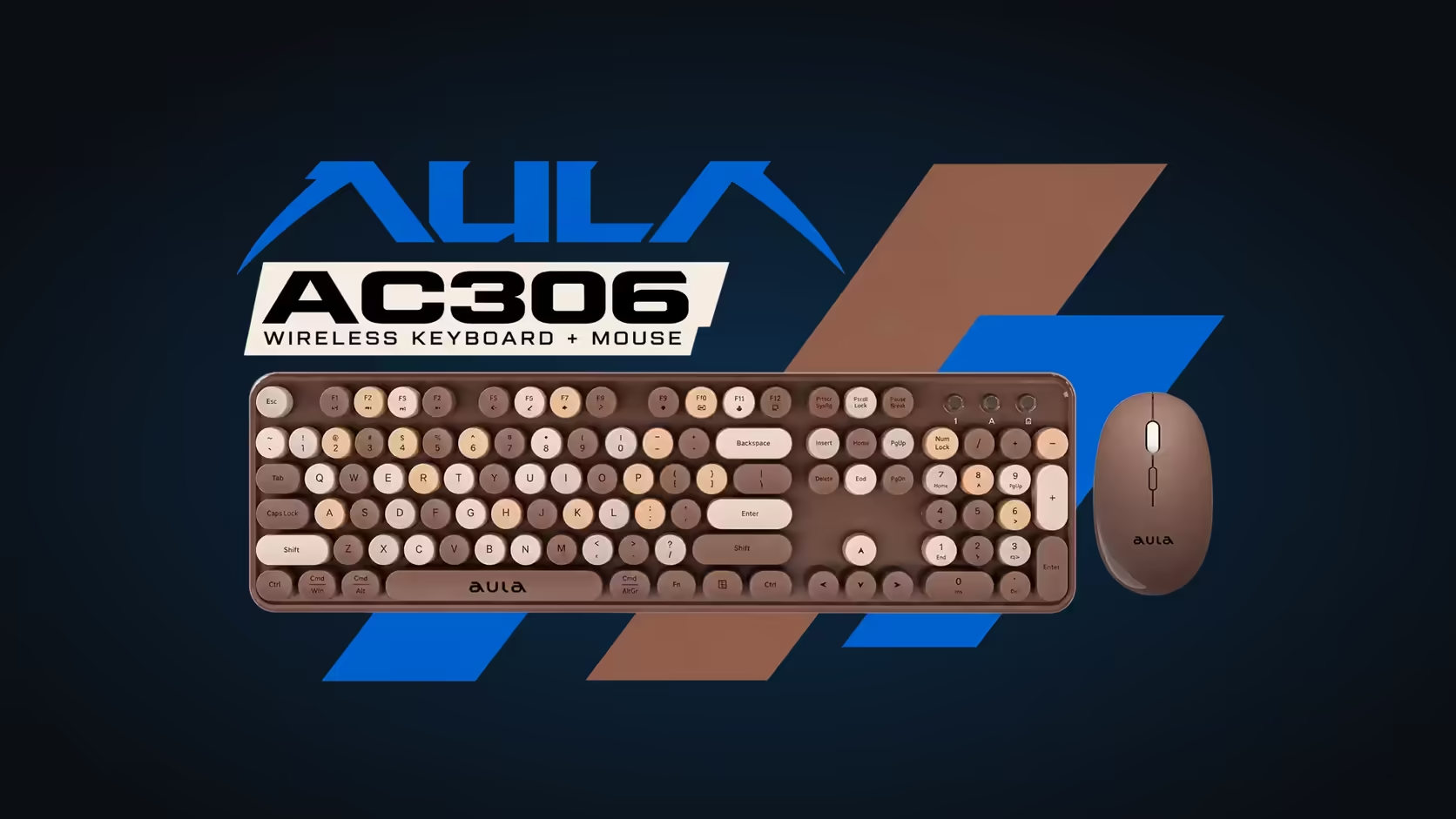
Pair a magnetic AULA WIN68 or HERO for games with a quiet S102 PRO or AC306 membrane board for work. The magnetic boards, R449 to R2,799 at Evetech, bring Rapid Trigger and 8000Hz polling. The R299 S102 PRO adds a number pad and a volume knob, and the R239 AC306 comes with its own wireless mouse. Both boards can be connected at once without conflict.
🎮 Why not one magnetic board for everything?
You can, and many people do, but it means constantly adjusting. A magnetic board set up for a shooter often has a very shallow actuation point and Rapid Trigger on, which makes keys fire at the lightest touch. That is ideal for counter-strafing and miserable for a three-page report, where a resting finger can type a stray letter.
A second keyboard removes the need to switch profiles. The play board stays tuned for play, the work board stays comfortable for work, and neither is a compromise.
The play board
- WIN68 HE or WIN68 MAX: compact 65% boards with 68 keys, wired, at 8000Hz. The small footprint leaves plenty of room for the mouse, which matters when a second keyboard is also on the desk.
- HERO 75 HE: a 75% board that is also tri-mode wireless, keeping 8000Hz on its receiver.
- HERO 84 HE: a wired 75% board with a 36-LED light box.
- AG75 Pro or Ultra: 75% boards in CNC aluminium with 0.001mm Rapid Trigger.
💼 The work board
S102 PRO for spreadsheets and email
For a day of documents, the S102 PRO is the natural partner. It is full-size with a dedicated number pad, sits on a quiet silicone membrane and has Cherry-profile keycaps and three typing angles. A volume knob handles calls and music, and a small readout tells you the active link and remaining charge. It connects by 2.4GHz, Bluetooth to two devices, or cable, so it can also serve a work laptop.
AC306 for a home office
The AC306 is a wireless keyboard and mouse set with round retro keycaps, a full-size membrane keyboard and a 3-step DPI mouse. It uses one shared 2.4GHz receiver and one AA battery in each device.
🧩 Arranging one desk with two boards
A few layouts work well:
- Stacked: the work board at the back, the play board in front. Pull the one you need forward.
- Side by side: a compact 65% or 75% play board on the left, where it takes little space, and the full-size work board centred in front of the monitor.
- Swap on a shelf: keep one board on a keyboard tray or shelf and bring it out when needed.
Put the play board wherever your mouse arm has the most room.
Do they conflict?
No. A computer happily accepts input from two keyboards at once. Whatever you press on either board goes to the active window. If you use the S102 PRO on Bluetooth for a work laptop and a wired WIN68 on the desktop, they talk to different machines entirely.
Can the AC306 mouse double up for fast games?
It is not built for that. The AC306 mouse is a 4-button optical design stepping through 800, 1000 and 1600 DPI on an AA battery, and AULA pitches the set for office and home use. Keep a dedicated mouse for play.
🛡️ Warranty on each board
Cover differs between the two roles. Evetech gives the magnetic play boards a 2 Years Local Warranty, while the S102 PRO and AC306 each have a 1 Year Local Warranty. Browse the play side in the gaming keyboards section at Evetech, and if you choose a hot-swap board, the keyboard switch range lets you tune its feel further.
Frequently Asked Questions
Why not one magnetic board for everything?
Settings tuned for fast games can make typing twitchy, so you end up switching profiles constantly.
Which membrane board suits spreadsheets and email all day?
The S102 PRO, with its number pad, quiet silicone membrane and adjustable typing angle.
How do I arrange two boards on one desk?
Stack them, set them side by side with the compact board to one side, or keep one on a shelf.
Is the AC306 mouse good for fast games?
It is designed for office and home use. Use a dedicated mouse for play.
Do two keyboards conflict when both are connected?
No. The computer accepts input from both, and each can even connect to a different device.
What warranty applies to each board?
Two years on the magnetic boards; one year on the S102 PRO and AC306.
Setting up one desk for work and play?
Browse the keyboards at Evetech and pair a fast board for play with a quiet, comfortable one for the working day.