Tired of your CPU hitting throttling temps in the middle of a tense Warzone match on a hot Gauteng afternoon? You’ve optimised your fan curves and reapplied thermal paste, but you’re still losing performance. For the ultimate enthusiast chasing single-digit temperature drops and maximum overclocking headroom, there's a final frontier: direct die cooling. It’s an extreme, high-risk technique, but the rewards can be incredible. This guide breaks down what you need to know. 🚀
What is Direct Die Cooling, Exactly?
Normally, the heat from your CPU’s silicon die travels through a layer of thermal interface material (TIM), into a metal Integrated Heat Spreader (IHS), and then finally into your cooler’s cold plate. Each layer adds a little thermal resistance.
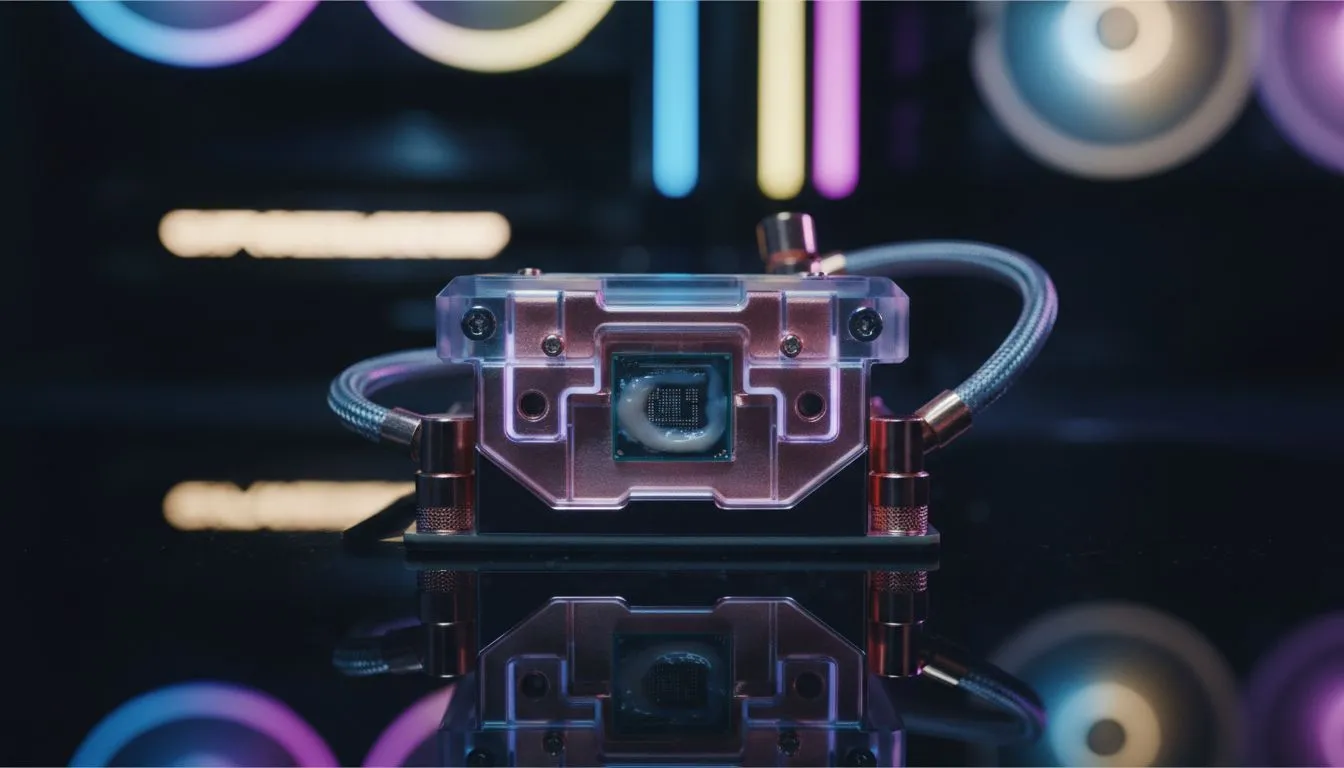
Direct die cooling is the process of removing that protective IHS entirely. This allows your CPU cooler to make direct contact with the processor die itself. By eliminating a middleman (the IHS), you create a super-efficient pathway for heat to escape. The result? Dramatically lower temperatures that traditional CPU coolers simply can't achieve with the IHS in place.
The High-Stakes World of Delidding
Getting to the die requires a process called "delidding"—physically separating the IHS from the CPU package. In the past, this involved risky methods like vices or razor blades. Thankfully, today we have specialised delidding tools that make the process safer... but not risk-free.
Successfully delidding your CPU is the first major hurdle. One slip can turn your prized processor into a very expensive keychain. It also instantly voids your warranty. This technique is purely for enthusiasts who understand and accept the risks involved in pushing their hardware to the absolute limit. For most gamers, a powerful and reliable Air Cooler offers fantastic performance without any of the danger.
Is This Extreme Cooling Method Right for Your Rig?
Before you start shopping for a delidding kit, you need to ask yourself if the benefits of a direct die setup outweigh the serious drawbacks.
The Pros:
- Unmatched Thermal Performance: Expect temperature drops of 10-20°C or even more under load compared to a traditional setup.
- Maximum Overclocking Headroom: Lower temps mean you can push voltages and clock speeds higher and more stably, squeezing every drop of performance from your silicon. ✨
- Enthusiast Status: Let's be honest, it's an elite mod that carries some serious bragging rights in the PC building community.
The Cons:
- Warranty? Gone: The moment you delid, your manufacturer's warranty is void.
- High Risk of Damage: You could crack the die or damage the PCB, permanently killing your CPU.
- Specialised Parts Needed: You can't just slap your old cooler back on. You'll need a special mounting frame and a compatible water block.
For the 99% of PC users, a modern high-performance Liquid Cooler (AIO) provides more than enough cooling power for intense gaming and content creation.
Liquid Metal is a Must ⚡
When going direct die, standard thermal paste won't cut it. You need to use a liquid metal thermal compound like Thermal Grizzly Conductonaut. Be extremely careful during application—liquid metal is electrically conductive. If it spills onto any of the surrounding components on the CPU package, it can cause a short circuit and destroy your hardware. Always protect the surrounding area with conformal coating or nail polish.
Choosing the Right Gear for a Direct Die Build
If you've decided to take the plunge, having the right supporting hardware is non-negotiable. Direct die cooling almost exclusively relies on water cooling because it offers the best contact and mounting pressure on the exposed die.
Your cooling system needs to be up to the task of wicking away all that heat you're now pulling directly from the source. This means investing in a robust solution. A high-performance AIO with a large radiator is essential. Look for top-tier models from brands like CORSAIR, which are known for their powerful pumps and efficient designs.
To maximise heat dissipation, pairing your direct die setup with a large radiator is key. A quality 360mm Radiator provides a massive surface area, ensuring your coolant stays chilled and your CPU remains stable even under the most demanding overclocks. 🔧 This is the final piece of the direct die cooling puzzle, turning a risky mod into a performance masterpiece.
Ready to Tame Your Temps?
Whether you're planning an extreme direct die project or just need a reliable upgrade for your gaming rig, the right cooling is everything. Explore our massive range of CPU coolers and find the perfect solution to keep your performance high and your temperatures low.