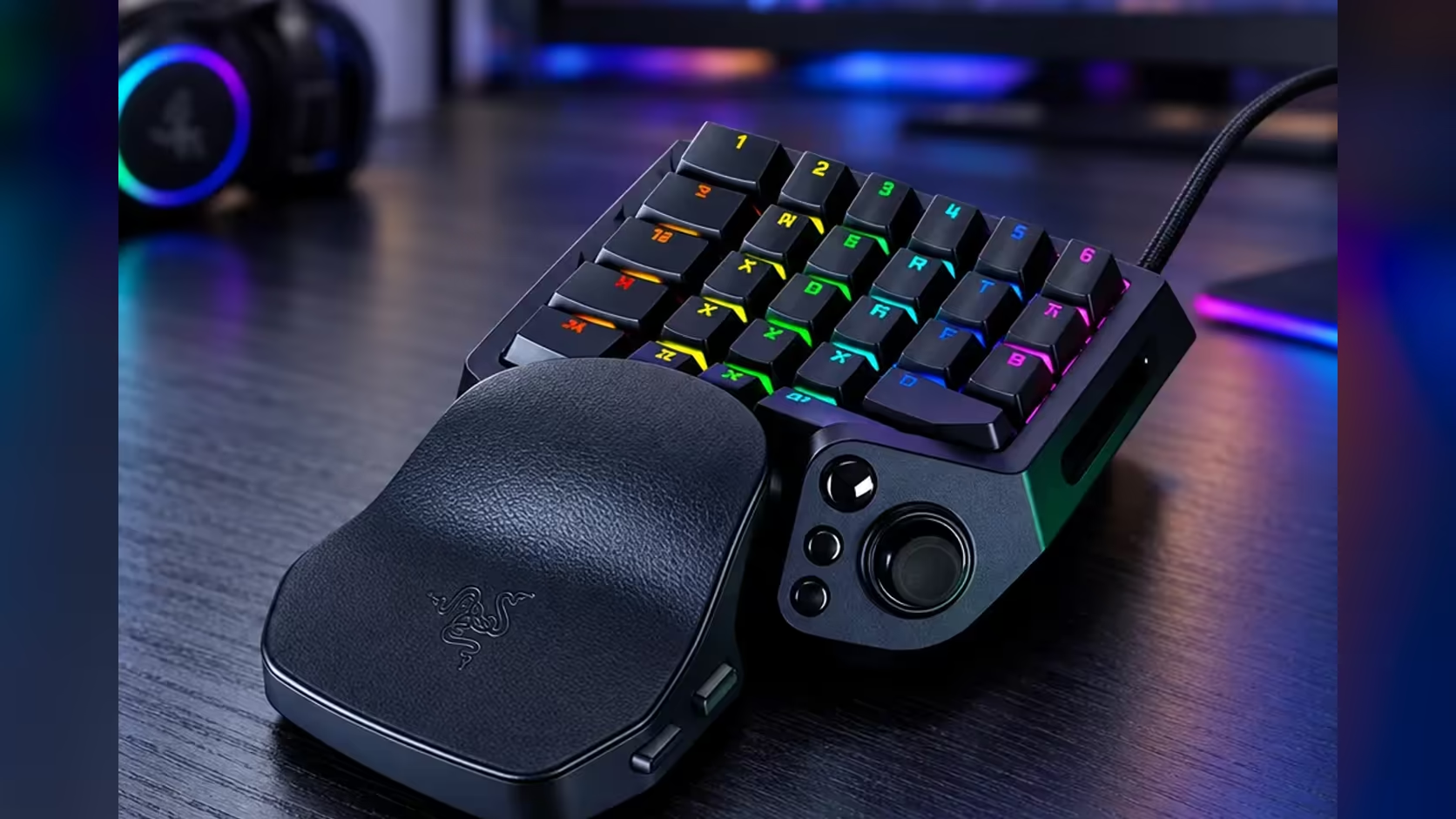
Pick the depth before you pick the key. Actuation is the distance a key has to travel before the keypad registers a press, and on the Razer Tartarus V2 Pro that point can sit anywhere from 0.1mm to 4.0mm. A shallow point fires on a light touch. A deep one ignores a resting finger. Setting adjustable actuation well takes about ten minutes, and the steps below show how to choose a depth for each key and test it in a game.
Quick Answer
Open Razer's software and set the actuation anywhere from 0.1mm to 4.0mm, then check whether the setting applies to one key or to the whole keypad. Keys you tap in quick bursts suit a setting near 1.0mm, while keys closest to your palm suit 2.5mm to 3.0mm. The Tartarus V2 Pro costs R4,799, and the full 0.1mm to 4.0mm range comes with it.
🎯 Match the depth to the job each key does
Start with what the key does, not with a number. A key you press in short bursts, such as a dodge or a quick heal, gains most from a shallow point, because it fires after 1.0mm of travel instead of 4.0mm. A key you hold while you aim does better at 1.5mm to 2.0mm, where a slightly firmer press confirms the action. Keys closest to your palm belong deeper, at 2.5mm to 3.0mm, so a resting hand does not fire them by accident.
Work through the controls in one sitting. Take the five actions you use most in one game and give each one a band from the three above, then check the result against the gaming keyboards range if you are still weighing up which keypad fits your games. Most players find that two or three keys need changing after the first session, so leave the rest at 2.0mm until you know which ones misfire.
⚡ Test each depth in a live fight
A setting can look right on paper and feel wrong under pressure, so test each change in the game itself. Load a training area, stand still, and press each key ten times at its new depth. Count the misses. A key that misses two or more of those ten presses is set too deep. A key that fires when you only rest your hand on it is set too shallow.
Then play a full match and note any accidental presses in the first ten minutes, because that is when a fresh setting is most likely to clash with how your hand naturally sits. Adjust in 0.5mm steps. Moving a key from 2.0mm to 2.5mm is a change you will feel in the next fight, while a 0.1mm nudge rarely changes how the key behaves when you are under pressure.
🔧 Stop accidental presses without slowing the keys you use most
A deeper point is the fix for bumped keys, but it costs you speed on the keys you press most. Raise the depth in small steps only on the keys that fire by mistake, and leave the rest alone. If one key still fires on a resting hand at 3.0mm, move the wrist rest and test again before pushing that key to 4.0mm. At 4.0mm every press becomes a deliberate stretch, and your reactions on that key will suffer.
Desk setup matters here too. A keypad that slides on a smooth desk will shift under your palm and change which keys your hand touches. A desk mat under the keypad keeps it still while you test, and our gaming accessories range has options in several sizes.
🧭 A starting point for a new game
When you switch to a new game, start every key at 2.0mm and play one session before you change anything. Most mistakes show up in the first fifteen minutes, when your hand is still learning where the keys sit. After that session, change only the keys that misfired, by 0.5mm each.
Keep a short note of the depth you used for each key in each game. Two games often want different depths for the same key, and a note saves you from repeating the test. Write the depths in millimetres, for example "Q at 1.5mm, E at 2.5mm", so you can set them again in a minute after a reinstall or a move to a new desk.
Frequently Asked Questions
What is a good starting depth for adjustable actuation?
Start every key at 2.0mm, which sits in the middle of the 0.1mm to 4.0mm range. Adjust only the keys that misfire, in 0.5mm steps, after a few games.
Can I set a different depth for each key?
It depends on the software. The Tartarus V2 Pro offers adjustable actuation from 0.1mm to 4.0mm, so check in Razer's software whether a setting applies to one key or to the whole keypad. A light setting on your fast keys beside a firm one by your palm needs control over single keys.
Does a shallow setting make a key faster?
It makes the key fire sooner in its travel. A key at 1.0mm fires after a quarter of the distance a 4.0mm key needs, which means less time between your finger moving and the action registering in the game.
Why would I set a key deeper than 2.0mm?
A deeper point stops a resting finger or a brushing palm from firing the key. Keys near the wrist rest are the usual reason, and 2.5mm to 3.0mm is the range most players reach for.
Is actuation the same as polling or Rapid Trigger?
No. Actuation sets when a key fires. Rapid Trigger changes when the key resets after release, and polling sets how often the keypad reports to your PC. Tune them one at a time so you know which change made the difference.
Ready to dial in your own depths?
Keep your test notes beside you, then weigh analog keypads in the gaming keyboard range against the number of keys your games actually need.