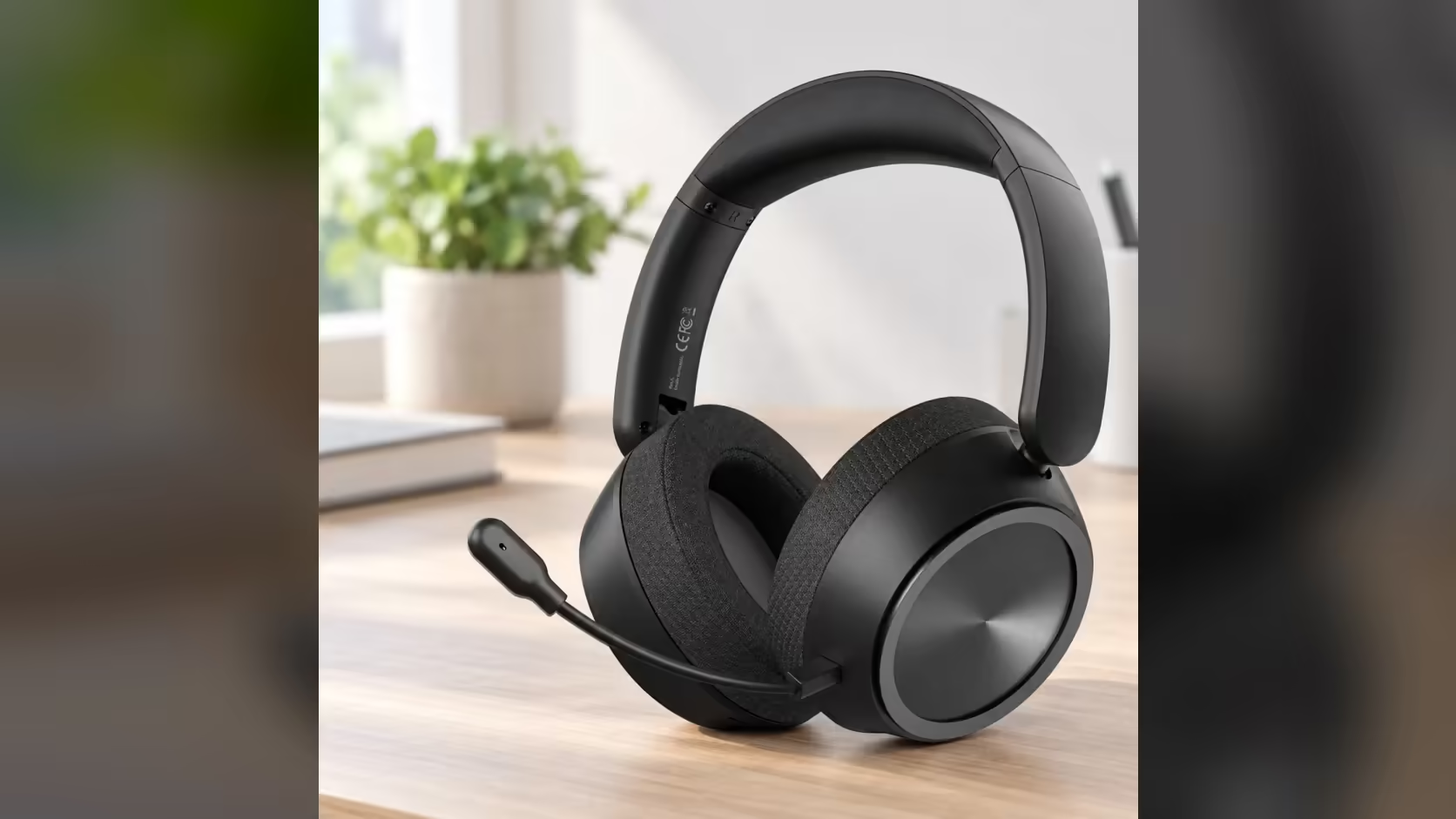
Every voice-chat regular has a story about the mute that did not happen: a sneeze, a sibling shouting down the passage, a heated opinion about a teammate that was meant to stay private. Software mutes live in an app you have to find. The AULA A600 puts a physical A600 mute switch on the ear cup instead, and learning to use it by feel is one of the more useful five-minute jobs you can do with a new headset.
Quick Answer
Slide the switch on the AULA A600's ear cup to mute its detachable omnidirectional mic, and slide it back to talk. AULA states it works the same in USB, 3.5mm, Bluetooth and 2.4GHz modes, so it needs no app and no settings change. The switch sits beside the power button, the M button and the volume scroll wheel. You will pay R459 for the A600 at Evetech.
🎚️ Learning the ear-cup layout by touch
Four controls share the ear cup: a power button, the M button, the mic slide switch and a volume scroll wheel. With the headset on your head, you cannot see any of them, so the goal is to know each one by its shape and position.
- Put the headset on and close your eyes.
- Run a fingertip slowly across the ear cup and count the controls as you meet them.
- Notice how the slide switch differs from the buttons. A slider moves along a track; a button presses in. That difference is what lets you find it in a hurry.
- Slide it one way and the other a few times so the motion becomes a habit.
The same cluster does other jobs, so it pays to know what not to touch. A single press of M changes sound profile between Game Mode and Music Mode. A double-click of M switches the connection from 2.4GHz to Bluetooth. The power button handles play, pause and calls. Grabbing the wrong control mid-game can cut your audio rather than your mic.
🔌 One switch, four connection modes
The A600 connects by 2.4GHz through its USB receiver, by Bluetooth, by USB-C cable and by 3.5mm cable. AULA's listing is specific that the slide switch mutes the mic in every one of those. That consistency matters more than it sounds. Plenty of people move between a PC on the receiver and a phone on Bluetooth in the same day, and a mute that behaves differently per mode is a mute you stop trusting.
Because the switch acts on the headset itself, there is also nothing to configure inside Discord, Teams or a game's voice settings. It is worth leaving your app's push-to-talk or voice activity settings as they are and using the switch as a hardware backstop on top of them.
Checking that mute is really mute
Trust, then verify, once. Open the input test in your chat app or your computer's sound settings, talk with the switch in each position, and watch the level meter. Silence on one side and movement on the other tells you the switch is doing its job on that connection. Repeat the test on Bluetooth if you use the headset with a phone as well.
🎙️ What the mic hears when it is live
Unmuted, the A600 uses a 360-degree omnidirectional mic, which AULA lists at -38dB +/-2dB sensitivity. Omnidirectional means it picks up sound from all around, not from one narrow cone in front. That makes placement forgiving, since the boom does not have to point dead at your mouth, but it also means the mic hears the room. Keyboards, fans and people talking nearby all find their way in more readily than with a tightly directional design.
That is exactly why a fast hardware mute is useful on this headset. When the room gets loud, a thumb on the switch is quicker than any menu.
Compared with a software mute
A software mute usually lives on a keyboard shortcut or in an app window. It works well when that app is in focus and the shortcut is not already taken by a game. A hardware switch has none of those dependencies. It also keeps working if you swap apps, switch devices or join a call from a phone that has never seen your PC's shortcuts.
🔧 Mute, unplug, or leave it be
The A600's mic is detachable, so you have two ways to silence it. Sliding the switch is the quick option for a short break or a noisy moment. Pulling the mic out suits a long listening session when you want the boom out of the way entirely. There is no reason to unplug it just to go quiet for a minute.
The rest of the headset is set up for long use either way: about 290g, an 8-step telescopic headband, ear cups that rotate 125 degrees, and a 2000mAh battery AULA rates at up to 110 hours.
If the switch ever stops responding, Evetech handles it under the 1 Year Local Warranty. The A600 is listed with the other gaming headsets, and the wireless headset collection groups it with receiver-based rivals.
Frequently Asked Questions
Does the switch work on Bluetooth?
Yes. AULA states it mutes the mic in Bluetooth, 2.4GHz, USB and 3.5mm modes.
Can I find it with the headset on?
Yes, with a little practice. The slide switch moves along a track while the other controls are buttons or a wheel, so it feels different under a fingertip.
What does the live mic pick up?
It is omnidirectional, so it hears your voice and some of the room around you as well.
Why use the switch instead of a software mute?
It needs no app, no shortcut and no settings, and it behaves the same on every connection.
Should I unplug the mic or mute it?
Mute it for short breaks. Unplug it when you plan a long session of music or films.
Who fixes the switch if it fails?
Evetech handles claims locally under the headset's warranty.
Want a mute you can find without looking?
Browse the gaming headset range at Evetech and compare models with hardware mic controls on the ear cup.