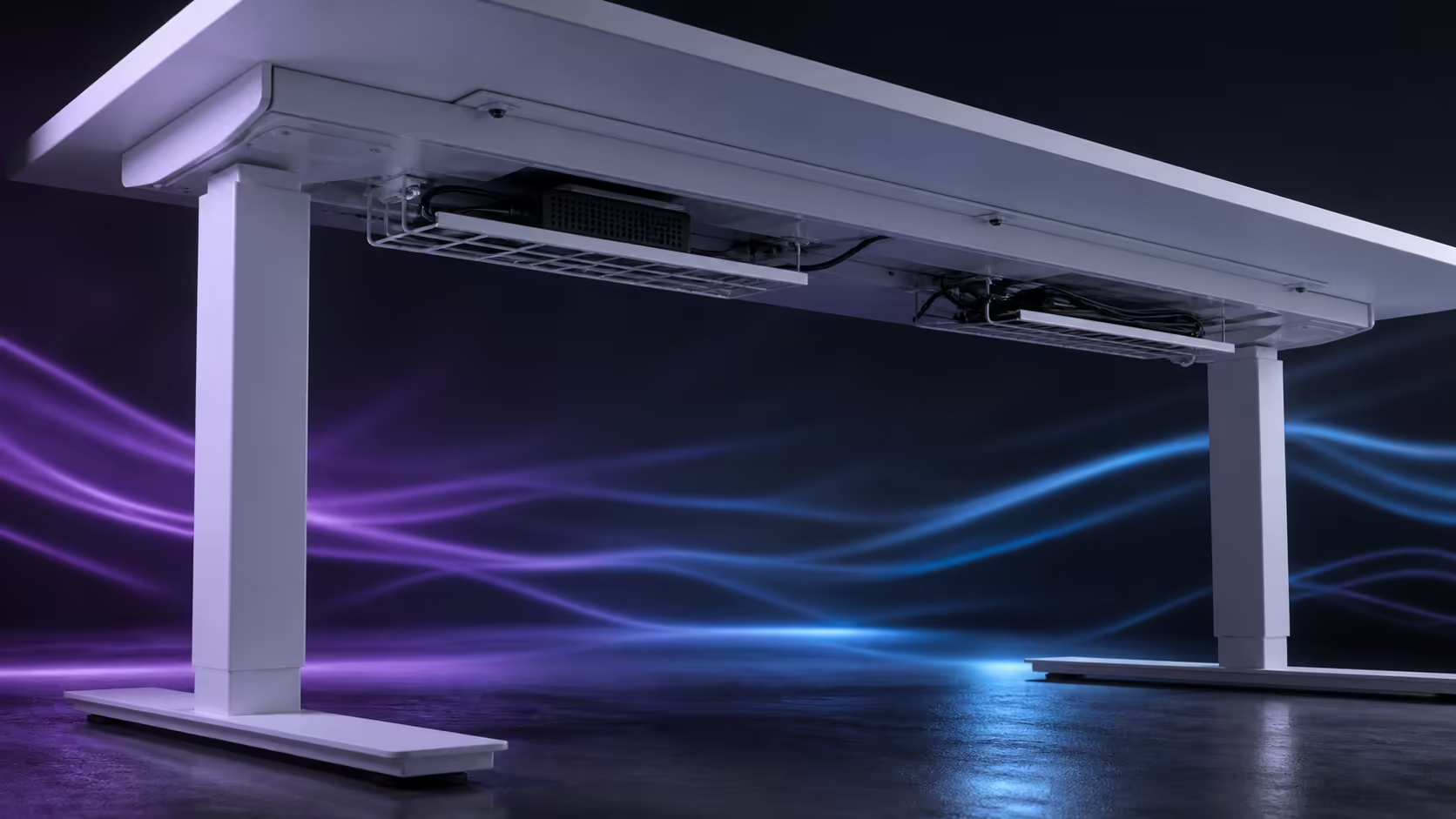
A cable basket system should make device changes easier, not simply move clutter out of sight. Organising multi-device cables with quick-release baskets requires clear groups, supported adaptors and safe movement. The R4,999 AROZZI Arena Nordico supplies two releasable baskets beneath a 71-115cm electric desk.
Quick Answer
List every device, assign permanent power and changing connections to separate baskets, then create controlled service loops for leads crossing to the room. The Arena Nordico costs R4,999; its paired quick-release baskets let one device group be opened without undoing the other.
🗺️ Draw the cable map first
List screens, computer, laptop, network, audio, controllers and chargers. Mark which devices move with the desktop and which remain fixed on the floor or wall. Every crossing between those groups needs vertical freedom.
Label similar leads at both ends before routing. The Evetech gaming desk range offers workstation comparisons, but the real port locations determine which basket each cable should enter.
Sketch the rear panel and two trays. Avoid a lead that crosses both baskets, because it prevents either one from releasing independently. Guide cross-desk runs along the rear zone first.
Leave spare capacity for future adaptors. A basket packed tightly on day one cannot accept a replacement with a different shape.
Prioritise equipment by failure impact. Network, main display and computer power should be easy to trace because losing one can stop work. Decorative lighting can sit in a secondary position without crossing those core routes.
Put a simple identifier on the basket itself. Left and right or power and devices makes spoken troubleshooting much clearer when another person needs to unplug something.
🧺 Give each basket a maintenance role
One tray can carry permanent power distribution and heavy bricks. The other can handle display excess, laptop connections or accessories that change. Choose the division that makes fault tracing obvious.
Place frequent plugs near an accessible edge and labels where they can be read. Use broad loops and gentle fasteners. Tight bends or dense coils block ventilation and turn one cable replacement into a larger job.
Practise lowering each basket after loading it. Support its weight and watch for a short lead. Quick release only helps when the contents permit the service motion.
Balance heavy bricks rather than stacking them beside one release point. A level load is easier to control with one hand while the other guides cables.
Keep ventilation in mind. Do not bury warm adaptors under dense cable loops or block their surfaces with unrelated storage.
Keep unrelated spare parts out. A loose screw or unused adaptor can rattle during desk travel and confuse diagnosis.
↕️ Protect the vertical crossing
Mount power distribution to the moving assembly where practical so most device leads travel entirely with the top. One main power lead then forms the controlled route to the wall.
Where a floor computer remains fixed, its display, USB and network connections need their own safe curves. Raise the desk slowly from 71cm to 115cm, stopping before any connector tightens.
At the top, inspect plug angles. At the bottom, ensure excess cannot reach chair wheels. Move the chair through its normal path. The AROZZI setup collection supplies product-family context; broader gaming setup choices can help account for every device.
Test with a microphone arm or headphone cable connected if either appears during real use. Occasional accessories are common causes of a route passing installation and failing during the first busy session.
Keep the controller lead separate from removable accessories. The height control must remain dependable even when a laptop or gaming device leaves.
Use the adjustable rear panel to collect monitor leads after they travel along arm joints. Preserve slack for both arm movement and desk height.
🔧 Keep the organisation useful over time
Photograph the loaded baskets and labels. When a device is replaced, the image shows its route and prevents neighbouring leads from being pulled by mistake.
Date the photo or update it after a major change. An outdated map can be worse than none if it sends someone towards the wrong plug.
Use the first service event as a quality check. If one charger can be replaced while the other basket remains untouched, the grouping has proved its value.
Repeat the full-height movement check after that replacement because a new cable can change the shortest point in the system.
Inspect after a week of height changes. A loop may migrate or a heavy brick may slide. Correct these early while the logic remains familiar.
After moving the desk to another wall, rebuild the fixed-room crossing. A socket on the opposite side can send the old loop diagonally across the frame if it is merely stretched to fit.
Add new gear through the existing groups. Temporary chargers should not become permanent cables across the controller or both baskets. A tidy multi-device desk remains traceable and serviceable, even if some organised cable is visible at standing height.
Frequently Asked Questions
Why use two cable groups?
Separate trays improve tracing and allow one section to release without disturbing the entire workstation.
Should power bricks hang from connectors?
No. Support their weight in a ventilated basket and keep the plug and label accessible.
How should a frequently removed laptop connect?
Place its charger and docking ends near the service side so daily removal does not disturb permanent power and display routes.
What is checked at the low desk position?
Ensure returning cable stays clear of feet, chair casters and frame parts. The service loop must be safe at both endpoints.
What does the cable-equipped Arena Nordico cost?
It is R4,999 in white, with two quick-release baskets, rear-panel adjustment, memory control and 71-115cm movement.
Ready to turn a multi-device bundle into two serviceable systems?
Compare Evetech gaming desks after mapping permanent power, changing connections and every cable that crosses the moving boundary.