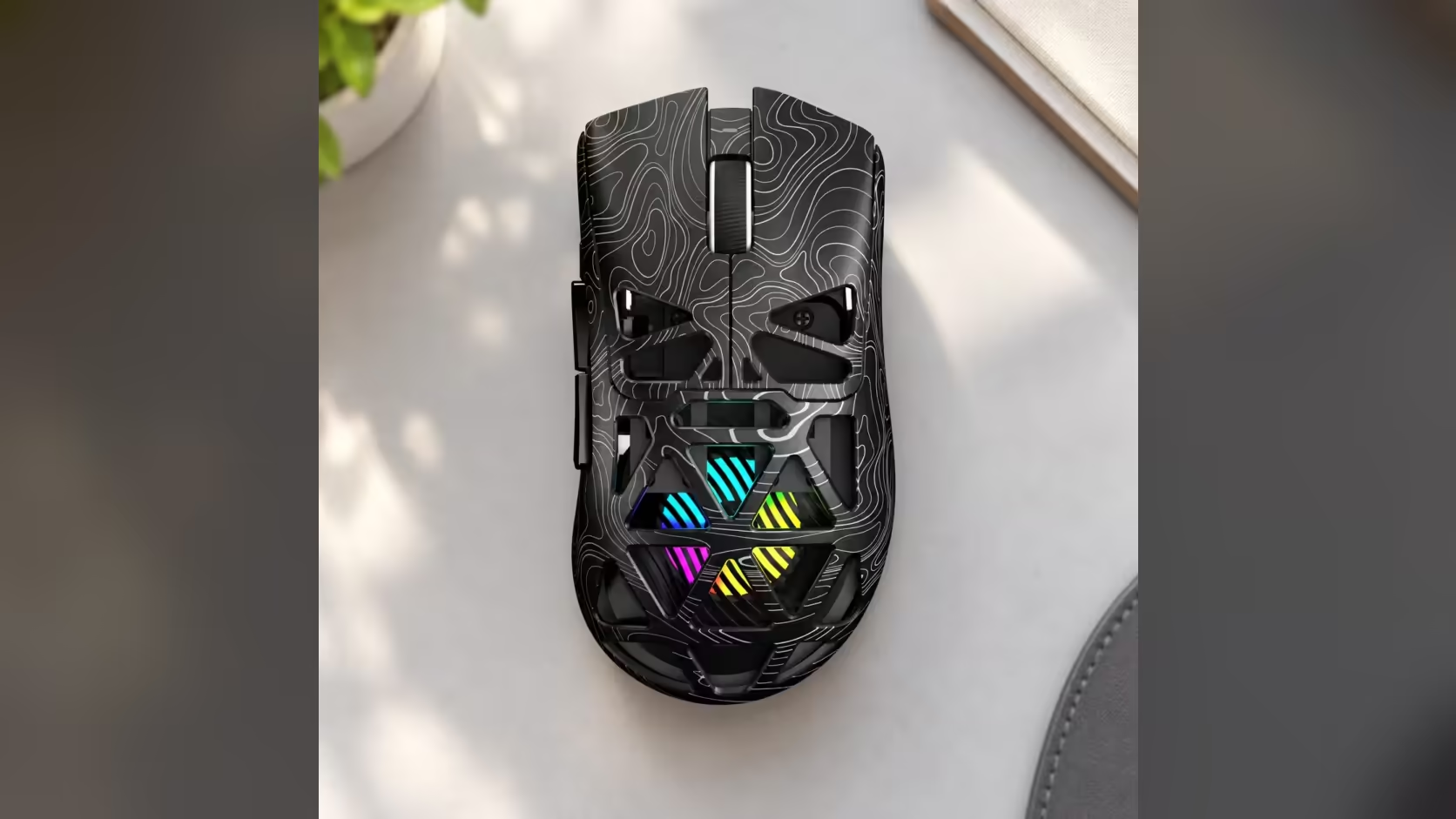
Anyone who has spent a summer in Cape Town knows the south-easter does not stay outside. The Cape Doctor finds its way through window frames and under doors, and a fine grey film settles on every flat surface in the house, your desk included. That matters more than usual if your mouse has an open top. This guide covers cleaning a honeycomb mouse like the AULA SC620 Contour through the windy months without hurting it.
Quick Answer
Clean the SC620 Contour's honeycomb about once a week while the wind is blowing, using short bursts of compressed air and a soft, dry brush. Hold the can upright, keep the nozzle a little away from the shell and never open the mouse. The open cells sit over the RGB lighting, so dust shows up there sooner than on a closed shell. Evetech stocks the SC620 Contour at R349.
🌬️ Why wind season is harder on an open shell
A solid mouse collects dust on the outside, where one wipe removes it. The SC620 Contour's top is hollowed into a honeycomb so its RGB glows through, and those same gaps give fine particles a way in. AULA uses the cut-outs to keep the mouse at 67g, which is a real benefit for aiming, but it does mean the inside of the shell is closer to the room than on a conventional design.
The Cape Doctor adds two things: volume and fineness. Strong south-easterly days carry a lot of light dust, and it is fine enough to settle into narrow gaps rather than bouncing off. None of this is a reason to avoid an open-shell mouse. It is a reason to build a short habit around it.
Where it shows up soonest
The lighting gives you an early warning. Dust sitting on the lit surfaces under the cells shows as dull patches or specks in the glow, usually before you feel any change in how the mouse moves. The edges of the cells and the seams near the buttons tend to collect it too.
🧹 A weekly routine that takes five minutes
- Switch to a clean surface. Unplug the cable if it is connected, and put the mouse on a clean cloth so you are not blowing grit back into it from the desk.
- Compressed air, in short puffs. Keep the can upright and the nozzle several centimetres from the shell. Short bursts across the honeycomb lift dust out; one long blast can push it deeper or chill the parts with the propellant.
- Brush the cell edges. A soft, dry brush, such as a clean make-up or paint brush, sweeps the rims of the openings and the button seams.
- Wipe the outside. A dry microfibre cloth, or one only lightly dampened and wrung out, for the sides and the underside. Keep moisture away from the openings.
- Check the glow. Turn the lighting up in AULA's driver for a moment. Even colour across the cells means the job is done.
Tools to skip
Avoid anything wet on the top shell, cotton buds that can leave fibres snagged in the cells, and household vacuum nozzles pressed against the openings. Fingers and tissues push dust inwards rather than lifting it out.
🔒 Why you should not open it up
It is tempting to take the shell off for a deep clean. Resist it. Opening a mouse risks the small clips, the battery connection and the lighting board, and it is not something AULA describes as a user task. If the inside has built up more than air and a brush can shift, that is the point to talk to the seller rather than reach for a screwdriver.
This is where buying locally earns its keep. The SC620 Contour from Evetech carries a 1 Year Local Warranty, so a genuine fault within that year is handled in South Africa, not by posting a mouse to an overseas seller and waiting. Check Evetech's warranty terms before doing anything drastic to the shell, and keep your proof of purchase somewhere you can find it.
🏠 Cutting down the dust at the source
Cleaning the mouse is half the job. The other half is giving the Cape Doctor less to work with:
- Keep windows on the windward side closed during strong gusts, even if the room feels stuffy.
- Wipe the desk before the mouse. A pad or desk that is gritty will feed dust straight back into the shell every time you move.
- Cover the setup overnight on the worst days. A clean cloth over the keyboard and mouse is enough.
- Park it on a clean pad. A fabric pad that gets shaken out regularly catches dust that would otherwise reach the mouse.
The rest of the mouse is easy to live with. It connects over 2.4GHz, Bluetooth 5.3 or a cable, uses a PAW3311 sensor with six DPI levels up to 12,000, and has a dedicated Fire button. If you are weighing it against a closed-shell design, Evetech's gaming mice category shows both styles side by side, and the wireless mouse page narrows it to cable-free options.
Frequently Asked Questions
Can wind-blown dust really get inside a honeycomb mouse?
Yes. The south-easter carries fine particles indoors, and the open cells on the SC620 Contour give them a way past the shell.
How often should it be cleaned in windy weeks?
About once a week while the wind is up, and whenever you notice specks or dull patches in the RGB glow.
Is compressed air the only safe option?
No. A soft, dry brush and a dry microfibre cloth work well too. Keep liquids and cotton buds away from the openings.
Should the shell come off for a proper clean?
No. Opening it risks the clips, the battery and the lighting board. If dust is stuck deep inside, speak to the seller.
Does the Cape Doctor affect other parts of a setup?
Yes. Keyboards, fans and pads collect the same dust, so a desk-wide wipe keeps the mouse cleaner for longer.
What local cover does the SC620 Contour have?
It is sold by Evetech with local warranty support, so claims are dealt with in South Africa.
Setting up a desk that copes with windy season?
See Evetech's gaming mouse range for open-shell and closed designs, and choose the style that suits your room.