You hit refresh on a site after an error and the same message comes back. When the status is HTTP 429, repeated refreshes work against the request the server is making. Close the extra tabs or pause the job that keeps retrying. If you manage the app that shows the error, the response headers may tell you when a retry makes sense.
Quick Answer
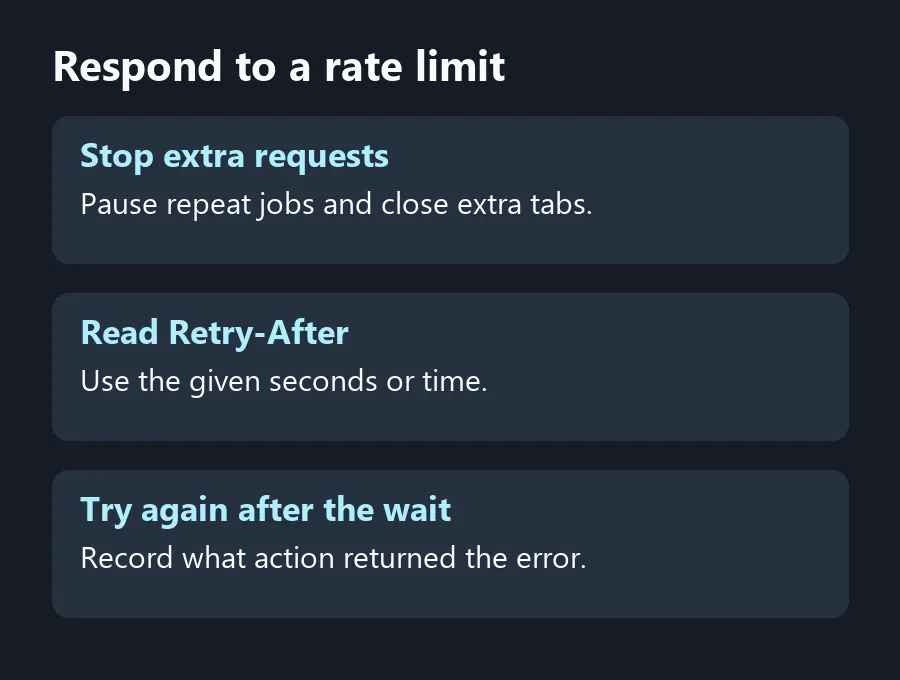
HTTP error 429 means a service is limiting how often it will accept requests. Stop refreshing, follow any Retry-After instruction and try once after the wait. If an app keeps sending requests in the background, pause that work first. Start with these R0 checks.
⏱️ Give the service time to accept another request
Close duplicate tabs that may be loading the same page. If the problem came from a desktop app with a transfer or sync queue, pause the relevant job through its controls. Wait before trying the page again. Keep any unsaved work open while you decide what can be stopped, especially if the error appeared while submitting a form.
The 429 standard lets the service send a Retry-After header. It does not require one. If the app does not show a countdown or a time to try again, leave the page alone for a while and check the service's guidance. Check the service's help page if the response gives no retry time.
📋 Read the wait if you run the client
Look at the timestamp and response headers in your own app logs or the browser's network view. Retry-After can contain a number of seconds or an HTTP date. If it says 120 as a number, allow at least two minutes from the response. If it shows a date and time, wait until then. Record which request returned the code, so you can compare it with the user action or background task that sent it.
Check whether one click queues several identical operations or a retry timer keeps running after the first failure. If you maintain that client, cancel duplicates, respect the service's published limits and count successful attempts when you test a fix. Pause any repeated job that continues returning 429 and let it recover before resuming normal work.
🧰 Rule out the wrong shopping trip
A faster fibre line will not change the service's request limit. If the browser displays 429 but other pages load, record which action caused it before changing any equipment. If several unrelated services also lose their connection and you are investigating a separate network fault, try a wired connection through Cable Solutions and check Networking for equipment that fits that problem. Keep the 429 timestamp in your support notes; it identifies a server response, which is different from a device losing its link to the router.
Frequently Asked Questions
What does HTTP 429 mean?
The service received too many requests within the limit it applies and is asking the client to slow down.
Does every 429 say how long to wait?
No. The server can send Retry-After, but the standard does not require it.
Is Retry-After always in seconds?
It can be a number of seconds or an HTTP date. Use the form the service returned.
Should I leave an automatic retry running?
Pause a loop that repeats the error. Check the service guidance and resume at an allowed rate.
Will a new router clear it?
A router upgrade does not change the service's request limit.
What information helps support diagnose it?
Share the time, the action that triggered it and any Retry-After value. Leave credentials out of the report.
Respond to a rate limit
A timestamp and any retry instruction give you better evidence than replacing working network gear.