Microsoft plans to switch on Memory Integrity for more eligible Windows 11 computers from October 2026. The feature places important code checks inside a protected virtualised environment, making it harder for untrusted kernel software to interfere with the operating system. PC gamers should treat the change as a security update first, then measure any performance difference on their own hardware.
Quick Answer
The Windows 11 Memory Integrity October update expands automatic protection to more compatible devices. Microsoft checks hardware, software and driver readiness before enabling it. Memory Integrity can block vulnerable or incompatible low-level drivers, so update graphics, audio, storage and peripheral software ahead of the rollout. Do not disable the protection in advance. Record performance in a few repeatable games, let the update settle, then compare the same scenes and settings.
🛡️ What the protection actually does
Windows drivers and other kernel components operate close to the core of the system. A flaw at that level can give malicious code powerful access. Memory Integrity uses virtualisation-based security to isolate checks that enforce stronger rules around code entering this sensitive area.
This is why an old device driver may become visible as a compatibility problem. The security layer is not claiming that every blocked driver is actively malicious. It is refusing software that does not meet the required integrity conditions. The correct first response is to identify the device and obtain a current driver from its manufacturer.
Open Windows Security, review the Core isolation page and note any listed conflict. Also run normal Windows updates before changing a setting. An unused legacy utility, old RGB controller or abandoned capture-device driver can be the cause even when the main graphics driver is current.
🎮 Test gaming performance without guesswork
Security features can add overhead, but the size is not identical across processors, games and configurations. A low-resolution competitive title that is limited by the processor may react differently from a graphics-heavy 4K game. Average frame rate alone can also hide a change in frame-time consistency.
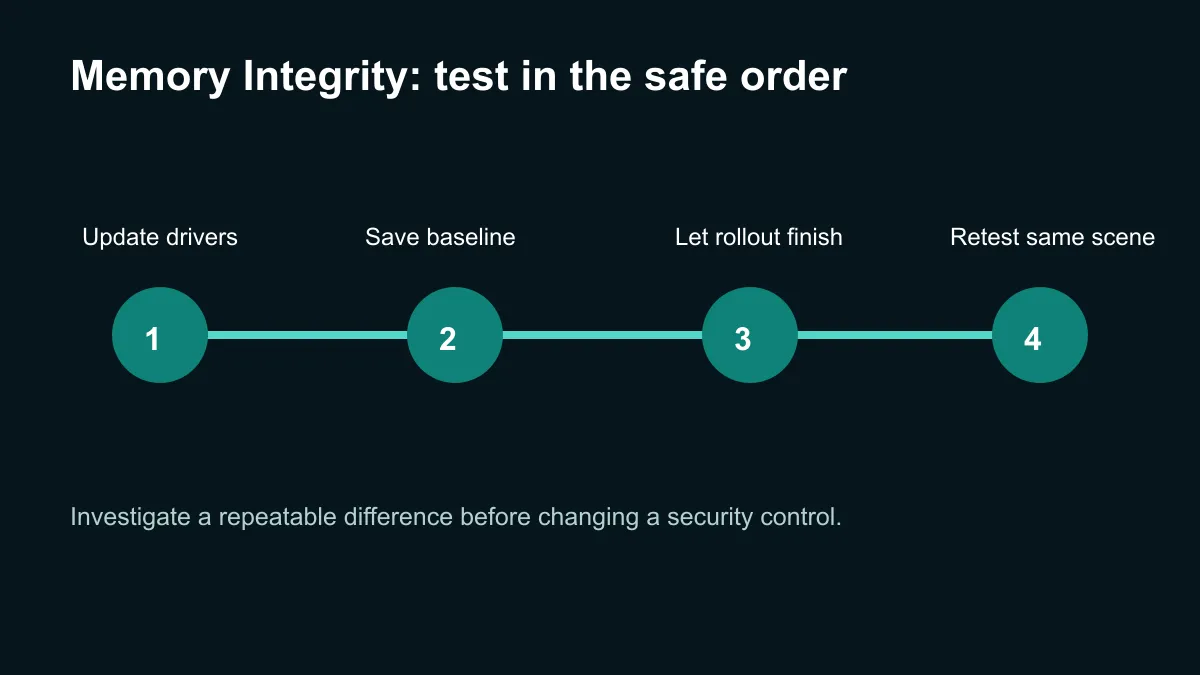
Choose two or three games you actually play and save their settings. Use the same resolution, scene, driver and power mode before and after activation. Record an average plus a low-percentile or frame-time result if your benchmark tool provides one. Close background downloads and allow Windows maintenance to finish before drawing a conclusion.
The gaming PC deals page shows current complete systems if older hardware is already struggling with modern security and game demands.
🔧 Handle a problem in the safest order
If a game performs differently, restart once and repeat the comparison. Check whether the graphics driver or game updated at the same time. Review temperatures and clocks so a cooling or power issue is not blamed on the Windows change.
For notebooks, test while connected to power and confirm the same performance profile is active. The laptop best-sellers page is useful for comparing newer platforms if an existing machine has persistent compatibility limits.
Only consider changing Memory Integrity after a specific reproducible problem has been isolated and driver updates have failed. Switching it off trades away protection; it should not be a routine tuning shortcut based on a result from unrelated hardware. Keep a note of the original state so any temporary diagnosis is reversible.
The October rollout should be uneventful for eligible PCs. Preparing current drivers and a simple benchmark record turns a vague fear about performance into evidence from the machine that matters.
Frequently Asked Questions
When does the wider Memory Integrity rollout start?
Microsoft says the expansion begins in October 2026 on eligible Windows 11 devices.
Will Windows enable it on every computer?
No. The rollout uses hardware, software and compatibility checks, so timing and eligibility can differ.
Can Memory Integrity reduce gaming performance?
The effect varies. Compare the same games, scenes and settings before and after activation on your own PC.
What should I do about an incompatible driver?
Identify the related device, install a current manufacturer driver and remove abandoned utilities that are no longer needed.
Should I turn the feature off before October?
No. Keep the security default, prepare drivers and investigate only if a repeatable issue appears.
Preparing a Windows 11 gaming PC?
Update drivers now and save a repeatable performance baseline so the October change can be judged with evidence.