Upper-body adjustments work as a system, but they should not be tuned as a bundle. 4D headrests and omni-motion armrests answer different relationships: one follows the seated view, while the other connects the forearms to the desk. The R7,399 E3 Air includes a dual-axis headrest and 360-degree mech-arm supports for a practical example.
Quick Answer
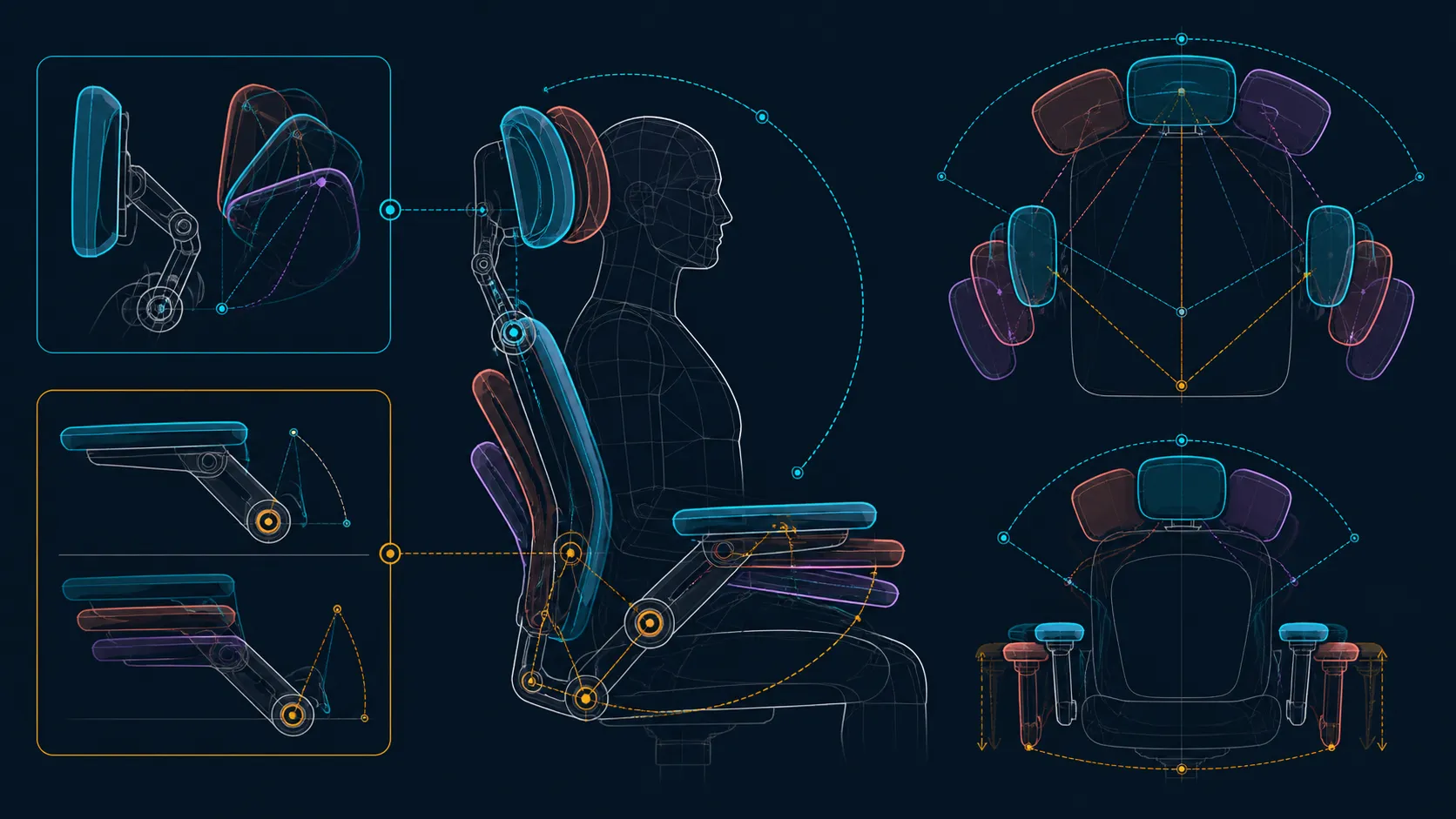
The E3 Air headrest supplies 40mm height, 70mm depth and dual 70-degree rotation, while its arms add 360-degree swivel, 40-degree linked tilt and XYZ positioning.
Set a 4D headrest around the established screen position, then set omni-motion armrests around the placed keyboard and mouse. On the R7,399 E3 Air, those are independent adjustment points rather than proof of universal comfort. Move one support at a time, repeat a familiar task and keep only positions that are easy to recover.
🖥️ Let the screen define the headrest test
Begin with the user's normal seated view. Place the display at the intended height and distance, then settle against the chair without reaching for the headrest. The support should be evaluated from that real posture. Adjusting it first can cause the monitor to be moved later to accommodate a chair setting that was never suitable.
The E3 Air headrest combines 40mm height, 70mm depth and dual 70-degree rotations. Explore one direction gently before returning to the work view. Notice whether the chin, shoulders or upper back shift; the goal is useful contact without a forced head position.
Test more than an intentional lean. Type a short paragraph, read a page and join part of a call while allowing ordinary small movements. A headrest that serves only a posed moment may add little during the work that fills the day.
Pay attention to absence as well as contact. Some tasks may not need continuous head support, and the correct position can be one that remains available without intruding. That is a more realistic standard than demanding constant contact simply because the chair offers several adjustments.
If two people share the desk, record separate viewing baselines. Screen height and headrest position may need a coordinated reset, but each variable should still be returned in a known order. A quick photograph of the screen relationship can be more useful than guessing from the previous user's setting.
Compare HBADA office seating at Evetech after noting the screen position and the upper support the user actually wants.
⌨️ Treat each armrest as a desk interface
The E3 Air uses mech-armrests capable of 360-degree omni-motion. Place the input devices first, bring the chair into its working location and move one support toward the forearm. Keep any required height or measured travel as separate criteria to verify.
The two sides may have different jobs. Typing can call for a balanced relationship with the keyboard, while mousing may use more room and a different elbow position. Matching the appearance of both armrests matters less than preserving relaxed shoulders and clean access to the devices.
Check collisions as part of support. Rotate through the normal task sequence and watch whether an armrest touches the desk, limits chair approach or blocks entry. A broad movement range earns value when it solves these spatial problems without introducing another.
Use a slow mouse trace and a sustained typing passage as different trials. The first exposes whether the dominant arm has room to move; the second shows whether both shoulders can remain settled. Keep the desk height and chair distance fixed so the arm supports are the only meaningful change.
🧩 Preserve the lower-body baseline
Head and arm settings depend on the posture below them. An 80-degree wrap distributes lower-back contact across three zones, while cloud-like mesh with a high-density design forms the seat. Establish those points before refining upper support, then hold them stable during each comparison.
If the user changes the lumbar position, desk distance and headrest together, a better result cannot be attributed reliably. Return to a known baseline whenever an adjustment feels worse. A brief note of chair-to-desk distance and support landmarks makes that reset much easier on a shared workstation.
Seat response can influence the entire chain too. The high-density cloud-like mesh surface should be evaluated before the upper supports are finalised. An owner who keeps sliding or changing seat position will not meet the headrest and armrests consistently, whatever their adjustment labels suggest.
Comfort remains individual, and adjustment features do not provide a medical guarantee. An ongoing neck, arm or wrist symptom needs suitable assessment instead of an endless control search.
🔄 Re-evaluate when the back angle changes
Reclining creates a second configuration rather than an extension of the first. The E3 Air reaches 140 degrees, but that maximum does not reveal lock points or mechanism behaviour. Learn the controls and clear the surrounding space before moving away from upright.
At the new angle, reassess the headrest first because the viewing relationship has changed. If the task still uses a keyboard or mouse, check arm support afterward. A break posture may not need the same input alignment, and a reading angle may not suit sustained typing.
Recovery is part of the test. Return upright, restore the screen view and repeat a short input sequence. If the chair cannot move between the two useful states without confusion, document the landmarks or decide whether the extra configuration will realistically be used.
Comparison across Evetech's broader office-chair range becomes easier when every feature has a defined job. Test viewing, typing, mousing and reclined activities separately. Judge the R7,399 E3 Air by how cleanly those configurations can be established and restored.
Those ranges let upper support follow screen work, desk approach, console use and recline. Set head and arms independently around the established posture, then test how synchro-tilt preserves elbow contact as the chair moves.
When the chair enters its 115-125-degree flow band, the linked arm tilt can preserve support while the headrest uses its depth and dual rotations to follow the gaze. Test that relationship as a system, then return upright and ensure both supports can be reset without guesswork.
The separate upper-support ranges should be judged by task fit.
Frequently Asked Questions
What upper head support is fitted?
E3 Air upper support combines 40mm vertical lift, 70mm depth travel and two 70-degree headrest rotations. Set those ranges against the real viewing posture.
How are the arm supports characterised?
They are mech-armrests with 360-degree omni-motion. That provides broad directional positioning around the desk without stating particular travel measurements or control steps.
Should the head and arms be adjusted together?
No. Stabilise the screen and seated posture, adjust the headrest, then leave it still while each arm support is aligned to its input task.
How can 4D headrest movement be evaluated?
Change one direction, repeat the same work action and notice the viewing angle, chin and shoulder position. Keep only a setting that remains useful without conscious posing.
Do multiple adjustments assure comfort?
They create choices, not a guaranteed result. Body dimensions, desk geometry, task and time all influence fit, and persistent symptoms require appropriate advice.
What lower support sits beneath the headrest?
Three lumbar zones use an 80-degree auto-wrap design. Assess that contact first because upper-body alignment is built on the seated position below it.
What rating sets the user limit?
The chair's maximum user weight is 150kg. Capacity is an essential gate, while seat dimensions and individual fit remain separate checks.
Ready to give every upper support a clear job?
Explore Evetech office chairs with separate tests for viewing, typing, mouse movement and changed back angles.