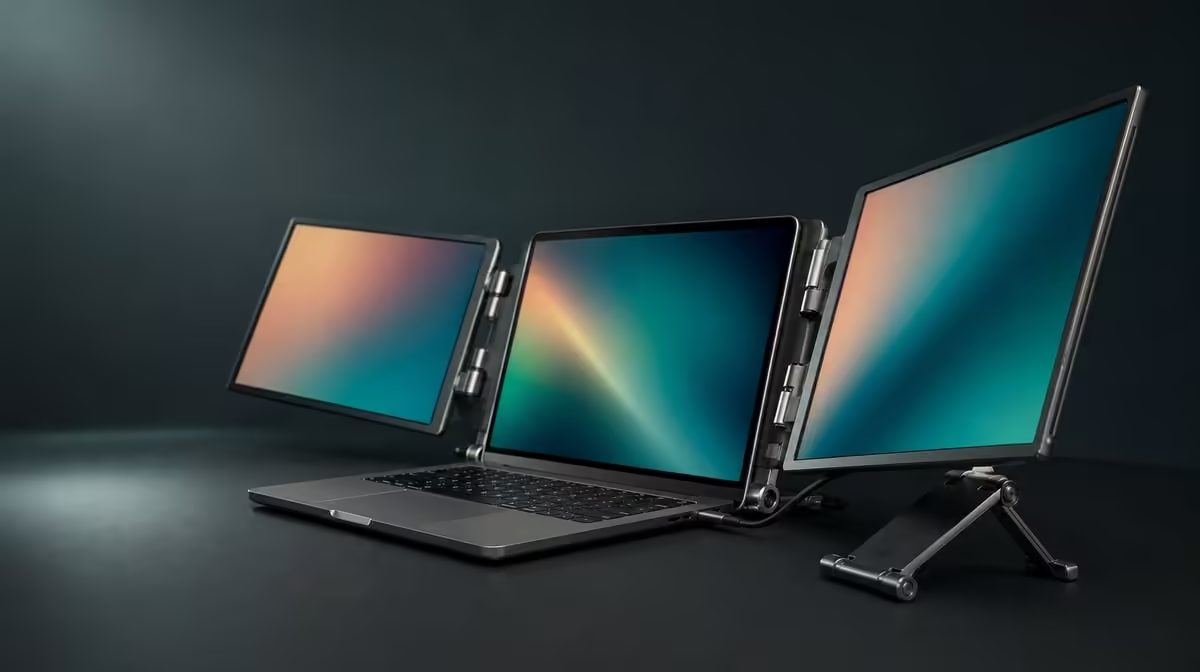
A folding monitor needs support while open, clearance while moving and protection while closed. Built-in stands and 360-degree folding are therefore parts of one physical routine, not isolated features. On the R4,299 UPERFECT Delta, that routine carries two independent 15.6-inch Full HD panels between the laptop desk and the travel bag.
Quick Answer
Deploy the R4,299 Delta's integrated stand on a stable surface before connecting, then use the 360-degree hinge only through positions that keep both panels supported and readable. Disconnect every cable before folding and protect the display faces in the bag. The broad movement range helps with positioning and transport, but it does not guarantee stability at every angle or fit in every backpack.
🪑 Understand what the built-in stand removes
The integrated support means the basic Delta setup does not need a separate monitor stand. That can reduce loose equipment at a temporary desk and one item in the travel kit.
It does not remove the need for a suitable surface. Clear enough space for the full assembly, place the stand flat and check for rocking before the laptop or cables are added. A soft, uneven or very narrow surface can change the result.
Position the notebook companion next. Its keyboard, trackpad and display should remain comfortable to use. The external panels add workspace, but the arrangement fails if the computer becomes awkward or the stand occupies the pointer area.
Try the real locations: main desk, meeting table and a smaller travel surface. Observe the monitor while typing normally and moving nearby items. Stability during a working session matters more than a staged photograph.
Compare mobile display and support formats in Evetech's portable screen range.
🔄 Use hinge range with a specific purpose
The Delta's body can fold through 360 degrees, giving it range for positioning and closure. Do not treat the maximum number as the correct working angle. Choose the orientation that suits the task while both panels remain readable and the stand stays planted.
Support the assembly with both hands while changing position. Move slowly and stop before attaching or tensioning cables. A lead crossing the hinge can be trapped, pulled or used accidentally as a restraint.
If one screen is shown to another person, plan the turn before moving it. Clear nearby objects, support the panels, rotate to the needed view and recheck the stand. Do not twist the display while a cable or laptop is resisting the movement.
The two IPS panels are independent and each has a native resolution of 1920 x 1080. Physical orientation does not replace the operating-system layout. After repositioning, identify the screens and make sure pointer movement still matches their order.
The hinge also allows the assembly to close for transport. Disconnect first. Folding should be a deliberate end-of-session step, never a way to manage a live connection.
🔌 Keep connections subordinate to support
One-cable use is possible only with a compatible USB-C host that drives both panels and supplies the power they need. Confirm the exact laptop port rather than inferring capability from the connector shape.
Once the stand and angle are set, route the cable with a relaxed curve. Keep it clear of moving joints and away from the edge where it could pull the monitor if the notebook shifts.
Detect both panels at native Full HD, choose extension for separate content and move a simple window across the laptop and external screens. This proves the digital layout after the physical setup is settled.
The independent displays can also show two compatible source devices, one per panel. That increases cable and control requirements. Arrange those paths so neither side disturbs the stand, and remove all leads before any hinge movement.
If a panel disappears during repositioning, stop moving the monitor and return to a stable baseline. Check the known source path before changing display settings. The Delta's 25ms response does not explain no signal; it concerns motion after an image is present.
🎒 Fold, protect and test the actual bag
Close applications and disconnect every source. Check both sides of the hinge for loose cable before folding. Support the panels and bring the assembly into its travel position without using the bag or case to force it.
Put the closed Delta into the intended protected compartment with the laptop, charger and required cables. The bag should close normally without pressure on the monitor.
Keep power bricks, hard plugs and rigid accessories away from the panel faces. Store leads so they cannot migrate between the screens during travel. Check how the complete bag balances and whether the load is practical for the route.
At the destination, remove the monitor without snagging cables. Open it on the stand before connecting, confirm stability and then rebuild the source path. A sensible packing order makes both departure and arrival safer.
For a display that never needs to fold, compare fixed options in the Evetech PC monitor category.
Validate the whole physical cycle
Work through a representative session. Put the active task on one Delta panel and reference or controls on the other, keeping the laptop in its planned role. Confirm text remains readable and the assembly stays settled.
Now run a full departure: save, disconnect, fold and pack. Move to a second surface and reverse the sequence. Time the second run and note any point where the hinge, stand, cables or bag creates friction.
The 25ms response positions the monitor around business, creative support and general multitasking rather than speed-first gaming. Physical flexibility does not change that display trade-off, so the workload and motion expectations still need to fit.
At R4,299, the stand and folding body earn value when they remove separate support equipment and make the two-screen layout repeatable across locations. If the monitor remains open permanently, fixed alternatives deserve equal attention.
Check current availability with Evetech and review the monitor best-seller collection after the stand, hinge, bag and host tests pass.
Photograph the open position from the side and the packed order from above. Those references make it easier to notice when a cable has been routed differently or a hard accessory has entered the display compartment. They also reduce unnecessary hinge adjustments at the next desk, because the stable position can be recreated before the source is connected.
Frequently Asked Questions
Does the Delta require a separate monitor stand?
No. Support is built into the folding assembly.
Is every point in the 360-degree range a working angle?
No. Use only positions that remain stable, readable and free of cable strain.
Should cables stay connected while folding?
No. Close work and disconnect all sources before moving the hinge into the travel position.
Does the hinge guarantee backpack fit?
No. Test the folded monitor and complete workstation kit in the intended bag.
Which display settings follow physical setup?
Use native 1920 x 1080 on both panels and select extension when different content is needed.
Can separate devices increase cable load?
Yes. Each panel can show its own compatible source, but the additional paths must be kept clear of the stand and hinge.
What work suits the monitor's 25ms response?
Documents, general business, CAD support, editing tools and ordinary multitasking are stronger fits than speed-sensitive play.
How much is the Delta?
The dual folding monitor costs R4,299.
Ready to make folding and support part of one safe, repeatable routine?
Compare Evetech portable displays and test the Delta from stable stand placement through protected travel.