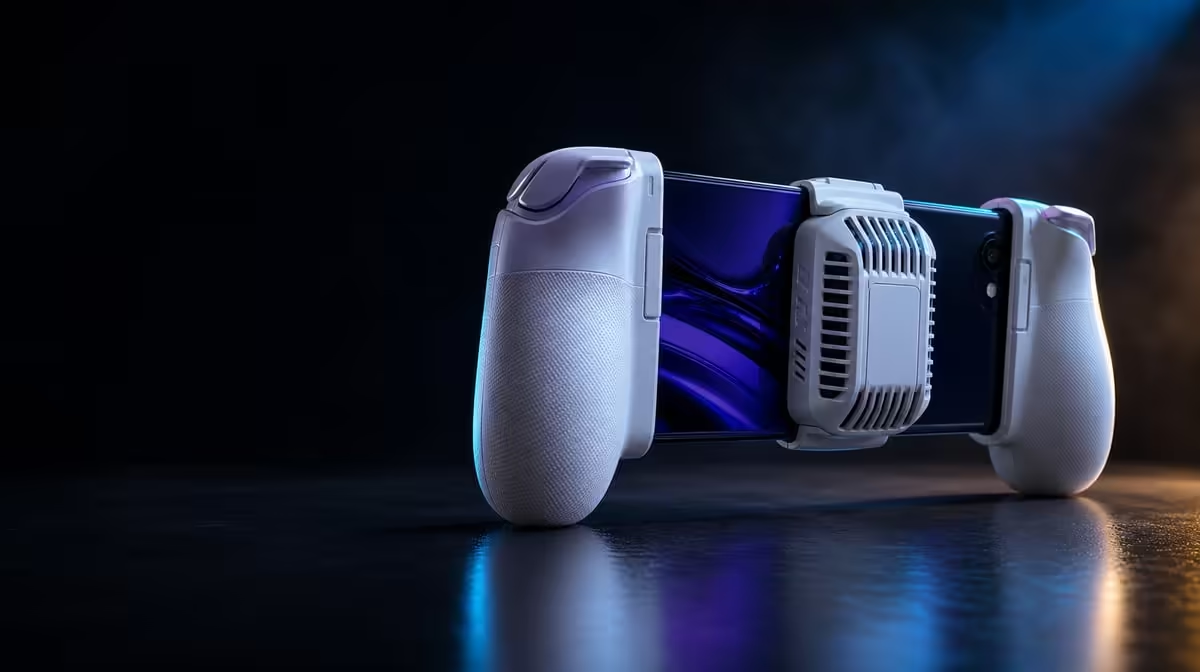
A phone cooler is most useful after the first burst of performance, when heat has had time to accumulate. The X3 Pro integrated cooler can support sustained mobile behaviour by improving the handset's thermal arrangement, provided the contact patch, airflow and power route are right. Its R1,199 price also includes the controller around that system, so the test must use the assembled device.
Quick Answer
The X3 Pro cooler may help a phone maintain steadier performance when it sits against a useful rear area and has unobstructed air. At R1,199, Charge Cool One Cable simplifies the setup, but phone workload, ambient heat, charging and internal thermal controls still determine the final result.
🧊 Cooling protects thermal headroom
Demanding mobile games keep processing and graphics hardware active for long periods. The phone converts part of that work into heat, and its internal controls may reduce operating speed as thermal headroom shrinks. A cooler aims to move heat away so that build-up is slower or less severe.
That mechanism does not promise a specific frame rate. Different phones place hot components in different areas and use their own protection logic. A title can also vary its load from one scene to another. The meaningful question is whether the complete setup changes sustained behaviour under matched conditions.
Buyers can inspect integrated formats in Evetech's gaming controller category. The X3 Pro supplies a local R1,199 reference, while the phone's physical layout decides how well its cooler can make contact.
Start every comparison from a similar baseline
Let the phone return to normal idle conditions and begin at a comparable battery level. Starting one test cold and the next immediately after a heavy session makes the cooler appear better or worse for the wrong reason.
📐 Contact quality sets the ceiling
Remove a protective case and inspect the rear of the handset. A raised camera island, decorative ridge or uneven panel can hold the phone away from the cooler. Fit the device without twisting it and look along both sides for a gap.
The controller should hold the handset securely but not bend it or load the USB-C plug. More clamping pressure cannot move a poorly placed cooler to the correct hot area. If alignment is weak, record the physical limitation rather than forcing the frame.
Check contact again after several minutes of active play. Trigger use, hand pressure and cable movement can shift a phone that looked stable on a desk. A changing gap undermines a long-session comparison.
🌬️ Airflow and power must remain independent checks
Identify the cooler's intake and outlet before gripping the controller. Keep palms, clothing, cushions and loose cables clear. External openings should be free of visible dust, but no tool or liquid should be pushed into the unit.
Charge Cool One Cable reduces routing complexity around cooling and charging. Give the line slack and support its weight so it does not pull the phone away from the cooler. Incoming energy may not always exceed a heavy game's consumption, and charging can add heat, so battery change belongs in the notes.
Evetech's mobile gaming accessories section can help organise the surrounding station. Any extra item should preserve airflow and connector relief rather than crowding the rear of the phone.
🧪 Run a useful before-and-after test
Select one repeatable game route or training scene. Fix brightness, graphics settings, background activity and room location. Record behaviour at five, fifteen and thirty minutes with the intended cooling arrangement, then repeat safely with the comparison condition.
Watch for consistency, not merely a peak number. Frame pacing, touch or control response and handset warnings can describe the experience. Stop immediately at a temperature alert. A successful result never requires defeating the phone's protective behaviour.
Repeat on another day to reduce the influence of one unusual run. If the improvement appears only in a menu or for the first few minutes, it does not prove sustained support. If the phone remains steadier through the demanding section, the cooler has performed a job that matters.
The accessories best-seller view adds context for a complete mobile setup. Keep conclusions tied to the same phone, workload and conditions rather than transferring them automatically to every handset.
Add a contact-control run to the test. Shift the phone a few millimetres only if the frame safely allows it, then return it to the intended position and compare. The point is not to hunt for a flattering placement, but to confirm that ordinary handling does not move the cooler away from its useful area.
Observe the fan path at different hand angles. A clear intake on a table may be partly covered once the player leans back or rests an elbow. Photograph the grip from behind if needed; the image can reveal a finger or cable crossing an opening that the player cannot see.
Separate thermal improvement from acoustic preference. A cooler may operate normally while producing a sound the owner notices in a quiet room. Assess that during real game audio, not by placing an ear against the controller.
Repeat the battery measurement with the intended power source. Record starting percentage, ending percentage and any phone alert. A result from another source should not be carried over without testing because the routing and incoming energy may differ.
After the session, check how quickly the setup can be removed without touching a warm phone surface unnecessarily. Safe, controlled disassembly belongs to practical cooling use.
The X3 Pro's R1,199 price buys the integrated arrangement, while the result depends on disciplined contact and repeatable conditions. A cooler that performs one well-controlled job is more credible than a broad promise applied to every mobile title.
Keep a photo of the successful phone position and cable route. Recreating the same geometry makes later tests comparable and reveals when the handset has shifted.
Repeat the controlled run after a major game or phone update. Software changes can alter workload even when the cooler is unchanged, so the old result should be treated as a baseline rather than permanent proof.
The integrated system is easiest to understand when every conclusion names its conditions: this handset, this scene, this room and this power arrangement. That precision makes the cooling claim useful to the owner without stretching it beyond the evidence.
Include a control run after cleaning the accessible cooler openings. If behaviour changes, note the maintenance step instead of attributing it to a new game profile. Recheck that the phone returned to the same photographed position.
Store the cable and controller together only after both have cooled and disconnected normally. This protects the known route and prevents a rushed coil from placing pressure on the sticks or USB-C plug.
A sound thermal record is cumulative. Each careful session adds context to what the R1,199 integrated design can do for that specific mobile workload.
Frequently Asked Questions
How can an integrated cooler affect sustained performance?
It can slow heat build-up by moving energy away from the phone, leaving more thermal headroom under a repeated workload.
Why is rear contact so important?
A physical gap reduces the path between the warm handset surface and cooler. Camera bumps and cases can create that gap.
Does one-cable routing remove the need to watch battery behaviour?
No. It tidies the route, while phone demand and incoming power still determine whether the battery rises or falls.
How much is this cooled controller system?
The GameSir X3 Pro costs R1,199 and combines the cooler with Hall sticks, fast triggers and motion input.
Ready to test cooling beyond the first five minutes?
Compare Evetech's mobile controller options and use a repeatable workload to judge the fit and thermal arrangement.