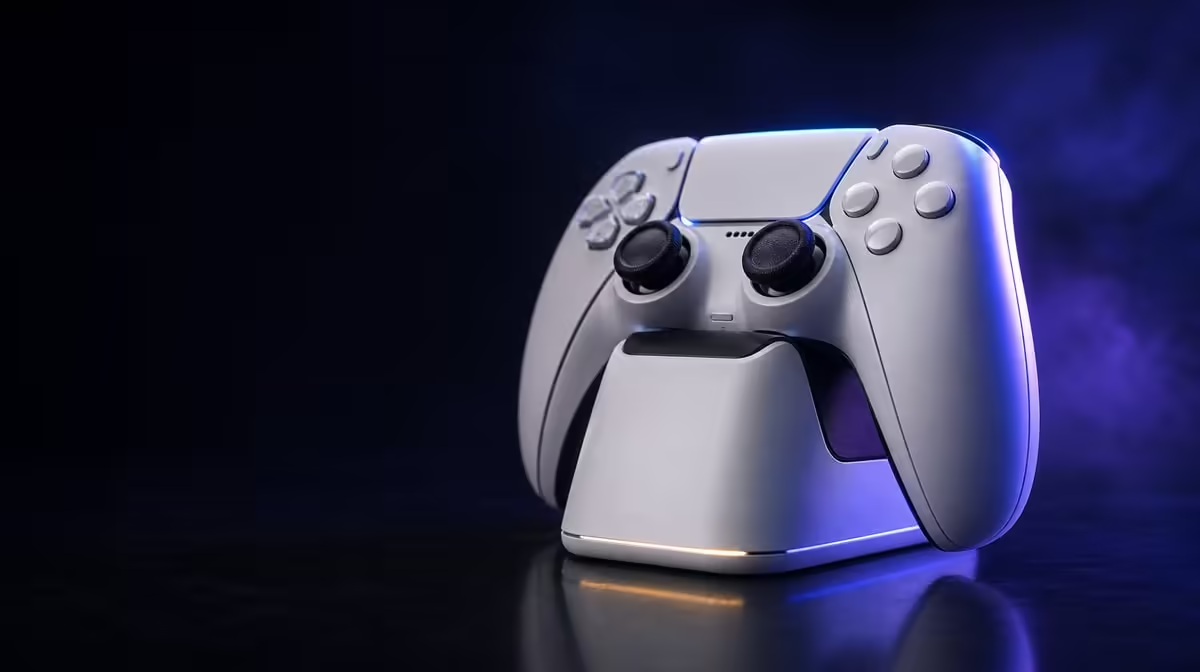
Smart charging manages power around a correctly seated controller; it does not rewrite battery chemistry. Smart Start-Stop Charging on the GameSir Cyclone 2 works through the included dock, which comes in the R999 package. Stable contact, sensible temperature and gentle maintenance still determine whether the daily routine remains reliable.
Quick Answer
The Cyclone 2 dock automatically manages when charging starts and stops around the controller's battery state. It does not increase capacity or guarantee lifespan. At R999, the dock is included; place it level, seat the controller correctly and resolve contact interruptions before judging the smart feature.
⚡ What starts and stops
The dock applies and manages charging power around a controller that is seated as intended. Automation reduces the need to connect a cable directly after every session.
This does not mean the dock is wireless. Its own power lead remains, and the base must keep stable contact with the controller.
Observe charging after placement. A normal managed state change differs from rapid reconnecting triggered by movement or poor alignment.
Use the same seating motion several times. The controller should settle without being twisted or pressed into a special angle. If it works only under pressure, correct the physical setup before relying on automation.
Check the dock cable while lifting the controller. A taut lead can move the base slightly and turn good contact into intermittent contact. Add slack or reroute it before the next charge.
Keep the Smart Start-Stop explanation modest: it manages power state. It does not reveal a secret battery condition or create a fixed charging time.
The Evetech gaming controller range provides a useful category for comparing included charging systems.
🔋 What the feature does not change
Smart Start-Stop does not add battery capacity, establish an exact runtime or freeze ageing. Temperature, use, time and the battery's condition remain relevant.
It also cannot overcome unstable physical contact. A crooked gamepad may repeatedly disconnect even though the management logic is working correctly.
Value comes from routine: one storage point, automatic management and less direct cable handling. Buyers who use that routine daily receive more benefit than those who leave the dock packed away.
Measure the routine over a week. Count direct cable connections avoided, failed dock placements and sessions that began with the controller where expected. Repeated convenience is the practical evidence.
If the dock is used only occasionally, do not give it the same weight as daily TMR stick input. Features earn value through frequency as well as capability.
The R999 price includes the base, so buyers can score the complete controller-and-dock package directly.
🧹 Maintenance supports automation
Place the dock on a firm, shaded surface. Route the cable with slack so the base stays level when the Cyclone 2 is lifted.
Disconnect power before cleaning. Use a gentle dry approach on exposed contact areas and the controller resting surface. Avoid liquid or scraping.
If charging remains unstable, keep the position fixed and alter a single appropriate part of the power path. Record what changes the result.
Begin with alignment, then visible debris, then cable tension and the suitable power source. This order moves from simple physical causes outward without changing everything at once.
Allow each test to settle. Rapidly lifting and replacing the controller can generate the status changes being diagnosed. Observe a stable attempt before moving on.
Do not open or modify the dock. Gentle external maintenance is sufficient for the checks described here. Anything beyond that would require facts and authority not present in this article.
Browse Evetech gaming accessories after the dock and cable have a reliable home.
🧭 Connect charging to the wider setup
The Cyclone 2 also offers tri-mode, multiplatform support, TMR sticks, Hall triggers and customisable RGB. None of those changes the charging maintenance order.
End each session by saving the correct profile, disconnecting from the host and seating the controller squarely. Confirm stable status before leaving the desk.
Keep the charging base away from direct sun and warm equipment. Temperature remains a battery factor even when power application is automated.
Use the dock as a clean handoff between platforms. The controller returns to one neutral storage place after PC or Android play, reducing the chance that a device switch leaves it uncharged elsewhere.
Use the dock as a storage anchor that keeps pressure off the sticks. A consistent resting place can support both battery routine and physical control care.
Review the base after desk rearrangements. A new cable crossing, mat or device can change alignment and airflow. Smart management stays the same while the environment changes around it.
The complete value therefore combines automation with human discipline. Start-stop charging supplies management; correct seating, clean contact and a cool location supply the conditions it needs.
Build a five-point end-of-session check: save profile, disconnect host, inspect the dock surface, place the controller squarely and confirm stable status. This routine makes smart charging visible without demanding constant monitoring.
If the charging state changes later, begin from the same five points. A recorded routine helps identify what differed: a moved cable, visible dust, a warmer location or crooked seating.
Smart Start-Stop should be scored against direct charging by daily convenience. The dock wins when it reduces repeated plugging and creates a consistent home. A cable may remain useful for travel without weakening the base's fixed-desk role.
The controller's R999 price includes this choice. Buyers can value the charging system together with TMR sticks and Hall triggers while refusing to treat any one feature as a battery guarantee.
Review the routine after a week. If the controller returns cleanly, contact stays stable and direct cable handling drops, Smart Start-Stop has delivered practical value. If the base remains unused, the feature may matter less despite being included.
Battery care remains broader than charging logic. Avoid unnecessary heat, protect the controller physically and use the managed dock as intended. These habits complement automation without making unsupported lifespan promises.
The result is a charging system with clear boundaries: it manages power around a good docked state, while the user maintains the environment that makes that state reliable.
When charging behaves predictably, organise the surrounding desk with context from Evetech's accessory favourites.
Evaluate the automation over a complete day rather than one placement. Use the controller, return it naturally, confirm a stable charging state and then lift it for the next session. Several successful cycles show that the dock location and cable route support the feature.
If the routine fails only after the desk is moved, the environment has changed even though the charging logic has not. Restore level support and relaxed cable tension before making claims about Smart Start-Stop behaviour.
The R999 package includes the base, so this daily test also decides how much of the purchase value comes from charging convenience.
Frequently Asked Questions
What does the dock manage automatically?
It manages charging power around the correctly seated Cyclone 2 and its battery state.
Does Smart Start-Stop increase capacity?
No. It changes charging management, not the battery's designed capacity.
Can it guarantee battery lifespan?
No. Age, temperature, use and stable contact still influence long-term behaviour.
Is the dock optional in the R999 package?
The dock is included with the Phantom White Cyclone 2 at R999.
What maintenance helps?
Keep the base level and shaded, route the cable with slack and clean exposed areas gently with power disconnected.
Ready to use smart charging without expecting magic?
Explore docked gaming controllers at Evetech and support the Cyclone 2 automation with stable seating, clean contact and sensible temperature.