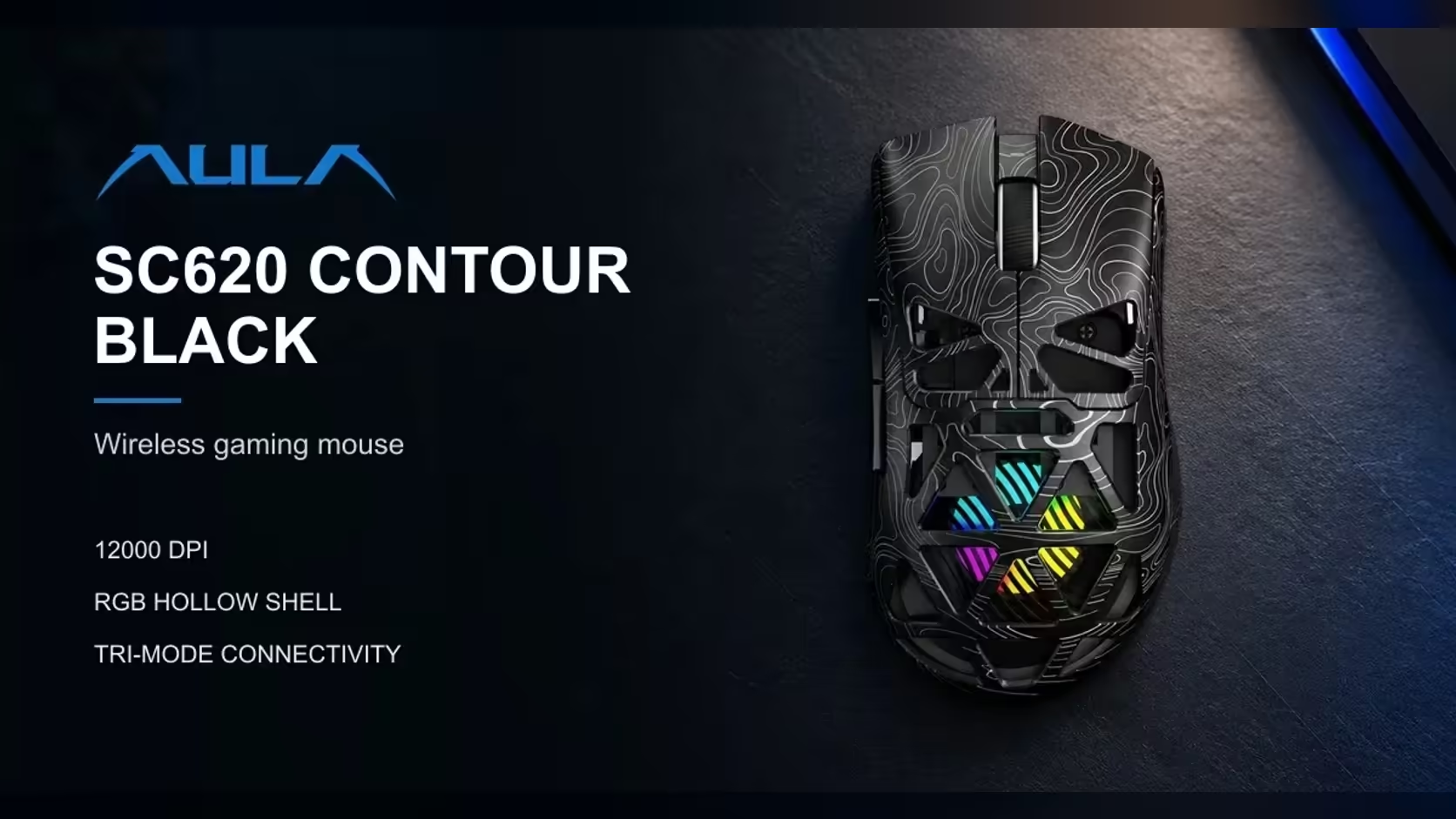
Most gaming mice try to stand out with a bigger DPI number. Two AULA mice take a different route and make the difference something you can see. The SC620 Contour glows from inside a honeycomb shell. The SC590 Pro carries a small screen on its body that reports battery, DPI and connection. Under the surface they share a lot, which makes this AULA mouse comparison a question of what you want to look at on your desk.
Quick Answer
Choose the AULA SC620 Contour if you want RGB glowing through a hollow honeycomb shell, a dedicated Fire button and 67g on a 400mAh battery. Choose the AULA SC590 Pro if you want a built-in display showing battery level, DPI and connection mode, at about 64g on a 500mAh battery. Both use the PAW3311 sensor at 1000Hz and connect by 2.4GHz, Bluetooth or cable. Evetech prices the SC620 Contour at R349 and the SC590 Pro at R319.
🔀 Two answers to the same problem
Every wireless mouse raises the same small questions during use. How much charge is left? Which DPI step am I on? Is it on the receiver or on Bluetooth? Usually the answer is hidden in software or signalled by a coloured light you have to decode.
The SC590 Pro answers those questions directly. Its screen reports whether the link is dongle, Bluetooth or cable, exactly how much charge remains, and the current DPI step, while the buttons beside it switch DPI. There is no guessing and no app to open.
The SC620 Contour answers a different question: what should a mouse look like? Its top shell is hollowed into a honeycomb and RGB lighting shines through the gaps, filling the whole shape rather than a strip or logo. AULA's driver sets the brightness and speed of that glow.
What they share
Strip away the display and the lighting and the two are close relatives. Both use the PAW3311 optical sensor. Both poll at 1000Hz. Each connects by USB dongle, Bluetooth or lead. Both sit in the same light weight class, within a few grams of each other.
📊 Side by side
- Standout feature: a honeycomb shell with RGB inside on the SC620 Contour (the honeycomb mouse below); a built-in display for battery, DPI and mode on the SC590 Pro (the display model below).
- Sensor and polling: the PAW3311 at 1000Hz on both.
- DPI levels: 800, 1600, 3200, 4800, 8000 and 12,000 on the honeycomb mouse; 1200, 2400, 3200, 6400, 10,000 and 20,000 on the display model.
- Connections: 2.4GHz, Bluetooth 5.3 and wired USB on the honeycomb mouse; 2.4GHz, Bluetooth and USB-C wired on the display model.
- Battery: 400mAh against 500mAh.
- Weight: 67g against about 64g.
- Colours: black or white for the honeycomb mouse; black for the display model.
- Extras: a dedicated Fire button and programmable buttons on the honeycomb mouse; six buttons with DPI controls beside the display on the display model.
Reading the DPI steps
The two sensors are the same model, but the preset steps differ. The SC620 Contour starts at 800 and tops out at 12,000, which places more of its steps in the range most players use for aiming. The display model starts at 1200 and climbs to 20,000, suited to very high-resolution screens or anyone who likes a fast pointer. For most people, the lower steps on either mouse matter far more than the top number.
Reading the weight and battery figures
The SC590 Pro is a touch lighter and carries the bigger battery, which is a neat trick given it also houses a screen. For battery life, AULA Argentina's rating, cited on the SC590 Pro's product page, is roughly 20 hours in constant use and 120 idle, and real-world results vary. AULA publishes no hour figure for the SC620 Contour, where the RGB brightness and sleep time you pick will shape runtime.
🖥️ Who each one suits
The lit-desk builder
If your PC has glass panels, RGB fans and a lit keyboard, the SC620 Contour belongs in that picture. Its glow comes from the whole shell, and the white version softens it into a gentler light. The Fire button adds a practical extra for games: one mapped command, such as a click burst, per press.
The practical checker
If you are the person who has been caught out by a flat mouse mid-meeting, or who shares a PC and never knows what DPI the last user left, the readout model is the calmer choice. A glance tells you everything, with nothing to install. AULA lists Windows 2000, XP, 7, 8 and 10 support.
Mixed use
Both handle games and work comfortably at 1000Hz. The honeycomb mouse gives more control through its driver, which remaps buttons and records macros on Windows over the receiver or cable. The readout mouse is simpler: six buttons, DPI switching on the mouse itself, and a screen that confirms what you just changed.
🎨 Living with each one
Care and cleaning
The SC620 Contour's open cells show off the lighting but also let dust and liquid reach inside more easily than a closed shell. A weekly puff of compressed air keeps the glow even. The display model is a conventional closed body, so a cloth wipe is all it needs.
Setting up
With the SC620 Contour, plan a short session in AULA's driver to set lighting, sleep time and your DPI steps. The driver does not work over Bluetooth, so plug in the receiver or cable while you do it. With the readout model, most of the setup happens on the mouse itself using the buttons beside the display.
Size and shape
The SC590 Pro's body is roughly 118 by 60 by 38mm. AULA shapes the honeycomb model for claw, palm and fingertip grips. Both are light enough to reduce arm strain over long sessions.
Evetech carries both mice, and the price for each sits on its product page at Evetech. To compare them against other options, browse the gaming mice category, or focus on cable-free designs through the wireless mouse page. Each is sold with a 1 Year Local Warranty.
Frequently Asked Questions
What exactly appears on the SC590 Pro's screen?
Which link is in use, the precise charge left and the DPI step, with buttons alongside to change that step.
Which of the two weighs less?
The SC590 Pro, at about 64g, against the SC620 Contour's 67g.
Is the sensor the same in both mice?
Yes. Both use the PAW3311 and poll at 1000Hz, though their preset DPI steps differ.
Does one have a larger battery?
The SC590 Pro has 500mAh; the SC620 Contour has 400mAh.
Which fits a desk full of RGB?
The SC620 Contour. Its lighting glows through the whole honeycomb shell.
Which is easier for someone who dislikes software?
The SC590 Pro. Its DPI buttons and display work without a driver open.
Does Evetech sell both of these AULA mice?
Yes. The SC620 Contour comes in black and white, and the SC590 Pro in black.
Glow or readout: which will you pick?
Compare the SC620 Contour, the SC590 Pro and other wireless mice across Evetech's gaming mouse range.