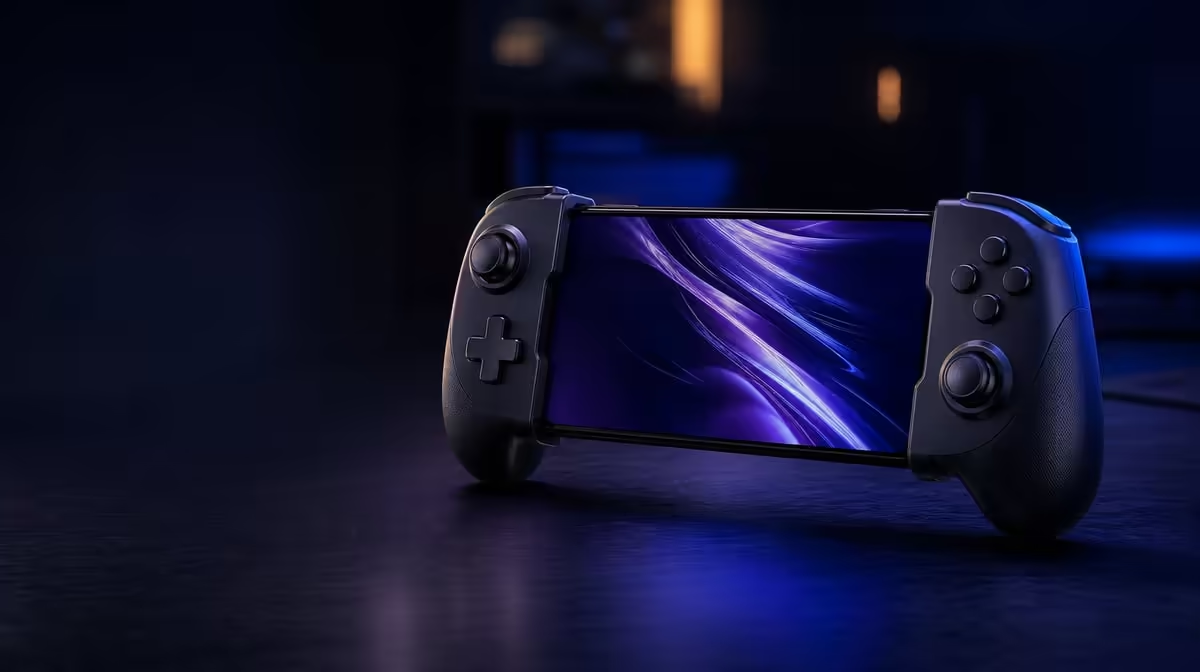
A mobile controller can look impressive and still be wrong for the phone, games or places where it will be used. A useful wireless mobile controller checklist begins with compatibility and fit, then works through connections, control hardware, feedback and customisation. The Android-compatible GameSir X5s costs R699 and offers tri-mode connectivity, Hall Effect sticks and a lightweight design, making it a practical example rather than an abstract feature list.
Quick Answer
Check device and game support first, then compare connection routes, stick technology, motion input, feedback and layout controls. At R699, the GameSir X5s combines Android compatibility with Bluetooth, USB-C and 2.4GHz connectivity, anti-drift Hall sticks, 6-axis gyro and a lightweight format. A receiver does not accompany the controller for 2.4GHz use, so plan that mode separately.
📱 Start with the phone and the games
Platform compatibility is the gate through which every other feature must pass. Confirm that the controller supports the intended Android device, then check whether the games you play accept external controller input. A Bluetooth pairing can succeed even when a title remains designed around touch controls, so connection and game support must not be treated as the same result.
Make a short list of real uses. Include the two or three games played most often, whether the controller will travel, and whether it also needs to serve a PC. That list prevents a general buying guide from becoming a hunt for the longest specification sheet.
Turn those uses into pass, useful and optional columns. Android and game support belong in pass. A preferred wireless route may be useful. A feature that sounds interesting but lacks a supported game belongs in optional. This simple ranking stops an attractive extra from compensating for a failed requirement and gives unlike controllers a fair basis for comparison.
Fit is not only a measurement question. Consider how the phone and controller will sit in your hands, whether a case changes the arrangement, and whether cables remain practical in your normal position. The queue identifies the X5s as lightweight, a useful trait for portable play, but no unsupported dimension or weight is needed to judge the principle: a mobile controller should not make the overall kit awkward to carry or tiring to hold.
Use the Evetech gaming controller range to compare formats after those compatibility questions have a clear answer.
🔌 Match connection modes to real locations
Wireless convenience can mean different things. Bluetooth keeps the mobile kit simple because it does not rely on a separate receiver. USB-C supplies a direct wired path when a cable fits the session. A 2.4GHz mode uses a compatible dongle, which can be useful for another setup but adds a piece to plan, carry and budget for.
The X5s supports all three routes. A 2.4GHz dongle does not come with it, so R699 should not be mistaken for the price of a complete receiver-based arrangement. If Bluetooth and USB-C already cover phone and PC use, the excluded accessory may not matter. If 2.4GHz is central to the plan, confirm compatibility and consider the complete setup before choosing.
Connection choice also affects troubleshooting. Tri-mode hardware lets a player compare a wireless route with USB-C while leaving the game and device unchanged. That is useful when input feels delayed, but it should not encourage random switching. Test one mode properly, note the result and then change a single variable.
South African internet latency is separate from controller latency. Data travelling to a game server follows a different path from the local press travelling to the phone or PC. An offline menu or local scene can help separate the two when a response feels late.
🎯 Judge the controls beneath your thumbs
The stick design deserves attention because it affects nearly every game. Hall Effect sticks sense position magnetically, reducing the contact-wear mechanism associated with traditional potentiometer tracks. The X5s includes anti-drift Hall sticks at R699, which gives buyers a concrete baseline for drift-resistant mobile control.
Hall hardware does not eliminate the need to inspect neutral input or configure deadzone sensibly. Calibration, software and physical condition still matter. Test that each stick returns consistently, then make small adjustments rather than hiding a problem with a large deadzone.
Analog triggers add graduated input where the game supports it. They should be checked separately from the sticks because a trigger reports travel along a different input. If a title reads the trigger as only on or off, that may reflect the game's control design rather than a fault.
Six-axis gyro is valuable when supported games use physical movement for aiming or interaction. It should earn its place on the checklist through the games you actually play. A player who enjoys motion correction can pair gyro with the Hall sticks; someone whose titles do not expose motion input should give more weight to connections, layout and basic control feel.
Browse the wider gaming accessories category at Evetech after deciding which controller inputs are essential.
🧩 Decide which extras solve a problem
HD Vibration can provide varied physical cues when a game supports detailed feedback. Swappable ABXY buttons can help visible labels match a preferred convention. Turbo can repeat a suitable action. Software customisation can align supported settings and mappings with different games.
Each feature is useful in the right context, but none should be counted twice simply because it has both a menu and a marketing name. Ask what the feature changes during a normal week. If you move between games with different button conventions, ABXY flexibility may matter. If you rely on precise mobile aim, Hall sticks and gyro may carry more value. If the controller spends most of its time in a bag, lightweight design and a simple Bluetooth route may dominate.
Comfort and complexity belong on this final check as well. More settings can help a player who enjoys maintaining profiles, but they also create more layers to diagnose. A buyer who wants immediate, repeatable control may prefer to leave most options at their baseline. Customisation is valuable because it is available for a need, not because every toggle must be changed.
The X5s brings these options together at R699, yet setup discipline remains important. Save a default profile before changing mappings. Test Turbo on one action. Calibrate gyro while the controller is still. Adjust vibration to a level that communicates without disturbing fine movement.
The Evetech accessories best-seller page can help with the final surrounding choices, but the controller decision should still trace back to the device, games and connection routine identified at the beginning.
Frequently Asked Questions
What should I confirm before comparing mobile controller features?
Confirm Android device support and external controller support in the games you play. A strong feature set cannot compensate for a title that does not read the controller as intended.
Is tri-mode connectivity necessary for everyone?
No. It is most useful when one controller must move between different mobile and PC arrangements. Bluetooth or USB-C alone may cover a simpler routine.
Why should Hall sticks matter in a buying checklist?
They reduce the contact-wear mechanism associated with traditional potentiometer sensing. That makes neutral consistency and long-term drift resistance part of the value discussion.
What does the GameSir X5s cost?
The Android-compatible X5s is R699. Remember that 2.4GHz use requires a separately planned dongle when comparing the full cost of that particular connection route.
Ready to turn a feature list into a useful mobile setup?
Explore Evetech gaming controllers and choose around your device, favourite games and everyday connection routine.