



PCIe 5.0 vs PCIe 4.0 for Video editing in 4k in SA
PCIe 5.0 vs PCIe 4.0 for video editing in 4k is mainly about fit, features, compatibility, cost, and upgrade path, not one automatic winner. SA buyers should match the choice to the setup.
Read moreA tri-mode controller uses multiple connection types to cover devices with different wireless and wired requirements. The GameSir G7 Pro serves Xbox by cable, PC wirelessly or wired, and Android over Bluetooth, making it suited to mixed-platform users.
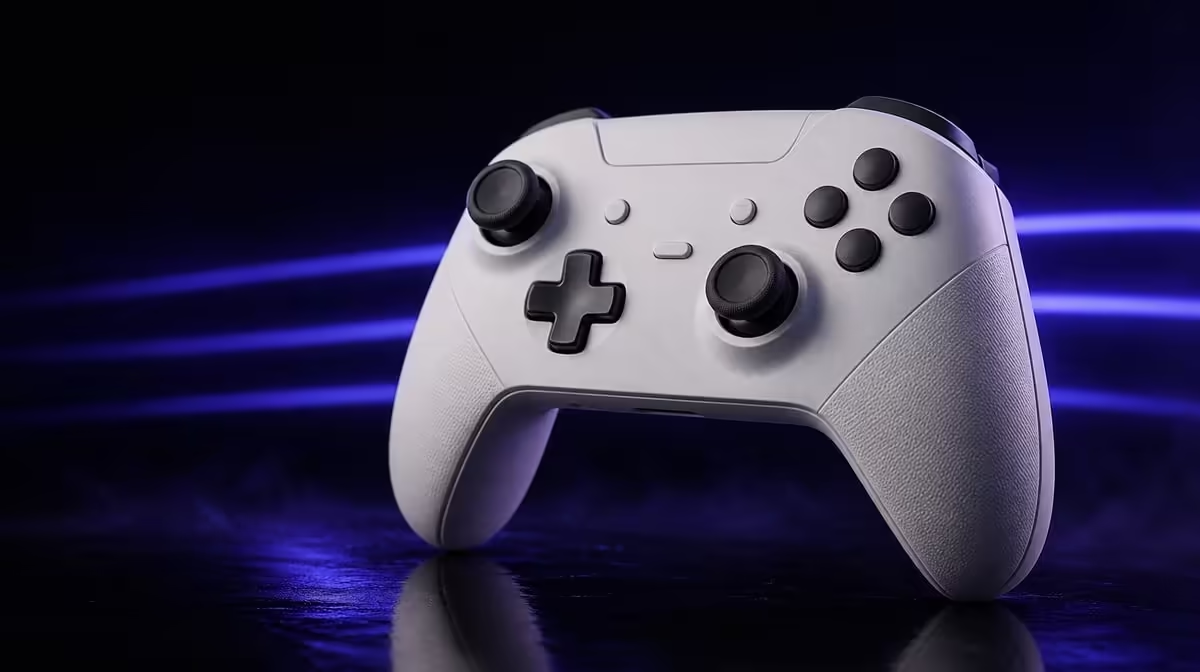
A controller can be called flexible while still using different links on different devices. A tri-mode gaming controller is for players whose Xbox, PC and Android habits justify changing connection methods instead of buying a separate pad for each platform.
The R1,499 GameSir G7 Pro is tri-mode because it serves Xbox by cable, PC through a wired or 2.4GHz link, and Android over Bluetooth. It best suits a mixed-device player who accepts those platform-specific routes and values carrying the same controls between systems.
Tri-mode does not mean that three generic connection buttons work everywhere. It means the controller has several connection types, with each one assigned to compatible devices. The platform map matters more than the number in the label.
For the G7 Pro, Xbox play is wired. PC users can choose a cable or the dedicated 2.4GHz wireless link. Android uses Bluetooth. A buyer wanting cable-free Xbox play should therefore choose on that requirement before considering the other features.
Write the map in three rows: device, supported link and usual room position. Add the expected session type and whether a cable across that distance is acceptable. This exposes a mismatch before setup begins.
A household using only one Xbox gains less from tri-mode than someone who moves between a console, gaming PC and Android device. The feature earns value when those extra paths are used, not merely because they exist.
Start a comparison with Evetech's gaming controller category, keeping the platform map beside the product pages.
Wired Xbox use avoids a wireless pairing routine and keeps the controller physically connected. Measure the route from seat to console and account for people, pets and furniture before deciding whether that is comfortable.
PC offers the broadest choice. A desktop player can prefer the certainty of a cable, while a lounge or adjustable desk can benefit from 2.4GHz freedom. The G7 Pro also supports 1000Hz polling on PC, but the active result still depends on the chosen setup and the rest of the input chain.
Bluetooth on Android prioritises a connection type commonly used by mobile devices. Pair it only in the correct platform mode, test the controls in the intended game and note how to return to the PC configuration later.
Switching modes remains a deliberate action. Tri-mode does not remove device selection, pairing or cable changes. Give each platform its own short start sequence so a failed connection is not confused with an incompatible route.
Build a connection card that travels with the controller. For Xbox, note the wired route and where the lead is stored. For PC, identify whether the normal choice is cable or 2.4GHz. For Android, record the Bluetooth pairing name and the game used for the input check. The card prevents "tri-mode" from becoming three half-remembered setup attempts.
Think about hand-off between players too. A family member should be able to identify the current mode before pressing random combinations or removing pairings. Label the preferred platform sequence in ordinary language and include how to return the controller to its dock.
Browse Evetech's gaming accessories selection for other pieces that may belong in the platform setup.
Begin on Xbox with the wired path. Open a familiar game, check sticks, D-pad, face buttons, triggers, macro inputs and 3.5mm audio if it is part of the intended routine. The goal is a clean baseline before moving to another device.
On PC, prove the cable first, then evaluate 2.4GHz separately. Keep the same game scene and control actions. Confirm that the operating system and game see the intended device, and test the 1000Hz PC feature only after ordinary input is stable.
For Android, pair over Bluetooth and use a title known to accept controllers. Move through menus, perform gradual stick movement and check trigger response. A successful Bluetooth connection does not guarantee that every Android game maps inputs in the same way.
Return to the first platform after the round. If the player cannot restore its mode without trial and error, simplify the written sequence. Multi-platform value depends on repeatability, not on a one-off demonstration.
The included charging dock can give wireless PC and Android routines a consistent storage point. It does not add wireless Xbox compatibility or change which link belongs to each device.
Run a second test after the controller has been away from all three devices. Start from the dock, connect to the chosen platform, launch the game and check a standard set of inputs. Time the whole process without rushing. The fastest theoretical link is less useful than a routine that the household can restore reliably.
Check audio as a separate Xbox or PC habit where the 3.5mm feature is needed. Do not assume that passing a button test proves the complete headset routine. The platform, game and audio path should be confirmed in the same mode that will be used.
The strongest buyer regularly plays on at least two supported device types, likes a familiar physical layout and is willing to select the appropriate link. One controller can then carry stick, trigger, macro and D-pad preferences across more of the week.
The weaker buyer uses one platform, insists on wireless Xbox or dislikes changing modes. That person should prioritise the required connection before TMR sticks, trigger stops or custom parts.
Create a utilisation forecast for one month. Mark expected Xbox, PC and Android sessions, the connection each will use and whether a platform-specific feature matters. If almost every mark sits in one row, the purchase can still make sense, but tri-mode should not receive most of the credit.
At R1,499, the value case spans magnetic thumb sensing, stop-equipped triggers, four rear inputs, changeable exterior parts, four rumble motors, a dock and the platform map. None of those extras corrects a connection mismatch.
Compare the physical controls after compatibility passes. Use the same movement drill, trigger exercise and D-pad sequence on each device. Familiar muscle memory across platforms can be an important benefit, yet game-level layouts may still differ and deserve their own profile notes.
The final decision should fit in one sentence: which devices are used, which links are acceptable and which shared control feature removes a recurring inconvenience. If the answer relies only on the words "tri-mode", the intended benefit remains undefined.
Review Evetech's accessory best sellers after deciding which two or three routes will be used and check current availability at purchase time.
It refers to a cabled Xbox route, two PC choices and an Android Bluetooth path.
No. Its Xbox route is wired, so buyers needing cable-free console play should treat that as a deciding requirement.
PC players can use the G7 Pro through a cable or its 2.4GHz wireless path.
Android use is handled through Bluetooth.
A player who regularly moves among supported Xbox, PC and Android setups gains more than someone using a single device.
No. The player still needs to choose the right platform setting and connection.
The included charging dock provides a regular place to return the controller after wireless PC or Android sessions.
Ready to map one controller across three devices? Compare Evetech's gaming controllers after writing down the exact Xbox, PC and Android connection your room requires.
It refers to a cabled Xbox route, two PC choices and an Android Bluetooth path.
No. Its Xbox route is wired, so buyers needing cable-free console play should treat that as a deciding requirement.
PC players can use the G7 Pro through a cable or its 2.4GHz wireless path.
Android use is handled through Bluetooth.
A player who regularly moves among supported Xbox, PC and Android setups gains more than someone using a single device.
No. The player still needs to choose the right platform setting and connection.
The included charging dock provides a regular place to return the controller after wireless PC or Android sessions.
PCIe 5.0 vs PCIe 4.0 for video editing in 4k is mainly about fit, features, compatibility, cost, and upgrade path, not one automatic winner. SA buyers should match the choice to the setup.
Read more
Wi-Fi 7 vs Wi-Fi 6e for competitive esports comes down to router support, latency goals, device compatibility, and coverage. SA buyers should match the choice to the real network setup.
Read more
ATX 3.1 vs ATX 3.0 for mMO and live-service games buyers - what changes is mostly about compatibility, budget, upgrade path, and setup fit. SA buyers should check device support and real needs before expecting a clear win from either option.
Read more
LGA 1851 vs LGA 1700 can affect Twitch and YouTube streaming when gaming and encoding share CPU resources. For SA creators, the real-world difference depends on encoder choice, memory support, motherboard cost, thermals, and upgrade plans.
Read more
X870E vs X670E for aaa single-player gaming is mainly about fit, features, compatibility, cost, and upgrade path, not one automatic winner. SA buyers should match the choice to the setup.
Read more
Hall Effect switches vs Mechanical switches for mMO and live-service games is mostly about compatibility, budget, upgrade path, and setup fit. SA buyers should check device support and real needs before expecting a clear win from either option.
Read more
A fake 113GB GTA VI ISO reportedly used empty padding around a small malware payload. SA gamers should delete unofficial builds, keep Windows security active and wait for official channels.

Wi-Fi 6E vs Wi-Fi 6 matters for 4K video editing when files move across a network. The real-world difference between Wi-Fi 6E and Wi-Fi 6 for video editing in 4K depends on NAS access, cloud uploads, router range, and SA creator workflows.

The difference between PCIe 5.0 and PCIe 4.0 for SA gamers is mostly bandwidth headroom. Compare GPU slot needs, NVMe speed, motherboard support, and upgrade timing before paying extra for a newer platform.

Gaming PC stuck pixel checks in South Africa should confirm the monitor fault first. Use colour tests, screenshot comparison, cable swaps, display menu checks, and clear photos before deciding on support.

Shokz OpenFit Air 2 earbuds weigh 7.2g each and use a redesigned dual-driver open-ear layout. SA buyers should choose them for comfort and awareness, not maximum isolation.

AMD's current driver now lists a Radeon RX 9050 4GB, while product coverage details a narrowed memory system. SA buyers should weigh the low VRAM ceiling against current local Radeon options.

Samsung Display has demonstrated a 16-inch 2.5K OLED laptop panel running at 300Hz. SA buyers should wait for a named notebook, full panel specifications and a local price before planning an upgrade.

Microsoft says some Windows 11 game crashes after recent updates are linked to RGB-related drivers. Affected SA gamers should confirm the update and driver before using the published registry workaround.

Minisforum's M2 Pro pairs Core Ultra X7, Arc B390 graphics and 32GB onboard memory in 1.8 litres. SA buyers should weigh its fixed memory and $1,439 launch offer against local mini PCs.

Smart monitors can add apps and convenience, but they also add privacy settings and unwanted-software risk. SA buyers should audit the operating system before paying for extras.

Lenovo says Legion Go failures linked to BIOS N3CN42WW are not user error. Affected SA owners should stop retrying the update, preserve proof and open a support case.

The ROG Gjallar gaming soundbar is now listed in the US at $599.99. SA buyers should compare its 2.1.2 audio, wireless bass and built-in chat controls with simpler local options.