The next SSD decision may be shaped as much by chip supply as by speed. Phison's latest warning is serious, but it is not a command to panic-buy storage.
Quick Answer
Phison's chief executive says NAND supply may need roughly four years to catch demand, while the company's own releases describe exceptionally strong demand and a tight market. That can support firmer SSD pricing, but it does not guarantee that every drive will become more expensive. Buy now if your current capacity or drive health already creates a real need; otherwise keep watching current SSD listings. In our 16 August catalogue snapshot, the first non-OEM retail SSD was a 512GB portable model at R899.
🔎 What the warning actually says
NAND flash is the storage silicon inside consumer SSDs, memory cards and many enterprise systems. Demand from AI infrastructure is adding pressure to a market that was already moving through a constrained cycle. Phison's June revenue release said global demand was exceptionally strong, there was no clear sign of easing, and some project visibility reached into the first half of 2027. An earlier quarterly release also described a tight market and rising NAND prices.
The four-year warning goes further by describing how long broad supply might take to catch up. Treat that as an industry outlook from a company close to controller and storage demand, not as a retail price schedule. Factories, capacity allocation, currency moves and local distributor stock can all change the price seen by a South African shopper.
💾 Start with the job, not the forecast
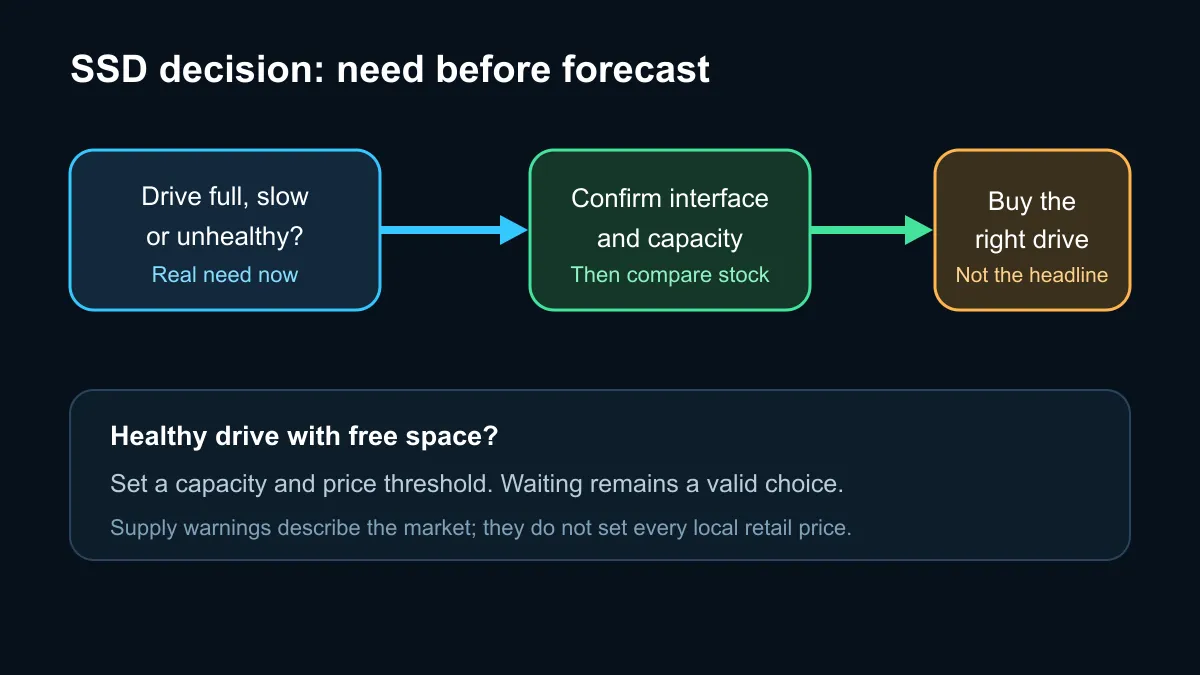
A storage upgrade makes sense when the old drive is full, too slow for the workload, or showing health problems. A gaming PC with a small boot drive may benefit from 1TB or 2TB simply because modern libraries are large. A laptop used for travel may need a portable drive for a second copy of important files. Those are immediate requirements that can justify buying without trying to predict a market bottom.
If the existing SSD is healthy and has plenty of free space, waiting remains reasonable. Compare actual models in the SSD specials section, note the capacity and interface, then track the same shortlist rather than jumping between unrelated products. A SATA drive can be a sensible value upgrade for an older system, while an NVMe drive is usually the better fit for a compatible modern motherboard.
🧭 Read local stock carefully
Our read-only catalogue snapshot found a 512GB portable SSD at R899, a 1TB portable model at R1,299, a 512GB SATA drive at R1,549 and a 500GB Gen4 NVMe drive at R1,999. These are timestamped examples, not permanent price promises. They also serve different jobs, so the cheapest number alone does not identify the best internal boot drive.
Check that the motherboard has the required M.2 slot and supports the intended drive length. For SATA, confirm that a data cable and power connector are available. Then compare endurance, warranty and capacity within the chosen interface. The SSD best-seller page can help narrow commonly considered options, but compatibility and workload still come first.
The safest response to a supply warning is a written threshold: capacity needed, interface required and a price you accept. That keeps a real upgrade moving while reducing the chance of buying the wrong drive because of a dramatic headline.
Frequently Asked Questions
Does the four-year warning mean SSD prices will rise every month?
No. It describes a broad supply-demand imbalance. Retail prices can still move down for a model because of promotions, replacement stock, exchange rates or competition.
Is a portable SSD a direct replacement for an internal NVMe drive?
Usually not. A portable SSD is convenient for external storage and backups, while an internal NVMe drive connects directly to a compatible M.2 slot.
Should a new gaming build start with 1TB?
For many buyers, 1TB is a practical baseline. A larger library, video work or fewer uninstall cycles can make 2TB more comfortable.
What should I check before ordering an M.2 SSD?
Confirm the motherboard's slot type, supported length, PCIe generation and whether using that slot changes any SATA or expansion connections.
Ready to plan the storage upgrade? Choose the interface and capacity first, then compare live local models against that exact need.