On-board controls on the HyperX QuadCast 2: why they matter for South African streamers 🔧
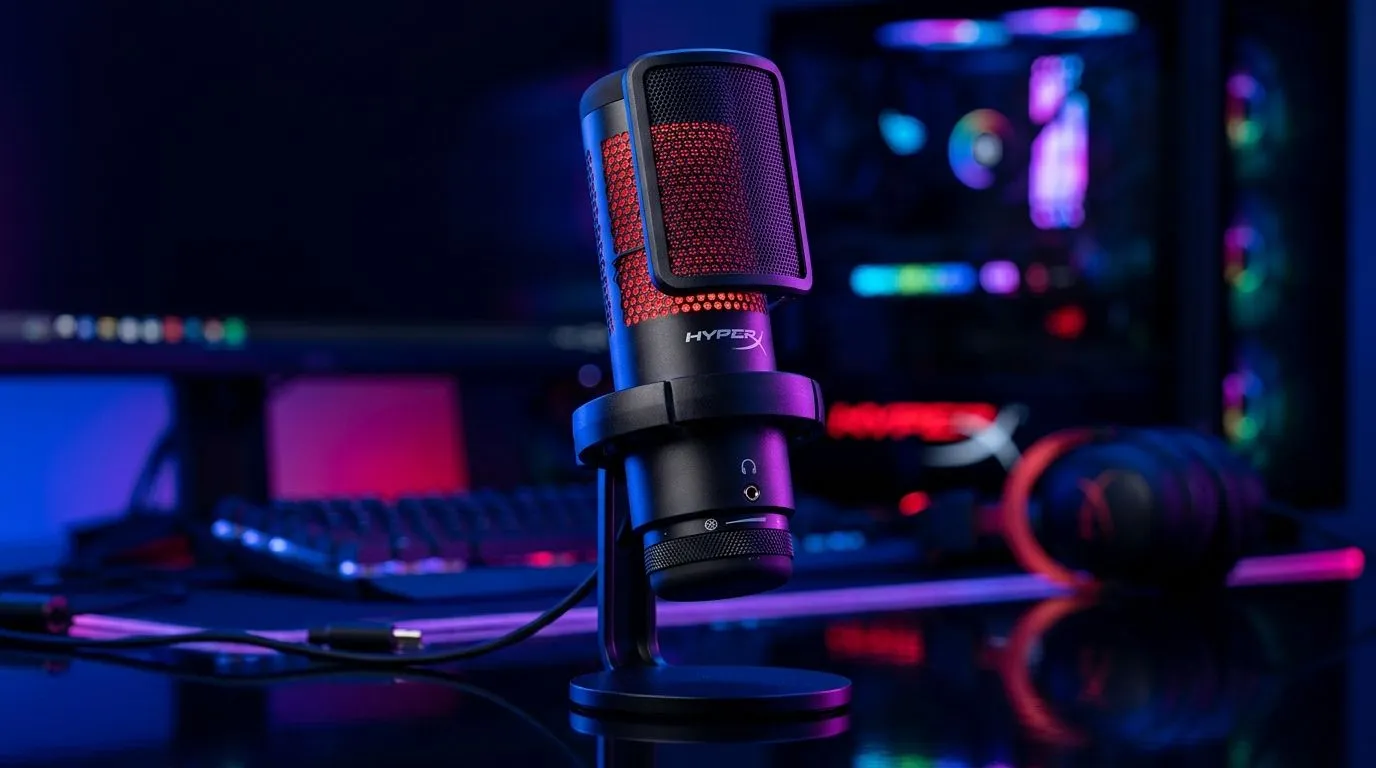
If you’ve ever gone live, spoken for ten minutes, and only then noticed your mic was clipping… you already know why onboard controls matter. The HyperX QuadCast 2 keeps things close, fast, and easy to manage. For South African creators, that means fewer mid-stream panic moments and more time sounding clean on camera. It’s a small detail, but it can save a whole session.
HyperX QuadCast 2 gain control explained for real-world use
The most useful part of the on-board gain and monitoring controls on HyperX QuadCast 2 is simple: you can adjust your input without digging through software every time. That is especially handy if you move between Discord, OBS, and game chat all day.
Gain control changes how much microphone signal is sent into your recording or stream. Too low, and you sound distant. Too high, and your voice can distort. Being able to tweak that directly on the mic makes setup quicker, especially if your room is not acoustically treated.
For streamers, that matters. South African homes are not all quiet studios. Fans hum. Family noise happens. Street noise sneaks in. A mic with easy access to controls helps you react fast instead of rebuilding your entire audio chain.
HyperX QuadCast 2 monitoring controls and why they help
Mic monitoring lets you hear your own voice through the headset while you speak. That feedback helps you catch issues instantly. You can hear if your level is too hot, if you’re speaking too softly, or if your mic position has shifted.
This is useful during long content sessions. It keeps your voice consistent without constant guessing. It also helps new streamers build better mic habits faster.
A quick creator habit that pays off
Before you go live, do a 20-second test. Speak normally, laugh once, and raise your voice slightly. Then listen back with monitoring enabled. You’ll spot clipping and volume spikes before your audience does.
Streaming Setup Tip ⚡
On Windows, set your input level first, then use the mic’s onboard gain for fine-tuning. That keeps your audio easier to manage across OBS, Discord, and in-game chat, especially when you switch between apps mid-session.
HyperX QuadCast 2 and the broader streaming essentials picture
If you’re building a clean setup, a microphone is only one part of the puzzle. A decent webcam, proper lighting, and a tidy desk all help your stream look more professional. Evetech’s streaming essentials section is a good place to start if you’re putting together the full package.
Some creators also like to match their setup with accessories from brands they already trust. If you’re browsing by brand, Evetech’s CORSAIR streaming essentials can help narrow the search. And for RGB-heavy battlestations, the Cololight streaming essentials page is worth a look too.
HyperX QuadCast 2 monitoring controls alongside webcams
Good audio and good video work best together. A sharp webcam makes your stream feel more polished, but poor mic levels can still ruin the impression. If you’re upgrading both, check Evetech’s webcams range and plan the setup as a whole.
That’s the smart move. Viewers forgive slightly average video more easily than bad audio. Clean voice, stable gain, and live monitoring make your content easier to watch for longer. That’s true whether you’re streaming Warzone, chatting on Twitch, or recording YouTube shorts from Joburg, Cape Town, or Durban 🚀
Why this matters before you buy
A lot of buyers chase specs first and usability second. With microphones, that order should be reversed. Ask yourself: can you adjust quickly, hear yourself clearly, and stay in control while gaming?
That’s where the on-board gain and monitoring controls on HyperX QuadCast 2 stand out. They reduce friction. They make setup feel less technical. And for creators who want to focus on content, that simplicity is worth real money in the long run.
Ready to Find Your Perfect Match?
The Mac vs Windows debate is complex, but for maximum power, choice, and value in South Africa, Windows is hard to beat. Explore our massive range of laptop specials and find the perfect machine to conquer your world.