




RTX 5090 For Elden Ring At 1080p: SA Gamer Guide
RTX 5090 Elden Ring at 1080p guidance depends on settings, CPU balance, VRAM, cooling, and game updates. Treat FPS wording as a test target, not a guaranteed result for SA builds.
Read moreA practical DDR5 RAM kit spec floor for matric-to-varsity upgrades should avoid obvious weak links. Use SA buyer context to compare compatibility, capacity, cooling, warranty, and upgrade room before paying for extras.
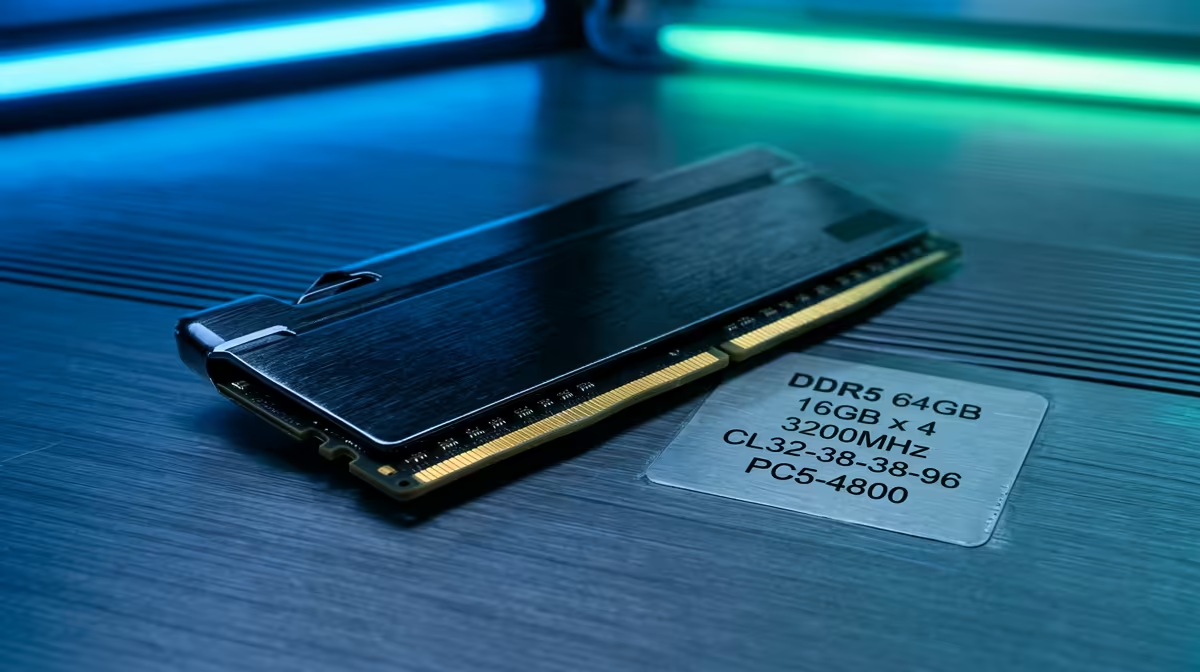
For a student moving from matric to varsity in SA, the practical DDR5 floor is a 32GB (2x16GB) kit at 5600MHz or 6000MHz — it handles coding, research with many tabs, and light gaming for years, typically R1,800 to R2,800. Skip 16GB for a new build; it fills up fast with student multitasking.
A varsity workload means an IDE or office app, a browser with a dozen tabs, a PDF reader, and a conferencing app open together — 16GB fills up and starts swapping, causing slowdowns. 32GB (2x16GB) gives comfortable headroom for years of study and light gaming. Buying it as a 2x16GB kit enables dual-channel, which improves performance over a single stick.
DDR5 prices are low enough now that 32GB is affordable future-proofing rather than a luxury.
For AMD AM5 boards, DDR5-6000 CL30 is the sweet spot and pairs ideally with Ryzen chips. For Intel, DDR5-5600 or 6000 works well. Make sure your board supports DDR5 (AM5 or LGA 1700/1851 with DDR5) — DDR5 won't fit DDR4 slots. Enable the EXPO (AMD) or XMP (Intel) profile in the BIOS to run the rated speed instead of the default 4800MHz.
Buy a matched kit rather than mixing single sticks, which can cause instability.
For a new build, 32GB is the better floor. 16GB fills up quickly once an IDE, browser tabs, and a conferencing app run together, causing slowdowns. 32GB gives years of comfortable headroom and is cheap with current DDR5 prices.
For AMD AM5, DDR5-6000 CL30 is ideal. For Intel, DDR5-5600 or 6000 works well. Don't overpay for 7200MHz unless your board supports it stably — the real-world difference for student tasks is negligible.
Yes — enable the EXPO (AMD) or XMP (Intel) profile in the BIOS so the RAM runs at its rated speed. Without it, the kit defaults to 4800MHz. It's a one-click toggle in most BIOS menus.
RTX 5090 Elden Ring at 1080p guidance depends on settings, CPU balance, VRAM, cooling, and game updates. Treat FPS wording as a test target, not a guaranteed result for SA builds.
Read more
Cheapest GPU that runs Hollow Knight at 1440p should be shortlisted around the job it must do. South African buyers should compare GPU tier, VRAM, cooling, and PSU headroom, warranty path, and upgrade room before treating any pick as best.
Read more
60% Mechanical Keyboard in SA Comparison needs structured comparison. Use a matrix for specs, use case, budget tier, warranty, and upgrade path, with live price and availability checked before final picks.
Read more
Will the Arc B580 still be relevant in 2028 should be shortlisted around the job it must do. South African buyers should compare fit, performance, compatibility, and upgrade room, warranty path, and upgrade room before treating any pick as best.
Read more
Common Sapphire Graphics Cards buying mistakes that cost SA shoppers needs a cautious, practical check of specs, fit, support, and real local conditions. Use it as a planning guide, then confirm current price, stock, and product details before publishing
Read more
Should SA buyers pay more for LAN ports or QoS should be shortlisted around the job it must do. South African buyers should compare WiFi standard, coverage, latency, and device support, warranty path, and upgrade room before treating any pick as best.
Read more
Steam download region can affect which content server supplies your game files. Compare speed units and test another nearby region before blaming your router. A controlled download test costs no replacement hardware and helps you choose the next step.

HiBy PULSE and GRID are a gaming headset and an external sound card with Cyberpunk 2077 designs. The reveal does not yet provide detailed specifications or pricing. Choose whether to wait around your actual audio needs and the cost of a working headset today.

Pulsar X2F CrazyLight removes the rear shell for a dedicated fingertip grip. Its stated 29g weight is only useful if that shape suits your hand. Compare grip, receiver requirements and desk control before paying for a specialist gaming mouse.

Steam overlay not opening usually needs a settings or game-support check before a keyboard purchase. Review the global switch, the per-game option and the assigned shortcut. Test a second supported game to narrow the fault without reinstalling everything.

Steam processing Vulkan shaders is graphics preparation rather than a normal game download. On Linux, compare progress and repeat launches before deleting caches. A driver or game change can alter the work, so gather evidence before paying for a new GPU.

Steam discounts and events are moving towards personalised recommendations in early 2027. A firm start date is still pending. The change concerns promotional visibility, so compare the actual rand price and game requirements before making a purchase.

Windows 11 Bluetooth toggle missing can mean the radio is not being detected or enabled. Start with a complete power-off, then check the adapter and drivers. Pairing a new mouse cannot repair an absent Bluetooth control, so isolate the PC first.
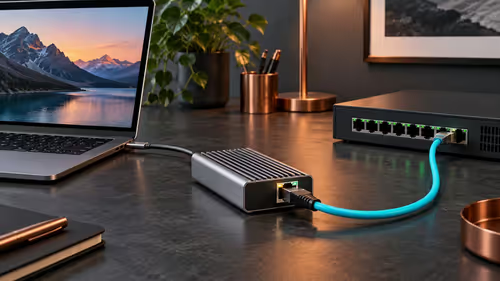
Sonnet Solo10G T5 adds 10GbE through a compatible Thunderbolt or USB4 host. It cannot raise a slow switch or storage device to that speed. Verify the computer, operating system and complete wired path before paying for a South African network upgrade.
RTX 5090 Elden Ring at 1080p guidance depends on settings, CPU balance, VRAM, cooling, and game updates. Treat FPS wording as a test target, not a guaranteed result for SA builds.

RTX 4080 too expensive? Cheaper SA alternatives should solve the exact workload without overbuying. Compare nearby options by GPU tier, VRAM, cooling, and PSU headroom, local warranty path, and total build balance before moving to a product page.
Cheapest GPU that runs Hollow Knight at 1440p should be shortlisted around the job it must do. South African buyers should compare GPU tier, VRAM, cooling, and PSU headroom, warranty path, and upgrade room before treating any pick as best.

Best NSFAS-approved laptops under R5,200 should be shortlisted around the job it must do. South African buyers should compare CPU, GPU, RAM, and screen quality, warranty path, and upgrade room before treating any pick as best.