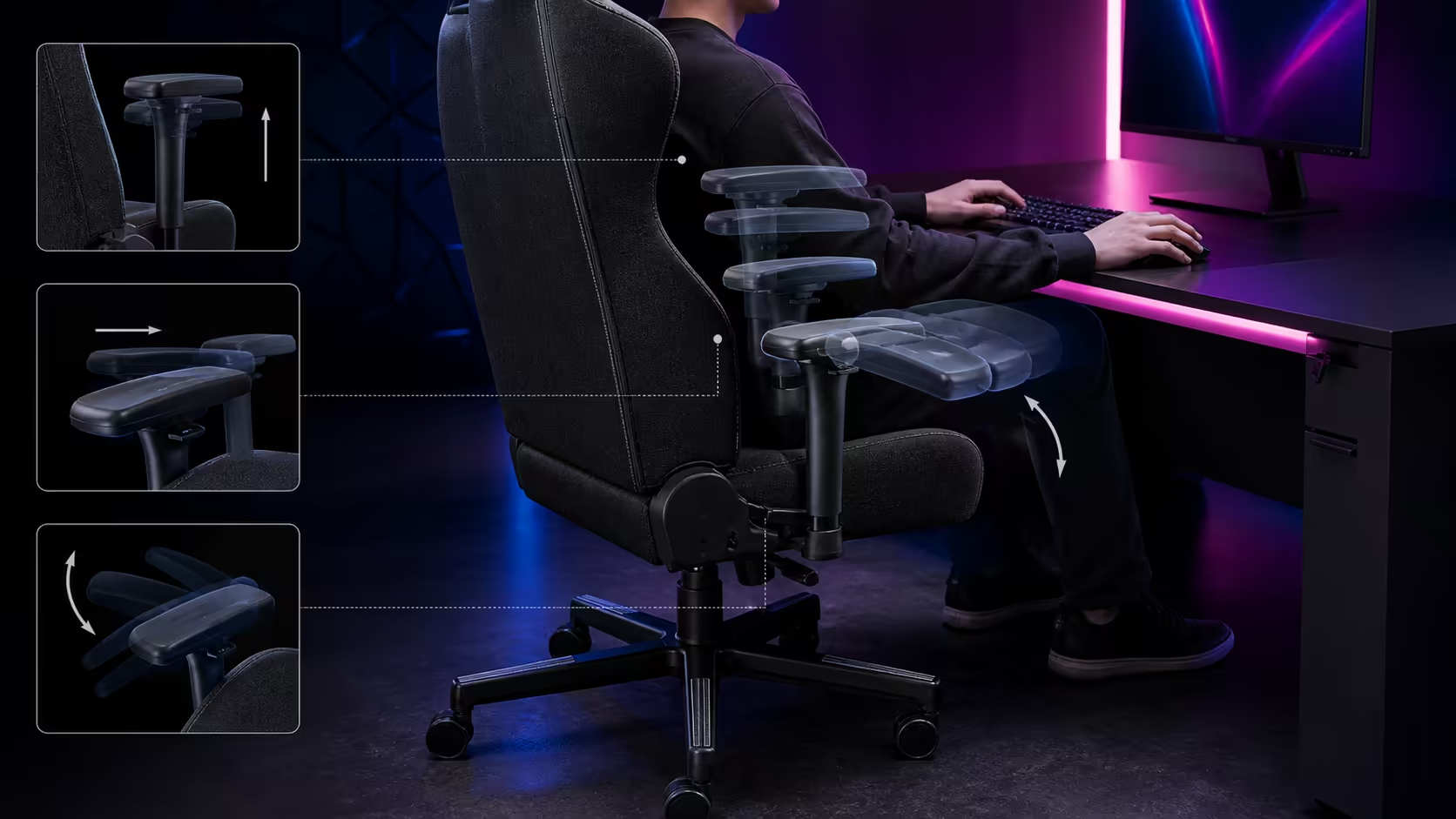
3D adjustable armrests change gaming and remote-work comfort by placing support beneath the forearms in three task-specific directions. They reduce reaching only when height, depth and pivot reach the user without lifting shoulders or blocking desk access.
Quick Answer
Vertical travel aligns the pads with relaxed elbows, front-to-back movement follows keyboard or mouse reach, and rotation matches the forearm angle. Arozzi's black Torretta costs R4,299 and uses this 3D system with adjustable seat height, breathable fluid-repellent fabric and two pillows. Save distinct settings for typing, mouse play and controller use when necessary.
↕️ Height reduces shoulder bracing
Let the arms hang naturally, then raise each pad until it carries light forearm weight. Stop before either shoulder rises. If the desk is high, raise the chair and restore the feet with a suitable footrest rather than using the pads to lift the body.
Check left and right independently because the input roles differ.
↔️ Depth manages task reach
Move a typing pad forwards when it meets the forearm without blocking the desk. Shift the mouse-side pad backwards for free elbow travel. A controller posture may bring both pads towards the lap.
Hard edges should stay away from the wrists. Test full mouse sweeps and ordinary typing, not a static pose.
🔄 Pivot follows the arms
Turn the pads towards a close keyboard posture or leave them neutral for straighter support. Excessive pivot creates edge pressure. This 3D design does not gain sideways width travel from the label.
Compare armrest systems in the gaming chair category using exact model information.
🛋️ Protect desk approach
Roll close with pads in every saved position. Check drawers, frames and desk edges for collisions or finger traps. A useful setting must support the task and allow safe entry and exit.
Move inputs closer before leaning the torso away from the backrest.
🦴 Recheck after pillow changes
The Torretta's two support cushions alter torso distance and elbow position. Place the lower and upper pillow first, then rebuild armrest depth and height. Remove any cushion that forces the head or pelvis forward.
🔁 Save concise profiles
Record seat height and the three pad directions for work, gaming and a second user. Keep only profiles that meaningfully differ. Restore from feet upwards after every chair handover.
At R4,299, compare usable range with gaming chairs above R4,000. Browse the Arozzi setup range after the desk test passes.
🚧 Diagnose the wrong type of support
A raised shoulder points towards excessive pad or desk height. An elbow that falls outside the pad may need a different pivot or a chair with suitable lateral spacing. Wrist pressure often means the support is too far forward.
Reduce contact when freedom matters more than support. Large mouse sweeps can work better with the pad behind the elbow than directly underneath it.
🧑🧑🧒 Configure multiple users
Restore seat height and pillow placement before the arms. Different torso and shoulder proportions move the elbows relative to the pads. Record each person's settings separately and never average them into one profile.
If the fixed lateral position fails a user, depth and pivot cannot manufacture width travel. Compare another exact chair.
🔧 Maintain moving components
Keep crumbs, fabric fibres and liquid away from the adjustment mechanisms. Move each pad within its intended stops and do not force a position that binds. Inspect looseness during routine chair care.
After moving the desk or chair, retest clearance through the complete range before restoring the saved profile.
Frequently Asked Questions
Which directions make these armrests 3D?
The pads move vertically, slide towards or away from the desk, and rotate to follow the forearms.
Do the Torretta pads adjust sideways?
Do not assign lateral width movement to this three-direction system.
Why can mouse and keyboard settings differ?
Mouse sweeps need elbow freedom, while typing often benefits from more forward support.
Should armrests carry the wrists?
No. Support the forearms lightly and keep pad edges away from the wrists.
When should settings be rebuilt?
Rebuild after changing chair height, pillows, desk position, inputs or user.
What can wrist pressure indicate?
The pad may sit too far forward or place a hard edge beneath the joint.
Can pivot compensate for missing lateral range?
No. Rotation changes angle, not the base spacing between the supports.
How should a new profile be verified?
Type, complete the widest normal mouse sweep and hold a controller for several minutes. Keep the setting only when shoulders stay relaxed, pad edges avoid the wrists and the chair can still approach the desk safely.
Want three armrest directions mapped to three real input postures?
Set relaxed elbow height, tune reach and pivot, then compare chairs by the usable positions your work and gaming require.