You’ve done it. The boxes have arrived from Evetech, filled with the parts for your dream PC. The excitement is electric… but so is the static in your carpet. Before you touch that pricey new graphics card, pause. One tiny, unseen spark of static electricity can instantly turn your new rig into a very expensive paperweight. This guide on anti-static tools for PC building is your cheap insurance policy to guarantee a successful, stress-free build. ⚡
What is ESD and Why Should You Care?
Electrostatic Discharge (ESD) is the sudden flow of electricity between two objects. It’s the same zap you feel when you touch a doorknob after walking across a carpet. While it’s harmless to you, that same jolt can be fatal to sensitive electronic components like your CPU, RAM, or motherboard.
Modern parts have some built-in protection, but the risk is never zero. When you're investing in a high-performance machine, perhaps one of the powerful PCs above R20k, spending an extra R100-R200 on basic anti-static protection isn't just a good idea; it's essential. Think of it as the seatbelt for your components.
The Essential Anti-Static Tools for PC Building
You don’t need a laboratory-grade setup to build your PC safely. For most home builders in South Africa, two key pieces of gear will eliminate 99% of the risk. The best part?
The Anti-Static Wrist Strap: Your First Line of Defence
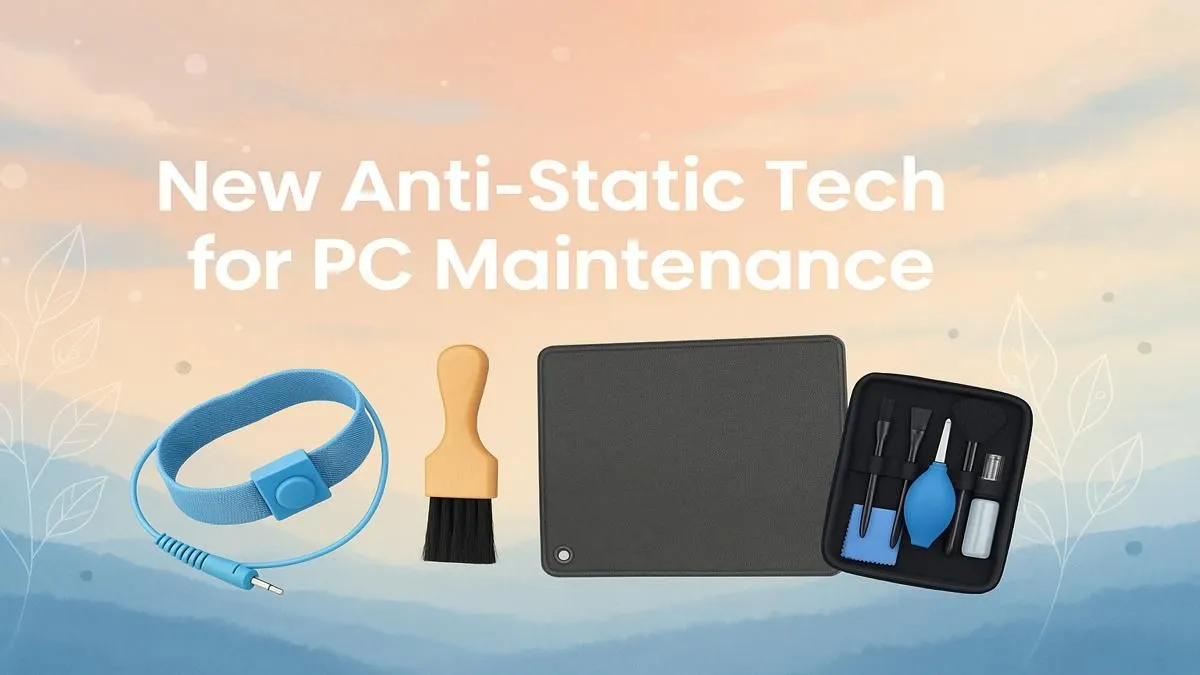
If you only buy one thing, make it this. An anti-static wrist strap is a simple band you wear on your wrist with a cord that clips onto a metal, unpainted part of your PC case.
How it works: It safely and continuously grounds you, equalising the electrical charge between your body and the computer. This means no static can build up and discharge into your precious components. It’s the single most effective anti-static tool for PC building you can own.
The Anti-Static Mat: Your Safe Workspace ✨
While a wrist strap is critical, an anti-static mat provides a larger, static-safe surface to place your motherboard, GPU, and other parts on during assembly. It protects them from any latent static on your desk or floor. While not strictly mandatory for a careful builder, it’s highly recommended, especially if your build space is carpeted. Even when building one of our popular budget gaming PCs, a mat adds peace of mind.
No Tools? No Problem! 🔧
If you're caught without any anti-static tools, you can minimise risk by using the 'touch-and-go' method. Before you pick up any component, touch an unpainted metal part of your plugged-in (but switched off) PC case. This grounds you temporarily. You'll need to do this every single time you're about to handle a new part to be safe.
Smart Building Habits for Static-Free Success
Tools are only half the battle. Adopting the right habits is a free and effective form of ESD protection.
- Work on a Hard Surface: Never build a PC on a carpet. Wood, tile, or laminate flooring is ideal.
- Ditch the Woollies: Avoid wearing wool or synthetic clothing that generates a lot of static. Cotton is your friend.
- Stay Hydrated: Dry air increases static electricity. While you can't control the Highveld climate, having a humidifier in the room can help (just keep liquids far from your parts!).
- Keep Parts Bagged: Leave components in their anti-static bags until the very moment you need to install them.
These simple rules apply to every build, whether you're assembling a beast of a machine or one of the many excellent PCs under R20k that offer incredible value.
Feeling Overwhelmed? There's an Easier Way
We get it. Juggling components, cables, and the threat of ESD can feel like a lot. If the thought of building it yourself is more daunting than exciting, why not let the pros handle it?
Opting for a professionally assembled PC means you get all the performance without any of the risk. Our technicians build in controlled environments using all the necessary anti-static tools for PC building, ensuring every part is installed perfectly. You can browse our regularly updated best gaming PC deals to find a rig that's ready to dominate, straight out of the box. Or, for an even wider selection, check out our full range of pre-built PC deals, all assembled with expert care.
Ready to Build Your Dream Rig?
Whether you're a DIY veteran gearing up for a new project or a newcomer looking for a hassle-free, pro-built system, we've got your back. Explore our massive range of gaming PCs and find the perfect machine to conquer your world.