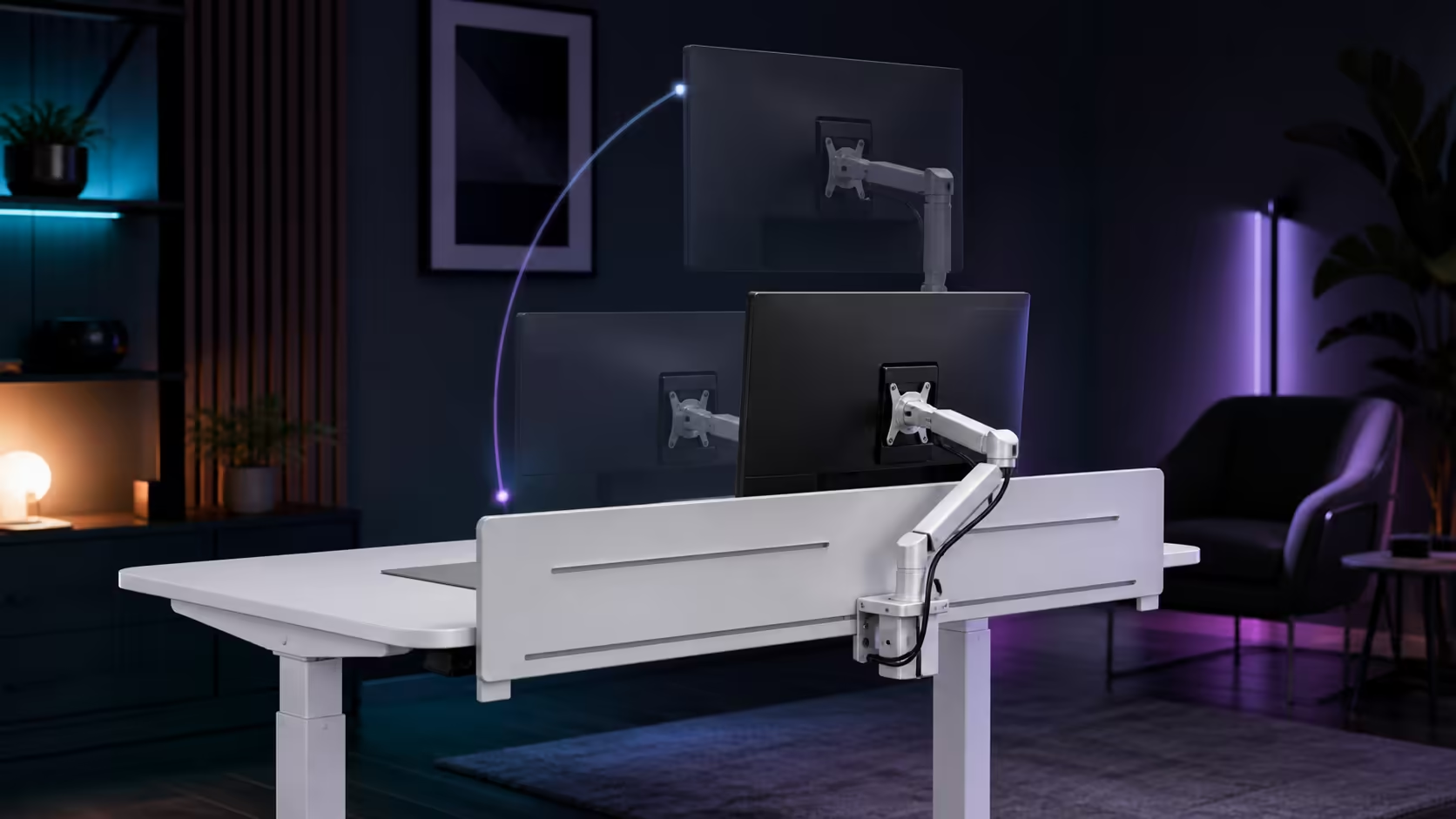
A monitor arm can free valuable surface space, but a standing desk monitor arm position has to work while the desk moves. Clamp placement, screen reach and cable slack all meet at the rear edge. The R4,999 AROZZI Arena Nordico helps by pairing an adjustable rear panel with electric 71-115cm travel and under-desk cable baskets.
Quick Answer
Place the arm where the screen can centre on the user without forcing the clamp into a cable route, then test it at both seated and standing heights. On the R4,999 Arena Nordico, use the adjustable rear panel as part of the mounting plan and keep display leads supported through the whole 71-115cm movement.
🖥️ Choose the screen position before the clamp position
Sit in the normal typing posture and move the loose monitor to a comfortable viewing point. Its centre should align with the work area rather than automatically with the middle of the desk. A laptop, drawing tablet or secondary display may shift that point. Check viewing distance using the smallest text normally read, since a screen that is too far away encourages leaning.
Now stand and repeat the assessment. The keyboard height should be set for the arms first; the monitor arm then brings the display to the eyes. Raising the desk merely to lift a low screen makes the shoulders rise too. This separation is the main advantage of mounting the panel on an arm.
Only after both views are understood should the clamp site be marked. The adjustable rear panel on the Arena Nordico provides flexibility for monitor mounting and cable work. Compare that layout with the broader Evetech gaming desk shelf, paying attention to the rear zone rather than assuming every edge accepts the same hardware.
🔧 Protect the clamp area and movement path
Clear the exact contact surfaces above and below the rear panel. A clamp must sit flat, with no cable, fabric or trim trapped beneath it. Tighten according to the arm hardware rather than applying maximum force by instinct. The display should remain steady when gently repositioned, while the mounting surface should show no distortion.
Keep the arm base away from the route used by thick power and video leads. On a multiple-screen setup, sketch each sweep before attaching both bases. Arms can collide behind the desk even when the panels look well separated from the front. Leave access for later tightening and for removing a cable without dismantling the entire station.
Check the desk against the wall before drilling the layout into muscle memory. The arm may extend behind the rear edge as it folds, so leave enough room for that arc. A small gap can prevent the screen from knocking the wall when somebody pulls it closer.
The white Arena Nordico is part of the AROZZI setup selection, which helps when coordinating the arm with the rest of the station. Its R4,999 price includes the powered desk functions, but the monitor arm itself should be chosen for the display and mounting method in use.
🔌 Give display cables their own service loop
Route video and power leads along the monitor arm first, allowing enough slack at every pivot. Bring them down towards one of the quick-release baskets, but avoid cinching the section that must open when the desk rises. The correct loop is not a hanging coil. It is a controlled curve with no tension at the highest desk position or at the furthest useful screen reach.
Test movement in stages. First articulate the arm while the desk stays seated. Then raise the top to the preferred standing preset and repeat. Finally move the desk towards 115cm while watching connectors, clips and the wall-side lead. This sequence shows whether trouble comes from arm articulation or vertical travel.
Power bricks can sit in the dual baskets so their weight does not pull on the display. Separate signal cables from bulky adaptors where space allows, and keep quick-release access unobstructed. The wider gaming setup department can help complete the area around the desk without treating cable management as an afterthought.
Finish by viewing a full-screen document and a game from both saved heights. Fine alignment matters more than perfect symmetry: the head should remain balanced, text should be easy to scan, and the mouse hand should not collide with the arm base. A rear-panel plan is successful when the monitor feels independent of the mechanism beneath it.
Frequently Asked Questions
Where should a monitor arm clamp sit on a standing desk?
It should sit on a flat, supported rear area that lets the screen align with the user. The exact left-right position depends on the primary work zone and any second display.
Should the monitor move when changing from sitting to standing?
Often it needs a small independent adjustment because head and viewing relationships change. Set keyboard height first, then use the arm to correct the screen rather than moving the desk for the monitor.
How much slack should monitor cables have?
Allow enough for the desk at its highest point and the arm at its furthest useful reach. Secure the remainder so the loop cannot catch behind furniture or below the frame.
Can power bricks go in the cable baskets?
Yes, the baskets are a practical place for supported adaptors when ventilation and access remain clear. Their weight should not hang from the monitor connector or arm clips.
What height range does the Arena Nordico use?
Its electric adjustment spans 71cm to 115cm. Test monitor and cable movement across that entire path even if the daily standing preset sits lower.
How much is the white electric desk?
The AROZZI Arena Nordico Electric Standing Desk in white is priced at R4,999. It includes an adjustable rear panel, LED memory presets and dual quick-release cable baskets.
Ready to give the monitor its own adjustment plan?
Browse Evetech gaming desks and design the rear edge around screen reach, secure clamping and cable travel.