Picking the best graphics card for local AI in South Africa starts with one spec that most gaming reviews treat as a footnote: video memory. An AI model has to fit in the card's VRAM to run at full speed, so a cheaper card with more memory can beat a faster one with less. We checked every in-stock graphics card at Evetech on 22 October 2026 and ranked them by AI memory and by what each gigabyte costs.
Quick Answer
The cheapest card for local AI is the Intel Arc B580 with 12GB at R6,999, which reaches the 14B tier; NVIDIA's cheapest 8GB option is the RTX 5060 at R7,999. The cheapest 16GB card is the RX 9060 XT at R9,999. For 32B models you need 24GB, and the Intel Arc Pro B60 delivers it at R14,399, against R57,999 for NVIDIA's cheapest 24GB card.
🧮 How the Evetech GPU AI Index works
The method matches our AI Laptop Index, so the two can be compared directly:
- AI memory is the card's own VRAM, read from our product data and checked against each product name. None of the 52 in-stock cards disagreed.
- Ranked cards are live, in-stock desktop cards with 8GB or more. Five cards below 8GB, such as display cards and entry models, were left out, as was one open-box card.
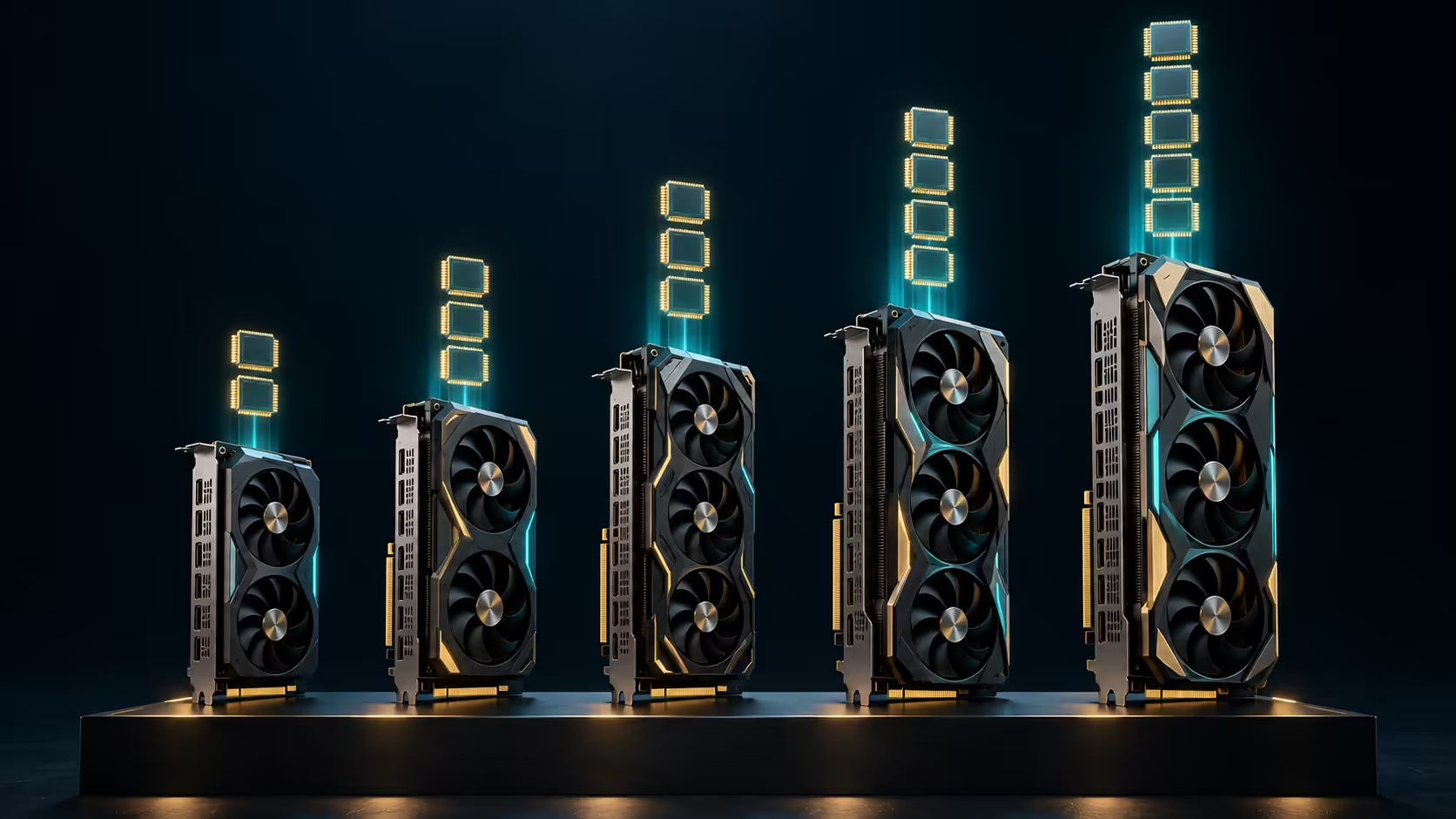
- Model size follows a deliberately cautious rule: roughly 0.7GB of VRAM for every billion parameters of a 4-bit model, leaving space for the conversation. So 8GB holds about 8B, 12GB and 16GB about 14B, and 24GB about 32B.
That left 46 cards across NVIDIA GeForce, NVIDIA workstation, AMD Radeon and Intel Arc. Nothing in stock had more than 32GB, so no single card here runs a 70B model at full speed.
🏆 The cheapest card for each model size
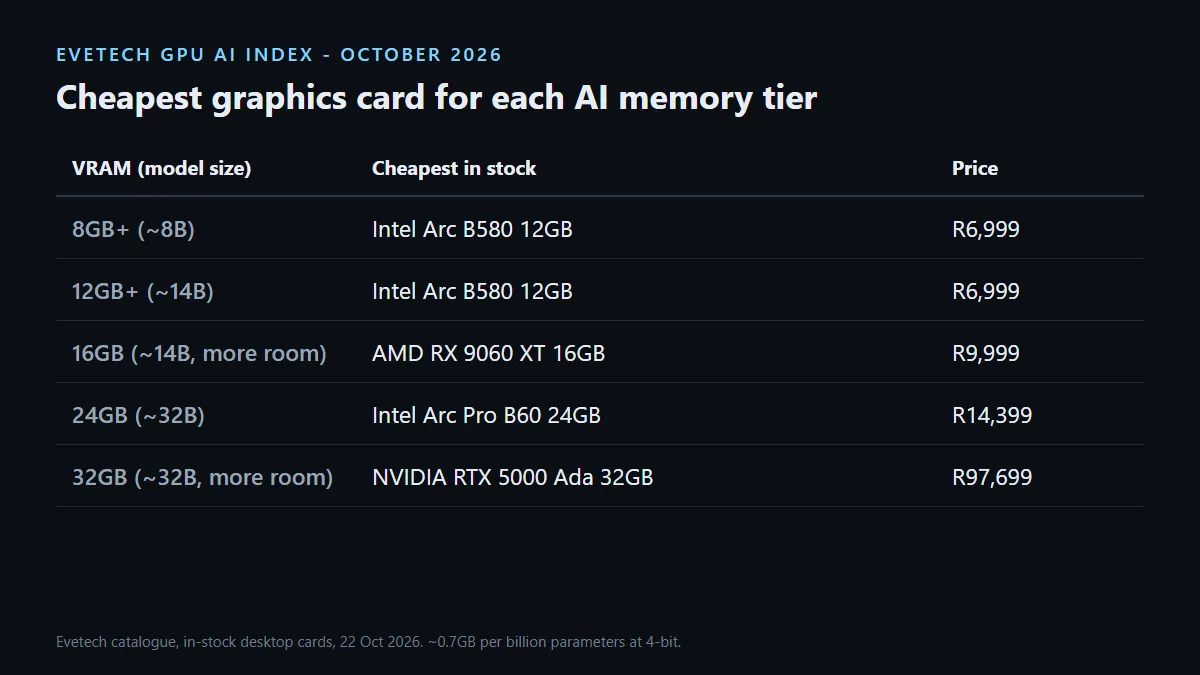
- About 8B (8GB): the RTX 5060 at R7,999 is the cheapest NVIDIA option. The Intel Arc B580 undercuts it at R6,999 and brings 12GB.
- About 14B (12GB to 16GB): the Arc B580 is the floor at R6,999. The RX 9060 XT 16GB at R9,999 adds headroom for longer conversations. On NVIDIA, the RTX 5070 12GB and the RTX 5060 Ti 16GB both start at R13,999.
- About 32B (24GB): the Intel Arc Pro B60 24GB at R14,399. NVIDIA's cheapest 24GB card in stock is the RTX PRO 4000 Blackwell at R57,999.
- 32GB: the NVIDIA RTX 5000 Ada workstation card at R97,699, with only a few units on hand.
💰 Rand per gigabyte of AI memory
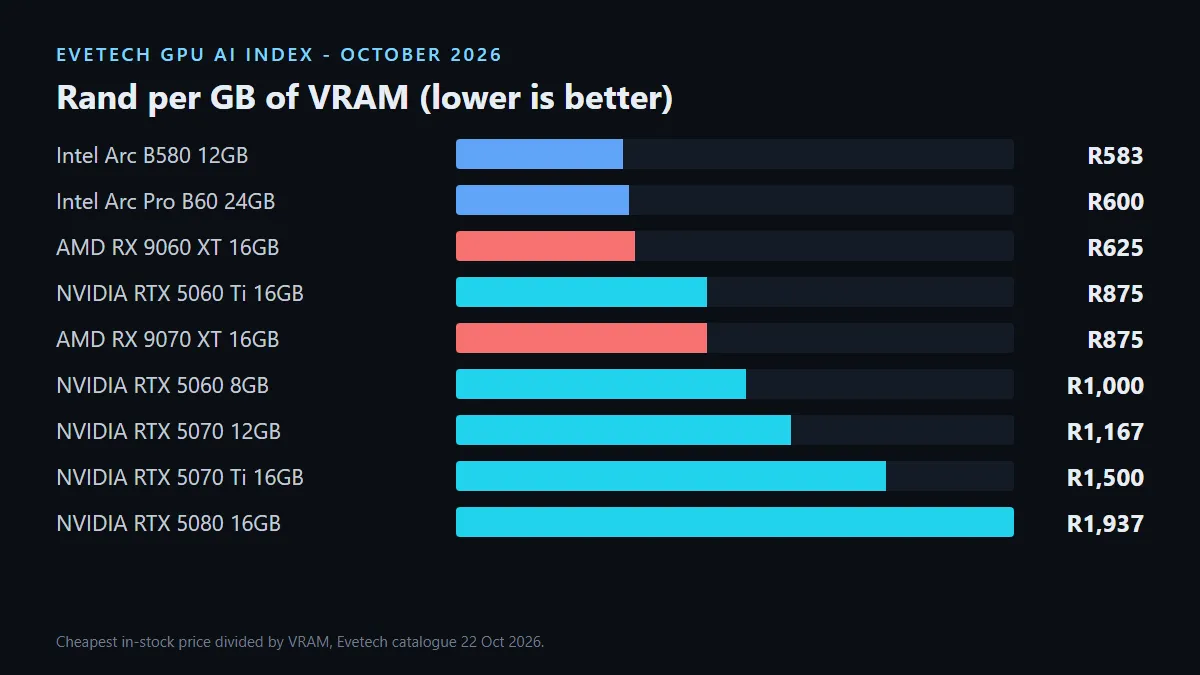
Dividing price by VRAM shows how much model capacity your money buys. The Arc B580 leads at about R583 per gigabyte, followed by the Arc Pro B60 at R600 and the RX 9060 XT 16GB at R625. The RTX 5060 Ti 16GB and RX 9070 XT both work out to about R875.
Higher-tier GeForce cards cost more per gigabyte because you are paying for speed: the RTX 5070 Ti is about R1,500 per gigabyte and the RTX 5080 about R1,937, both with 16GB. They run models faster, but they do not hold bigger ones than a R9,999 16GB card.
⚙️ The software catch: CUDA, ROCm and Vulkan
Memory decides what fits. Software decides how easily it runs. NVIDIA cards use CUDA, which most AI tools support first. Ollama, a popular way to run models locally, lists the RTX 5060 through RTX 5090 and the RTX PRO 4000 Blackwell among its supported NVIDIA GPUs.
AMD and Intel cards work too, through different routes. Ollama lists the RX 9060 XT and RX 9070 XT under AMD's ROCm library on Linux, but its Windows ROCm list covers older RX 7000 cards only. On Windows, the newer Radeon cards and Intel Arc run through Vulkan, which Ollama enables by default. That route works, but it can be slower than CUDA or ROCm, and some tools beyond Ollama may only support NVIDIA.
So the honest trade-off is this: AMD and Intel give you more memory per Rand, while NVIDIA gives you the smoothest software path. If your tools need CUDA, budget for an NVIDIA card with enough VRAM. If you mainly run models in Ollama, the cheaper high-memory cards are strong value.
🖥️ Desktop card or AI laptop?
A desktop card is far cheaper per gigabyte than a laptop. A 24GB Arc Pro B60 costs R14,399, while the cheapest laptop in our AI Laptop Index that reaches the same 32B tier is R64,999. The laptop includes a whole computer, of course, but if you already own a desktop with a spare PCIe slot and a capable power supply, a card upgrade is the cheapest way into local AI.
Laptops still win on one point: shared-memory machines with 128GB can hold 70B models, which no single desktop card in stock can do.
Browse all graphics cards, the GPU best sellers or the workstation graphics cards. Prices and stock move, so this index will be updated. The tiers are estimates: a longer chat, a different runtime or other software using the card can change what fits.
Frequently Asked Questions
What is the best graphics card for local AI in South Africa?
For model size per Rand, the Intel Arc Pro B60 24GB at R14,399 was the standout in our 22 October 2026 index, reaching the 32B tier.
How much VRAM do I need to run AI models locally?
About 8GB for 8B models, 12GB to 16GB for 14B models and 24GB for 32B models at 4-bit, by our cautious rule.
What is the cheapest 16GB graphics card for AI?
The RX 9060 XT 16GB at R9,999 on 22 October 2026. The cheapest NVIDIA 16GB card was the RTX 5060 Ti 16GB at R13,999.
Do AMD and Intel graphics cards work for local AI?
Yes. Ollama supports them through ROCm on Linux and Vulkan on Windows, though NVIDIA's CUDA has the widest tool support.
Is a desktop graphics card cheaper than an AI laptop?
Per gigabyte, yes. A 24GB desktop card costs R14,399, while the cheapest laptop reaching the same tier cost R64,999.
Can any graphics card in stock run a 70B model?
Not on its own. The largest card in stock had 32GB, while a 70B model needs about 50GB at 4-bit by our rule.
Choosing a graphics card for local AI?
Decide the largest model you want to run, find its memory tier above, then pick between speed and software support at that tier.