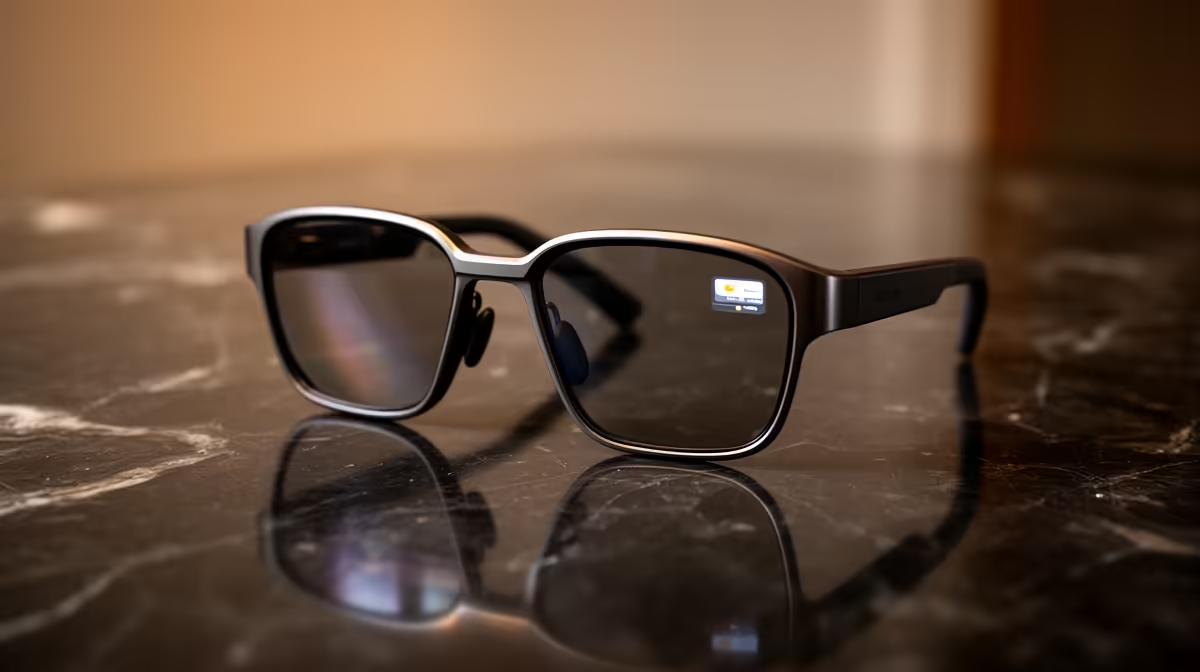
Following a conversation in a loud restaurant, or in a meeting where someone speaks softly, is hard work for anyone with reduced hearing. The Ray-Ban Display tackles that by painting a live transcription of what is being said directly onto a small screen built into the right lens, so the words appear in your field of view while you keep looking at the person talking. No phone held up, no glancing down, just text floating quietly in the corner of your vision.
Quick Answer
The Ray-Ban Display shows real-time captions on a monocular in-lens display sitting in the right lens, transcribing speech directed at you as it happens. You start captions from the glasses themselves or from the Meta AI app, then face the speaker for best accuracy. The display is private, with very little light leakage, so people around you cannot read what you see. Explore smart eyewear in the AR glasses range at Evetech.
How in-lens live captioning works
The display is a small, bright screen integrated into the right lens, not a separate device clipped on. It uses a custom light engine and a geometric waveguide to project text into your vision at a 20-degree field of view, sharp enough to read at a glance and bright enough to stay legible across a wide brightness range. The screen runs at a high refresh rate so the captions scroll smoothly rather than stuttering.
When live captions are active, the glasses listen to the speech aimed at you, convert it to text, and place that text on the in-lens screen in near real time. Because the display sits off to one side of your view rather than blocking the centre, you can still make eye contact and read body language while the words appear. That is the core accessibility win: the captions support the conversation instead of pulling you out of it.
Setting up live captions step by step
Getting captions running takes only a few actions once the glasses are paired to the Meta AI app on your phone.
- Pair and charge first. Connect the glasses to the Meta AI app and make sure both the frames and the neural control band are charged, since the display draws more power than audio-only smart glasses.
- Choose where to start captions. You can trigger live captions directly from the glasses or from within the Meta AI app. Starting from the app is handy when you know a meeting is about to begin; starting from the glasses suits a spontaneous conversation.
- Face the person speaking. The system captures speech most accurately when you look toward the talker. The microphones are tuned to favour the direction you face, so turning to the speaker sharpens the transcription.
- Read the captions in your lens. Text appears on the right-lens display as the person talks. Keep your gaze natural, since the captions sit at the edge of your view and do not require you to stare at them.
- Stop captions when done. End the session from the glasses or the app to save battery once the conversation finishes.
Getting the most accurate transcription
A few habits sharpen results. In a noisy room, position yourself so the person you most need to hear is in front of you rather than off to the side. Reduce competing noise where you can, since overlapping voices are the hardest case for any speech-to-text system. And give the system a moment at the start of a conversation to settle, as the first few words are sometimes the least accurate before context builds.
Who benefits most from in-lens captions
The clearest beneficiaries are people who are hard of hearing and want to stay engaged in face-to-face conversation without a phone or a separate device between them and the speaker. Captions in the lens mean the talker is not staring at the top of your head while you read a screen in your lap.
The feature also helps in situations rather than conditions. A noisy bar, a windy outdoor setting, a fast talker with an unfamiliar accent, all become easier to follow when the words are also written in your view. For travellers, the same display can show translated captions for select languages, turning a conversation in another language into readable text. The discretion matters here too: because the display leaks very little light, the person opposite you generally cannot tell you are reading captions at all, which keeps the interaction natural. You can see how these sit alongside other wearables in the best-selling accessories.
What to keep in mind before relying on it
Live captioning is assistive, not flawless. Heavy background noise, several people talking at once, or very quiet speech will reduce accuracy, so it works best as a strong aid rather than a perfect transcript. Battery life is also a real consideration: a display plus active listening uses more power than ordinary smart glasses, so plan around charging if you need captions through a long day. Treat it as a tool that makes most conversations dramatically easier, while keeping realistic expectations for the toughest acoustic situations.
Frequently Asked Questions
Do the captions block my view of the person talking?
No. The display sits to one side of your vision in the right lens rather than across the centre, so you can read the captions while still looking at the speaker and reading their expressions.
Can other people see what is on my display?
Generally not. The in-lens display is designed to leak very little light, so people facing you usually cannot read the text. The captioning stays private to you.
How do I start live captions?
You can start them either from the glasses directly or from the Meta AI app on your paired phone. Starting from the app suits a planned meeting, while starting from the glasses fits a spontaneous chat.
Are the captions accurate in a noisy room?
They work best when you face the speaker and background noise is limited. Overlapping voices and very loud environments reduce accuracy, so treat captions as a strong aid rather than a perfect transcript.
Can it translate other languages into captions?
Yes, it can display translated captions for select languages in real time, which helps when speaking with someone in a language you do not understand while keeping you engaged in the conversation.
Curious whether display smart glasses fit your daily life? Browse current models in the Evetech AR glasses range and see how in-lens captions could make conversations easier.