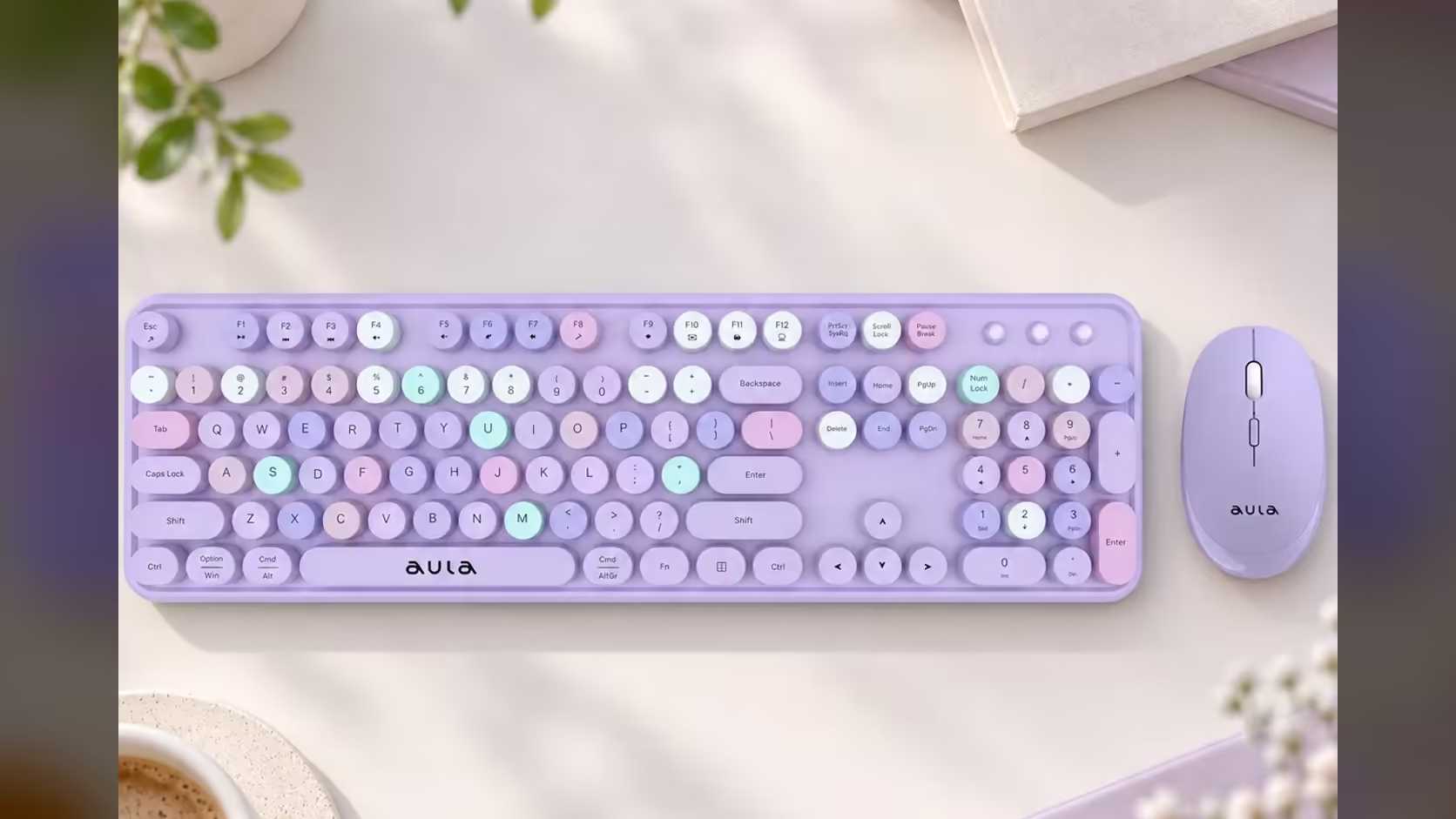
A learner's desk is rarely just a learner's desk. It doubles as the place where homework, projects, online classes and the occasional family video call all happen, often in a shared bedroom or a corner of the lounge. A good wireless keyboard and mouse set keeps that corner tidy and calm. The AULA AC306 is built for exactly that kind of everyday home use, and setting it up properly takes about ten minutes.
Quick Answer
Plug the AULA AC306's single USB receiver into the learner's computer, give each device its AA cell, and switch both on. The full-size board keeps a number pad for maths and data work, and its quiet membrane keys keep typing calm while others study or sleep nearby. There is no Bluetooth pairing to deal with. Evetech has the set at R239.
🪑 Planning the desk
Before unpacking, think about where everything will sit.
- Width. The AC306 keyboard measures 445 x 136 x 35mm, a normal full-size footprint. Leave room to its right for the mouse to move freely.
- Height. The keyboard should sit roughly at elbow height when the learner is seated, with shoulders relaxed. A chair that adjusts helps more than any desk accessory.
- Screen. Place the monitor or laptop straight ahead, not off to one side, so the neck stays straight during long homework sessions.
- Cables. With a wireless set, the only thing that needs a port is the small USB receiver, so the desk stays clear.
🔧 Setting up the AC306
- Put a single AA cell into each device. Check whether cells are included in the box; if not, a standard pack of AAs does the job.
- Turn the mouse over and take the USB receiver out of its storage slot.
- Plug the receiver into a USB port on the learner's computer. A front port on a desktop is easiest.
- Switch on both devices with their on/off switches.
- If the computer is a Mac, press Fn + E to set Mac mode. On Windows, Fn + W sets Windows mode.
That is it. The keyboard and mouse share that one receiver, so there is nothing to pair.
Older family laptops
AULA lists the AC306 as compatible with Windows and Mac, and it connects through a plain USB receiver rather than Bluetooth. That makes it a straightforward match for an older family laptop, as long as the laptop has a free USB port for the receiver. If every port is already in use, a simple USB hub solves it.
🧮 Features that help with schoolwork
A proper number pad
The AC306 is a full-size 104-key keyboard with a dedicated number pad. For maths homework, spreadsheet exercises, or entering data for a science project, typing numbers on a pad is faster and less error-prone than using the row above the letters. Num Lock and Caps Lock lights show at a glance whether the pad and capitals are on.
Quiet keys for a shared room
The keys sit on AULA's upgraded membrane, which AULA describes as quiet with a responsive feel. In a shared bedroom, that means an essay can be finished after a sibling has gone to sleep without a clatter of loud keys. There is no backlight, so the board will not light up a dark room either.
A mouse a younger learner can handle
At about 50g, the optical mouse is light in a small hand. Its speed button, sitting just behind the wheel, cycles through 800, 1000 and 1600 DPI. For a younger learner, the lowest setting makes the pointer slower and easier to control; older learners working on a larger screen may prefer a higher step.
🎨 Choosing a colour
The AC306 comes in pink, purple, blue and brown, each with round, retro-style floating keycaps. Letting the learner pick the colour is a small thing that often makes them care more about keeping the desk tidy. The brown blends into a wooden desk, while the pink, purple and blue add a bit of personality to a plain study corner.
Evetech carries the set among its keyboard and mouse combos with a 1 Year Local Warranty. For a standalone keyboard for a parent's work desk nearby, the office keyboard range at Evetech is worth a look too.
Frequently Asked Questions
Does the AC306 have a number pad for maths?
Yes. It is a full-size 104-key layout with a dedicated number pad.
Will it work with an older family laptop?
AULA lists Windows and Mac support, and it only needs a free USB port for its receiver.
How much desk space does the keyboard need?
It measures 445 x 136 x 35mm, so allow a normal full-size footprint plus room for the mouse.
Can a younger learner use the mouse easily?
Yes. It is light and has three DPI steps, and the slowest, 800, is easiest to control.
Is it quiet enough for a shared bedroom?
AULA describes its membrane keys as quiet, and there is no backlight to light up the room.
Which colour suits the desk?
Brown blends into wood; pink, purple and blue add some colour to a plain corner.
Setting up a study corner at home?
Browse the wireless keyboard and mouse sets at Evetech and choose a quiet, full-size option for homework and projects.