


Clean Gaming Keyboard: Guide for Dusty & Humid Conditions
Clean gaming keyboard quickly and safely in dusty or humid conditions with step-by-step tips, tool checklist, and maintenance routines to prevent corrosion and switch failure. 🧼💨
Read moreMaster Micro-ATX dual tower cooling without the headache! 🌡️ We cover clearance checks, RAM compatibility, and airflow tips to fit massive coolers in compact 2025 cases. Keep your rig frosty and quiet while maximizing performance. ❄️
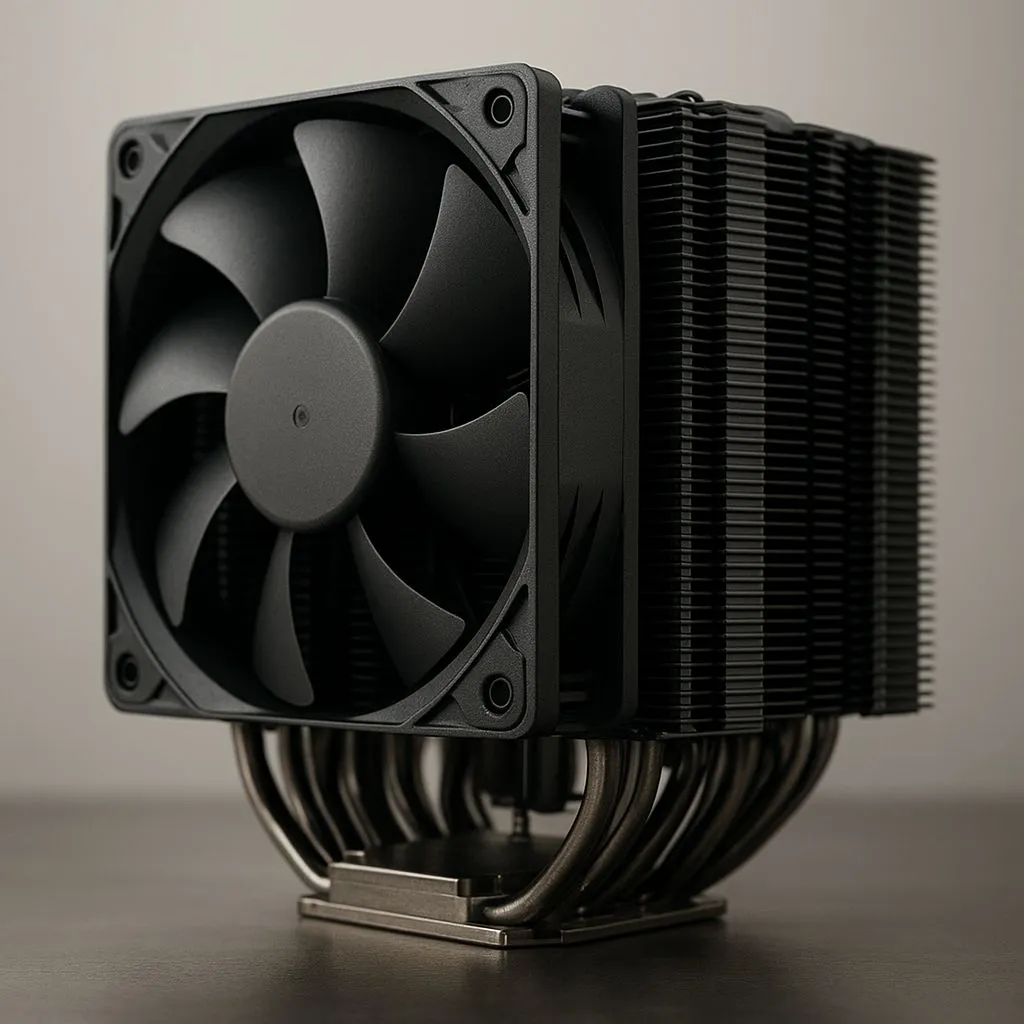
Building a compact Micro-ATX rig in South Africa? Awesome. You get serious power without a massive case hogging your desk. But cooling that beastly new CPU is the real challenge. You want the quiet, raw performance of a massive air cooler, but will it even fit? Forget guesswork. We're diving into the world of Micro-ATX dual tower cooling to show you how to fit big air into small cases without the drama. 🔧
When you're pushing a high-core-count CPU in a smaller chassis, heat becomes the enemy of performance. While stock coolers are... fine for basic tasks, they can quickly get overwhelmed and sound like a jet engine during a heavy gaming session. This is where the magic of a dual tower cooler comes in.
By using two separate fin stacks (towers) with fans pushing and pulling air through them, these coolers offer a massive surface area to dissipate heat. The result? Lower CPU temperatures, higher sustained boost clocks, and much quieter operation. It's the ultimate solution for gamers who demand peak performance and acoustic comfort, and it's why so many builders explore the wide world of CPU coolers to find their perfect match. The main challenge, of course, is making sure one of these giants will actually fit.
Success with Micro-ATX dual tower cooling comes down to one thing: planning. Before you even think about adding a cooler to your cart, you need to check a few key clearances.
Before you add any cooler to your cart, grab your case's spec sheet and find the 'Max CPU Cooler Height'. Then, check the cooler's height specification on its product page. This single measurement will save you from a massive headache and a potential return. Also, check RAM height if you plan on using both fans on a dual tower!
So, why not just get an All-In-One (AIO) liquid cooler? It's a valid question, especially in the tight confines of a Micro-ATX build. Both have their place.
While compact AIO liquid coolers from brands like CORSAIR offer a different approach by moving heat directly to a radiator on the case's edge, they come with their own set of challenges. Firstly, you're limited by your case's radiator support—finding space for even a beefy 360mm radiator in an mATX case is often impossible.
High-end air cooling, on the other hand, offers incredible reliability (no pumps to fail, no liquid to worry about) and is often quieter under typical loads. With careful selection, you can achieve cooling performance that rivals or even beats 240mm AIOs, making a well-chosen dual tower a fantastic option for a powerful and reliable mATX gaming rig. ✨
Ready to Tame Your Temps? Whether you choose the raw power of air or the sleek look of liquid, the right cooler is waiting. With careful planning, achieving effective Micro-ATX dual tower cooling is easier than ever. Browse our massive range of CPU coolers and find the perfect fit for your compact powerhouse.
Yes, provided the case supports the cooler's height (usually 155mm-165mm) and the motherboard layout allows for the width without blocking the GPU.
Check your case specifications for 'Max CPU Cooler Height' and compare it to the cooler's height spec. Always leave 2-3mm of buffer room.
Absolutely. Tall RAM modules often block the front fan of a dual tower cooler. Opt for low-profile memory or adjust the fan height if the case allows.
Air cooling is often more reliable and quieter for mATX, but AIOs save space around the CPU socket, making them easier to install in very tight chassis.
Use a push-pull configuration with high-pressure intake fans at the front and an exhaust fan at the rear to feed cool air directly into the towers.
Modern motherboards are reinforced, but using the correct backplate and mounting pressure is crucial to prevent PCB warping over time.
Clean gaming keyboard quickly and safely in dusty or humid conditions with step-by-step tips, tool checklist, and maintenance routines to prevent corrosion and switch failure. 🧼💨
Read more
Best gaming keyboard features to prioritize when building a high-end setup: mechanical switches, low latency, hot-swap, RGB, macros, durability and ergonomics 🎮⌨️
Read more
Custom actuation point keyboard setup guide: learn to set per-key actuation on your analog gaming keyboard for faster, precise inputs and better control 🎮⚙️
Read more
Cable management for home entertainment helps you eliminate cable clutter quickly and safely. Learn routing, concealment, and product picks to tidy your setup fast 📺🔌
Read more
conference room setup Microsoft Teams Zoom: Upgrade AV, camera, mic, and network to ensure seamless meetings, clear audio, and crisp video 🎯🔧
Read more
• Audit setup • Link accounts • Configure ViewBoard • Test workflows Integrate Google Workspace with ViewSonic ViewBoard to enable secure SSO, calendar and Drive sync, and smooth collaborative whiteboarding 🔗📋
Read more
Discover webcams that automatically adjust light and color for crystal-clear video calls 🎥✨. Boost your streaming quality today!
Read more
Discover webcams that blend into your workflow 🎯 Capture moments while you work, stream, or create. Upgrade your setup with smart, multitasking tech!
Read more
Dedicated media keys give streamers one-touch control to mute, switch scenes, clip highlights, and adjust audio — cutting task time and boosting consistency 🎛️⚡
Read more
PBT vs ABS keycaps: Clear, local guide for South African gamers—compare feel, sound, durability and where to buy. Find the best material for your budget and playstyle 🎮🇿🇦
Read more
- Multi-Function Digital Dial: define benefits - Show gamer setups and macros - Offer buying and setup tips Multi-Function Digital Dial puts programmable control at your fingertips for faster actions and smoother streaming. 🎮⚙️
Read more
- Explain benefits; - Show the science; - Compare options; - Recommend picks. Magnetic wrist rest for gaming cuts wrist strain and boosts comfort during long sessions 🕹️✨
Read more