



Fix stuck pixel on a USB DAC in South Africa
Stuck pixel on a usb dac usually needs a settings, driver, thermal, or power check first. Work through safe SA troubleshooting steps before replacing parts or assuming a full upgrade.
Read moreDeciding on a stock vs aftermarket CPU cooler for your build? This guide breaks down performance, noise, and price in South Africa. Learn if the free cooler is enough or if an upgrade will unlock your PC's true potential. Keep your temps low and your frames high! 🌡️🚀
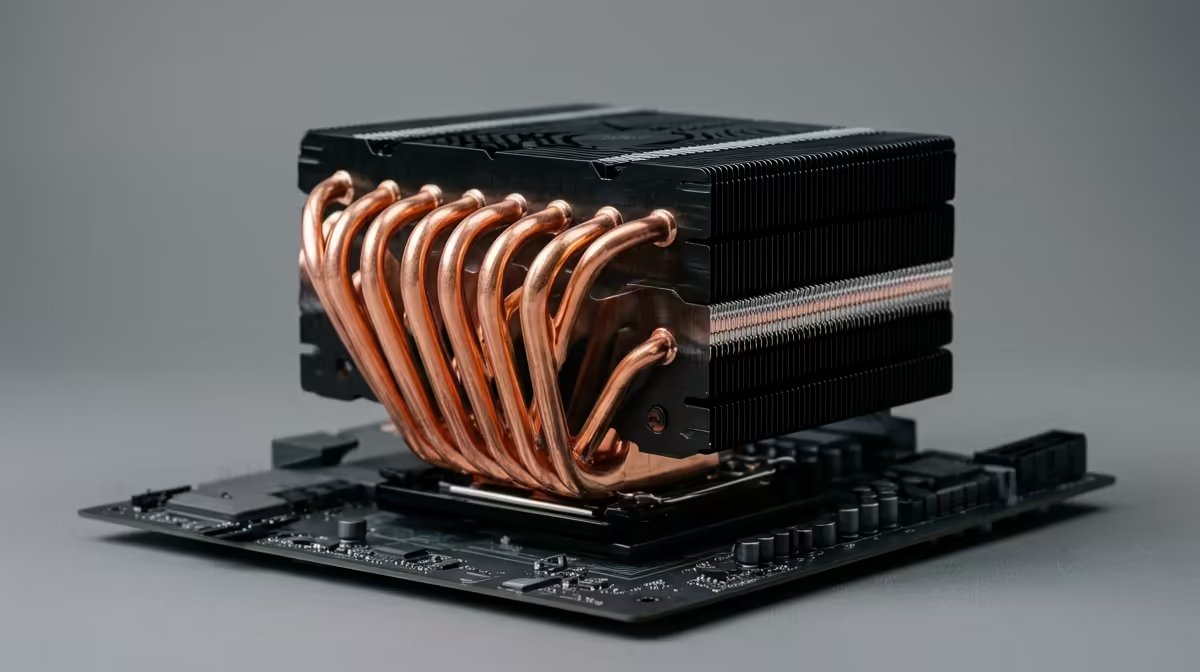
So, you’ve just unboxed your shiny new CPU. Tucked inside is a small, unassuming fan and heatsink combo—the stock cooler. Is this little guy enough to handle the heat, especially during a tense Warzone endgame on a sweltering South African summer afternoon? Or should you be looking at an aftermarket CPU cooler?
Let's cut through the noise. Deciding between a stock vs aftermarket CPU cooler isn't just about fancy RGB lights; it's about performance, noise, and your CPU's lifespan.
A stock cooler is the cooling solution bundled with most consumer CPUs from Intel and AMD. Think of it as the "good enough" option. It's designed to keep the processor from overheating under standard, non-overclocked conditions. For basic computing, browsing the web, or even some light gaming on an entry-level chip, it does the job.
The main benefit? It's free. But that comes with trade-offs. Stock coolers are built to a cost, often resulting in louder fans and just enough cooling capacity to meet the CPU's base specifications. When the load increases, so does the temperature... and the noise. They are one of many essential thermal solutions your PC needs, but they represent the absolute baseline.
An aftermarket CPU cooler is any cooler you buy separately. These are engineered by companies that specialise in one thing: keeping your components frosty. The debate of stock vs aftermarket CPU cooler really heats up when you demand more from your PC. Aftermarket options generally fall into two camps.
Don't let the simple design fool you. A good air cooler uses a combination of a large heatsink, copper heat pipes, and a high-quality fan to draw heat away from the CPU far more effectively than a stock cooler. They are incredibly reliable (a fan is the only moving part) and offer fantastic performance for their price. For many South African gamers, one of these powerful air coolers is the perfect, no-fuss upgrade for a quiet and cool rig.
All-In-One (AIO) liquid coolers take performance to the next level. They use a closed loop of liquid to transfer heat from the CPU block to a radiator, where it's expelled by fans. This process is incredibly efficient, making AIOs the top choice for enthusiasts who are overclocking high-end CPUs or who simply want the cleanest look inside their case. If you're taming a beast like a Core i9 or Ryzen 9, exploring the range of AIO liquid coolers is a must.
you buy a massive air cooler, check two things: your case's maximum CPU cooler height and your RAM's height. Some large coolers like the Noctua NH-D15 are amazing but can conflict with tall RAM sticks or smaller PC cases. Always measure twice!
So, which path should you choose? It boils down to your specific needs and budget.
You should stick with the STOCK cooler if:
You should UPGRADE to an AFTERMARKET cooler if:
A quality cooler is a smart investment. It allows your CPU to maintain its boost clocks for longer, giving you more consistent performance in games and demanding applications. If you're ready to upgrade, be sure to check out the latest CPU cooler deals to find a great price.
Ultimately, the choice between a stock vs aftermarket CPU cooler is about matching your hardware to your ambitions. A stock cooler will get you started, but an aftermarket cooler will unlock your PC's true potential. By investing a few hundred Rand, you can achieve lower temperatures, less noise, and better, more sustained performance.
Whether you're looking for a simple air cooler or a high-end liquid solution, you can browse Evetech's full selection of CPU coolers to find the perfect fit for your build and budget.
Ready to Beat the Heat? A cool CPU is a happy CPU. Don't let thermal throttling ruin your next victory. Design your perfectly cooled PC with our builder and ensure every component works in perfect harmony.
For light to moderate gaming on non-overclocked CPUs, a stock cooler is often sufficient. For high-end gaming or overclocking, an aftermarket cooler is highly recommended.
The primary aftermarket cpu cooler benefits are lower temperatures, quieter operation, and greater overclocking headroom, which improves system performance and component longevity.
Upgrade your CPU cooler if your processor is overheating and throttling, if the stock fan is too loud, or if you plan to overclock your CPU for maximum performance.
In South Africa, entry-level air coolers start around R400. Mid-range options are R800-R1500, while high-end air or AIO liquid coolers can exceed R2000.
Indirectly, yes. A better cooler prevents CPU thermal throttling, allowing it to maintain higher boost clock speeds for longer, resulting in more stable and potentially higher FPS.
Not necessarily. High-end air coolers can outperform entry-level AIO liquid coolers. Liquid cooling often provides the best absolute performance for top-tier CPUs.
Verify the cooler's listed CPU socket support (e.g., AM5, LGA1700) against your motherboard's socket. Also check case clearance for height and RAM clearance for width.
Generally, AMD's Wraith series stock coolers (Spire, Prism) offer better cooling performance than the stock coolers included with comparable non-K series Intel CPUs.
Stuck pixel on a usb dac usually needs a settings, driver, thermal, or power check first. Work through safe SA troubleshooting steps before replacing parts or assuming a full upgrade.
Read more
Windows 11 with an RX 9070 XT build can miss a monitor because of input, cable, driver, or adapter conflicts. For SA gamers, check the signal path, hardware detection, and graphics driver before swapping parts.
Read more
Dragon Age The Veilguard PC build planning at R10,000 should stay cautious about parts and settings. Balance GPU, CPU, RAM, storage, cooling, and upgrade room before picking a South African gaming PC.
Read more
A recommended build for Stalker 2 Heart of Chornobyl at R50 000 should push high-refresh 1440p without poor balance. Shape the SA build around GPU power, CPU pairing, quiet cooling, storage, and upgrade life.
Read more
NBA 2K25 R100,000 PC build planning starts with balanced parts. For SA gamers, compare CPU and GPU fit, RAM needs, SSD space, PSU headroom and cooling before buying.
Read more
Stardew Valley R15,000 PC build planning starts with balanced parts. For SA gamers, compare CPU and GPU fit, RAM needs, SSD space, PSU headroom and cooling before buying.
Read more
Tests reported audio capture and local-network scanning on a specific LG television with its screen off. LG says supported standby modes can keep voice and connected-device features active, so owners should review model-specific settings.

PCIe 5.0 and PCIe 4.0 differ most in lane support, compatibility, and upgrade value for video editing in 4k. SA buyers should match the choice to their actual hardware and games.

Real world difference between b850 b650 mmo live service games sits in stability, networking, storage, and upgrade room. SA players should compare LAN quality, USB layout, RAM support, and SSD slots for always-updated games.

Dead Pixel on Wi-Fi 7 Router is likely a display-path or source-title issue, so check the screen, cable, driver state, and related system symptoms before blaming the device itself.

Industry reports point to another roughly 10 percent Intel processor increase from 5 October, but Intel has not published a consumer price list confirming the scope. South African buyers should treat it as a risk signal, not a guaranteed Rand change.

Put the headphones in pairing mode, open Bluetooth and devices in Windows 11, then add the headset. If it fails, remove the old pairing and check charge, range and drivers.

Microsoft says upcoming Windows 11 work will target memory use on 8GB PCs and improve boot and sign-in responsiveness. There is no public release date or measured uplift yet.

Windows 11 does not show CPU temperature in its standard Settings pages. Use your CPU maker's supported utility or a trusted monitor, then read idle and loaded temperatures in context.

For a stable RTX 5070 starting point, use 1440p, the High preset, Ray Tracing Medium and DLSS Balanced, then measure the base frame rate before adding Frame Generation. Path tracing is a separate showcase mode, not the default.

Microsoft's September release is reported to address 972 vulnerabilities, including two zero-days. The practical response is to back up, secure the BitLocker recovery key, prioritise exposed systems and verify business-critical apps after deployment.

Minecraft frame generation currently means an unofficial Fabric mod, not the same thing as official Bedrock RTX with DLSS upscaling. Check the game edition, loader, version, GPU path and base frame rate before installing anything.

HKC's 27-inch Shield 27Q560 runs QHD at 560Hz or 1280 x 720 at up to 1060Hz. The headline rate is specialised: resolution, sustained frame rate, ports and eventual South African support decide whether it is useful.