


Clean Gaming Keyboard: Guide for Dusty & Humid Conditions
Clean gaming keyboard quickly and safely in dusty or humid conditions with step-by-step tips, tool checklist, and maintenance routines to prevent corrosion and switch failure. 🧼💨
Read morewhite themed gaming PC guide for South Africa: learn parts selection, Arctic AIO installation, cable management, and local buying tips for a cool, clean build 🎮 ❄️
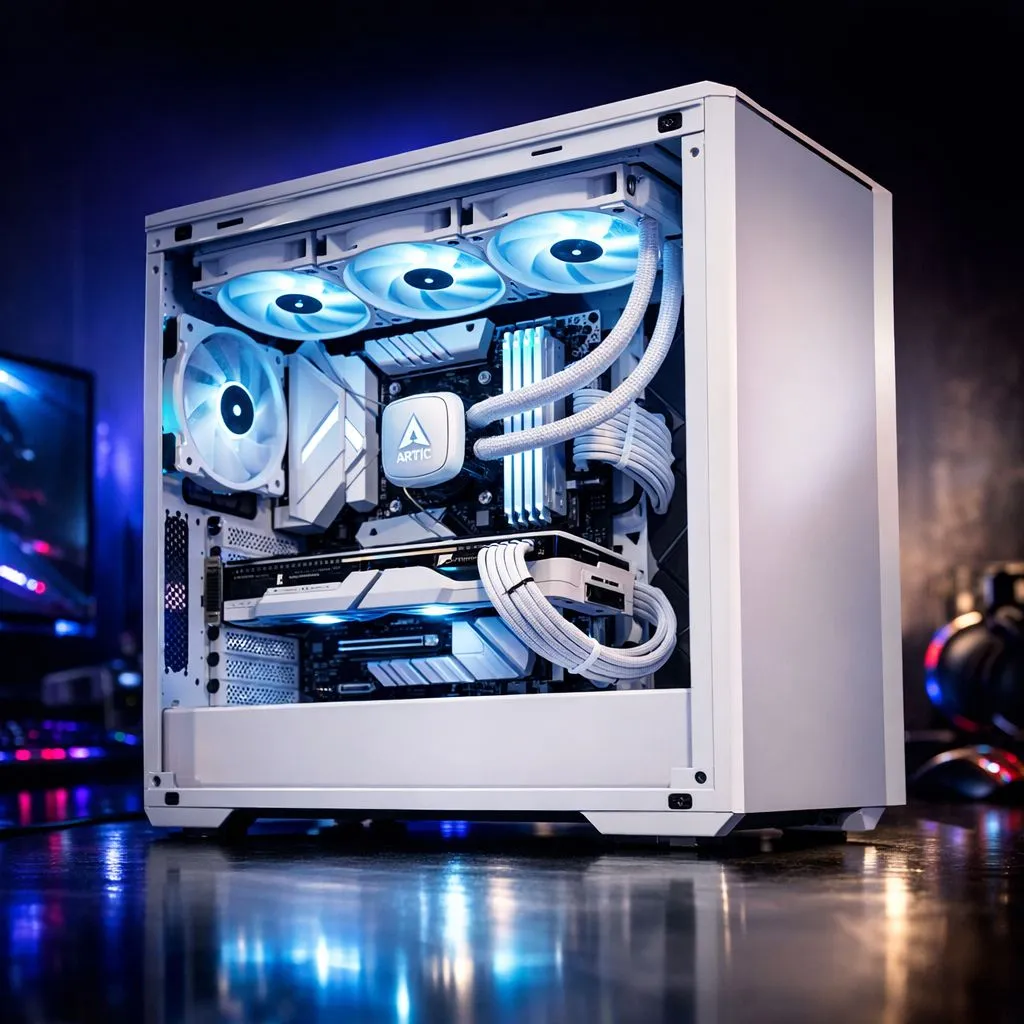
There is something undeniably sleek about a White Themed Gaming PC. While most setups stick to the classic black chassis, a "snow edition" build transforms your desk into a high-end sanctuary. It reflects RGB lighting beautifully and looks premium in any South African home office... but pulling off the look requires more than just a white case. You need the right cooling to match that frosty aesthetic. ❄️
Starting your journey requires a solid foundation. When you follow a Build Guide with Arctic AIO Cooling, the first thing to consider is the thermal headroom. South African summers can be brutal on hardware... so keeping your CPU chilled is vital for longevity. You can start by browsing our broad range of CPU coolers to find the right base for your rig.
For that ultra-clean look, most enthusiasts opt for liquid cooler (AIO) options. These units remove the bulky metal fins of traditional air coolers... giving you a clear view of your motherboard. If you want premium performance and white-out aesthetics, exploring the CORSAIR liquid coolers is a great move. They often feature high-quality white sleeving on the tubes and brilliant iCUE integration. ⚡
If you are on a tighter budget but still want that "Arctic" feel, Deepcool AIOs offer incredible value for money in ZAR. They provide a minimalist look that fits perfectly into a monochromatic theme without breaking the bank.
When building a white PC, cable management is twice as important because shadows and messy black cables stand out against the white backdrop. Use white cable combs and velcro ties to route your 24-pin and GPU cables tightly. This ensures the internal "Arctic" look remains pristine and unobstructed for maximum airflow.
The size of your radiator depends on your case and your processor's heat output. For high-end i9 or Ryzen 9 chips, we recommend 360mm radiator builds to ensure maximum heat dissipation during intense gaming sessions. These larger units fill out the top or front of a mid-tower case beautifully. ✨
However, for mid-range setups or smaller mATX cases, 240mm radiator units provide the perfect balance of size and cooling power. They are easier to mount in a variety of positions... ensuring you don't run into clearance issues with your RAM modules.
A White Themed Gaming PC looks incredible, but it does require a bit more love. Dust is more visible on white surfaces... so regular cleaning with compressed air is a must. Ensure your Arctic AIO Cooling fans are set to a positive pressure configuration to help keep the interior dust-free for longer. When your components stay cool, they perform better and last longer... giving you the best return on your investment. 🚀
Ready to Build Your Dream White PC? A clean, white aesthetic combined with top-tier cooling is the ultimate way to level up your setup. Explore our massive range of CPU coolers and find the perfect Arctic-inspired components to complete your masterpiece.
Start with a white case, Arctic AIO cooler, white GPU or shroud, white RAM, PSU shroud or cover, white fans, and compatible motherboard. Check local stock in SA.
Yes. Arctic AIOs fit most cases with supported radiator mounts; confirm radiator size (120/240/360mm) and case clearance before buying.
Mount the backplate, secure the pump block to the CPU, attach radiator and fans, and route tubes to avoid kinks. Follow the Arctic AIO installation guide.
Check Evetech, Rebel Tech, Wootware, and local retailers for white cases, Arctic AIO units, and white components with South African stock and shipping.
Use dust filters, positive case airflow, regular cleaning, and durable white components to resist yellowing. Good cable management reduces dust buildup.
Yes. Choose a mid-range CPU/GPU, a 240mm Arctic AIO, white case and fans. Balance component choices and watch Evetech deals for savings.
A 240mm or 360mm radiator gives better cooling and lower fan speeds. Choose based on case support and your GPU/CPU thermal needs.
Clean gaming keyboard quickly and safely in dusty or humid conditions with step-by-step tips, tool checklist, and maintenance routines to prevent corrosion and switch failure. 🧼💨
Read more
Best gaming keyboard features to prioritize when building a high-end setup: mechanical switches, low latency, hot-swap, RGB, macros, durability and ergonomics 🎮⌨️
Read more
Custom actuation point keyboard setup guide: learn to set per-key actuation on your analog gaming keyboard for faster, precise inputs and better control 🎮⚙️
Read more
Cable management for home entertainment helps you eliminate cable clutter quickly and safely. Learn routing, concealment, and product picks to tidy your setup fast 📺🔌
Read more
conference room setup Microsoft Teams Zoom: Upgrade AV, camera, mic, and network to ensure seamless meetings, clear audio, and crisp video 🎯🔧
Read more
• Audit setup • Link accounts • Configure ViewBoard • Test workflows Integrate Google Workspace with ViewSonic ViewBoard to enable secure SSO, calendar and Drive sync, and smooth collaborative whiteboarding 🔗📋
Read more
Discover webcams that automatically adjust light and color for crystal-clear video calls 🎥✨. Boost your streaming quality today!

Discover webcams that blend into your workflow 🎯 Capture moments while you work, stream, or create. Upgrade your setup with smart, multitasking tech!

Dedicated media keys give streamers one-touch control to mute, switch scenes, clip highlights, and adjust audio — cutting task time and boosting consistency 🎛️⚡

PBT vs ABS keycaps: Clear, local guide for South African gamers—compare feel, sound, durability and where to buy. Find the best material for your budget and playstyle 🎮🇿🇦

- Multi-Function Digital Dial: define benefits - Show gamer setups and macros - Offer buying and setup tips Multi-Function Digital Dial puts programmable control at your fingertips for faster actions and smoother streaming. 🎮⚙️

- Explain benefits; - Show the science; - Compare options; - Recommend picks. Magnetic wrist rest for gaming cuts wrist strain and boosts comfort during long sessions 🕹️✨