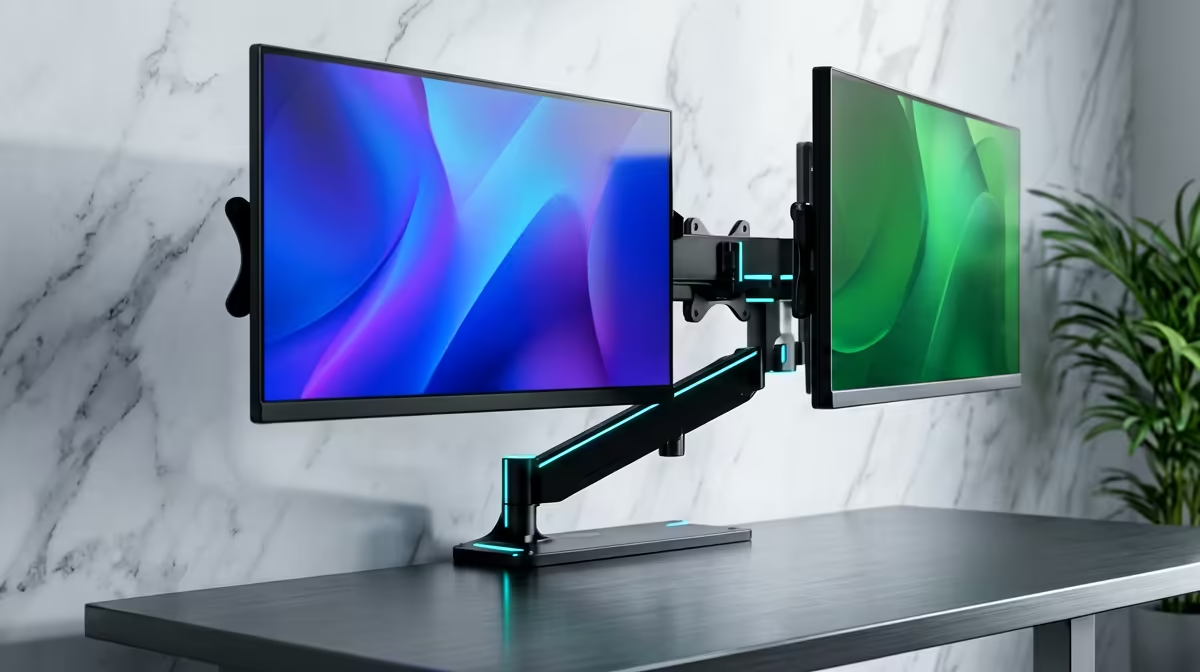
A good monitor arm does two jobs at once: it lifts your screen to a healthy eye level and it reclaims the desk space the original stand was hogging. Gas-spring arms float a display anywhere within their rated load, commonly up to about 9kg per arm, and they bolt on through the same VESA pattern almost every monitor already has on its back. This hub walks through single and dual arms, wall mounts, and the ultrawide-specific options that catch people out.
Quick Answer
For most South African desks, a single gas-spring VESA arm rated to around 9kg handles any standard 24-inch to 32-inch monitor and frees up the desk surface. Confirm two things before buying: your monitor's VESA pattern (usually 75x75mm or 100x100mm) and its weight against the arm's rated range. Heavier ultrawides and curved panels need an arm specifically rated for them.
How a gas-spring arm actually works
The mechanism is a sealed gas cylinder that counterbalances the weight of your screen. Once you tension it to match your monitor, the display stays exactly where you push it, up, down, forward, or tilted, without drifting. That floating adjustment is the whole point: you can pull the screen close for detailed work and push it back when you want breathing room, all without touching a knob.
The alternative is a fixed-height pole mount, which is cheaper and rock solid but only adjusts when you physically loosen and reposition it. Gas-spring is the choice for anyone who repositions through the day or shares a desk; a fixed mount suits a set-and-forget single-user station.
You can browse desk and ergonomic gear, including arms, mounts, and workspace furniture, through the gaming and ergonomic desk range at Evetech to round out the whole workspace.
VESA: the one spec you must check
VESA is the standardised hole pattern on the back of a monitor that mounts attach to. The two common sizes are 75x75mm and 100x100mm, measured between the screw holes. Almost every modern monitor uses one of these, but some slim or design-led panels omit the holes entirely or hide them behind a removable cover.
Before buying any arm, confirm your monitor has a VESA pattern and which one. If a panel has no VESA mount, you need a separate adapter plate, and not every monitor supports one. This single check prevents the most common mounting disappointment.
Single versus dual arms
Single arm
A single arm carries one display and is the right call for the majority of users. It clamps to the desk edge or fits through a grommet hole, and a quality unit holds a 32-inch screen steady with no sag.
Dual arm
A dual arm carries two monitors from one base, keeping them aligned and saving a second clamp point. The thing to watch is combined load: two screens must total within the arm's overall rated capacity, not just each fit individually. Two heavier panels can exceed a dual arm built for lighter displays.
Wall mounts and ultrawide considerations
Wall mounts
When desk space is genuinely tight, a wall mount moves the screen off the surface entirely. You trade adjustability and the ability to reposition the desk for maximum reclaimed space. Confirm the wall can take the fixings; drywall needs proper anchors or a stud.
Ultrawide and curved panels
Ultrawides are the classic mounting trap. They are wider and heavier than they look, and that width creates leverage that a standard arm was never tensioned for. An arm rated to 9kg for a flat 27-inch panel may struggle to hold a 34-inch or 49-inch ultrawide steady at its extended position. For these, buy an arm explicitly rated for ultrawide or heavy-duty use, and check both the weight limit and the screen-size rating.
Clamp versus grommet mounting
Most arms ship with two ways to attach to the desk. A C-clamp grips the rear edge and needs a few centimetres of clear overhang behind the desk. A grommet mount passes a bolt through a hole in the desk surface for a more permanent, very stable fix. Measure your desk thickness against the clamp's rated range before buying; very thick or very thin desks can fall outside it.
Arm build quality: what to look for
Not all arms are equal at the same price point. Look for aluminium construction with a wall thickness of at least 1.2mm on the main pivot tube; thinner steel arms flex visibly under heavier panels. The gas cylinder itself should have a tension adjustment screw you can reach without tools, so you can retension the arm as it settles over time. Cable management channels built into the arm route the display cable cleanly rather than leaving it dangling from the side, which both looks better and prevents the cable from restricting the arm's range.
For tilt and swivel, most quality single arms offer plus or minus 90 degrees of swivel and around 80 degrees forward plus 50 degrees back in tilt, which is enough to share a screen for a side conversation without rotating the whole arm. Full 360-degree rotation on the mounting point is useful if you need portrait mode for coding or document work.
Matching the arm to your needs
- One standard monitor, flexible positioning: single gas-spring arm.
- Two aligned monitors from one base: dual arm, mind the combined weight.
- Maximum desk space, set position: wall mount.
- Large curved or ultrawide panel: heavy-duty arm rated for the size.
If you want to see which ergonomic accessories other buyers are pairing with their desk overhauls, the best-selling desk accessories at Evetech is a useful snapshot of what is moving.
Frequently Asked Questions
How do I know if my monitor will fit a VESA arm?
Look at the back of the monitor for four screw holes in a square. If they measure 75mm or 100mm apart, that is your VESA pattern and standard arms will fit. Panels with no holes need an adapter plate, and not all support one.
What weight can a typical monitor arm hold?
Common gas-spring arms are rated up to around 9kg per arm, which covers most 24-inch to 32-inch monitors. Always check your monitor's weight against the arm's range, and remember dual arms have a combined limit across both screens.
Can I mount an ultrawide on a normal monitor arm?
Often not safely. Ultrawides are heavier and their width creates leverage a standard arm cannot hold steady. Buy an arm specifically rated for ultrawide or heavy panels, checking both the weight limit and the maximum screen size.
Clamp or grommet, which should I choose?
A C-clamp is quick and needs no permanent changes but requires clear space behind the desk. A grommet mount bolts through a hole for maximum stability. Match either to your desk thickness, which the arm will specify.
Will an arm damage my desk?
A properly fitted clamp on a desk within its rated thickness range spreads the load and will not damage a solid surface. Avoid over-tightening on thin or hollow desks, and use the grommet option for the most secure hold.
Reclaim your desk and fix your screen height the right way. Match a VESA arm to your monitor's pattern and weight, and complete the ergonomic setup with the right surface from the desk range at Evetech. Order online for nationwide delivery.