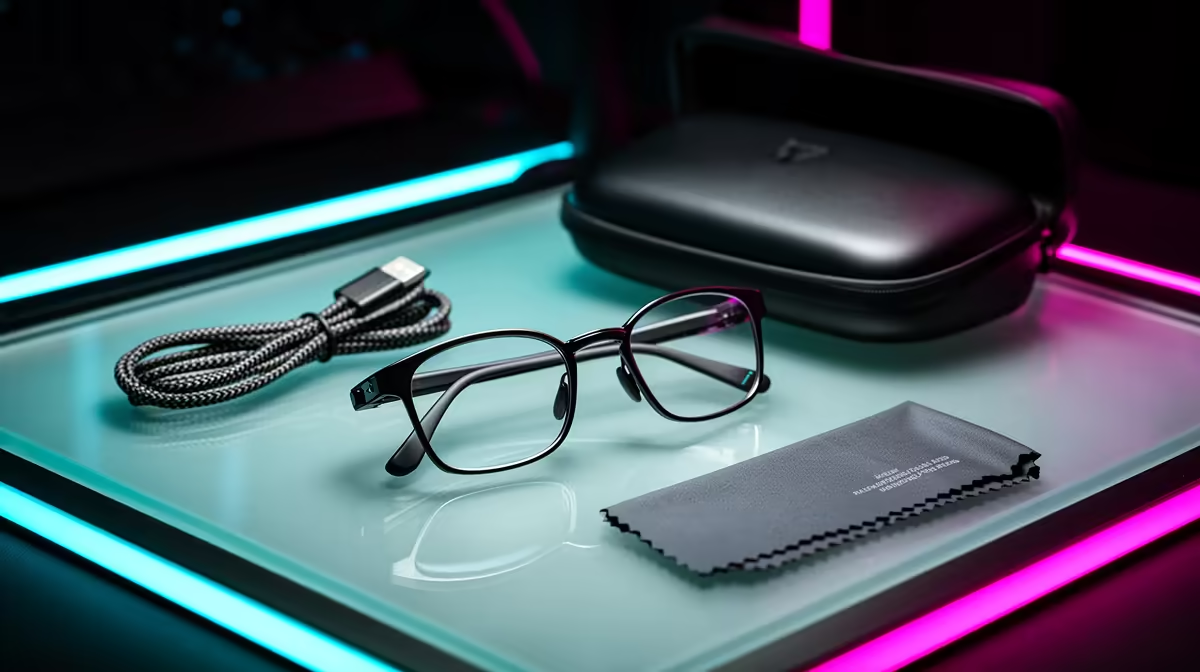
Open a box of Ray-Ban Meta smart glasses and there is less inside than the price might suggest, which is the point. The standard purchase gives you the glasses, a folding charging case, a USB-C charging cable, and a microfibre cleaning cloth. That is everything you need to wear them, capture photos and video, take calls, and talk to the built-in assistant on day one. The notable absence is prescription lenses, which are fitted separately.
Quick Answer
A standard Ray-Ban Meta box contains the glasses, the charging case, a USB-C cable, and a cleaning cloth. Prescription lenses are not included and are ordered separately through an optical partner. There are no essential extras you need to buy to start using the glasses.
What Each Item Does
Every piece in the box has a job, and understanding them helps you get set up faster.
The glasses are the obvious centrepiece, with cameras, open-ear speakers, microphones and the assistant built into a frame that looks like an ordinary pair of Ray-Bans. The charging case is the other half of the system. It folds shut, protects the glasses, and tops up their battery on the move, extending total runtime to roughly 30 hours across multiple charges. The USB-C cable charges the case, which in turn charges the glasses. The cleaning cloth keeps the lenses and the small camera windows clear, which matters more than it sounds, since a smudged lens shows up in every photo you take.
Prescription Lenses Are Separate
This is the single most common surprise for new buyers. The glasses ship with standard or sunglass lenses, not prescription ones. If you wear glasses to see clearly, you arrange prescription lenses separately through an optical partner, and that is an additional cost on top of the frames.
It is worth planning for before you buy. Decide upfront whether you want clear prescription lenses for indoor and screen use, prescription sunglass tints for outdoors, or a transition lens that adapts to light. Each route changes the final price and the lead time, so factor it into your budget rather than treating the box price as the whole story.
For buyers who specifically need prescription support, Meta launched two new frames -- the Blayzer Optics and Scriber Optics -- in early 2026. These are designed with over-extension hinges, adjustable temple tips, and interchangeable nose pads so an optician can fit and align lenses more precisely. They start at around USD 499 internationally before prescription lens costs are added, which gives a sense of the budget range before SA import and fitting fees apply.
How the Charging Case Works
The case is the charging hub, so its capacity matters more than just protecting the glasses. On a full charge, the case holds enough reserve to recharge the glasses roughly six times, extending total runtime to around 30 hours of combined use. A short stint in the case between uses is usually enough to keep the glasses going through a day of casual capture and calls.
Charging the case itself takes roughly two hours from a standard USB-C source. One detail to confirm at the point of sale is whether a USB-C cable is in your specific package, since documentation has not always been consistent across regions and revisions. If you already own USB-C cables for a phone or laptop, this is a non-issue. If not, a spare is cheap insurance.
Smart glasses sit alongside the wider wearable and AR category, and you can see what is currently stocked in the AR glasses range at Evetech. For chargers, cables and the small extras that pair well with a new pair, the accessories best sellers are a sensible place to round out the setup.
What the Camera Setup Looks Like Out of the Box
The Gen 2 model ships with a 12-megapixel camera capable of shooting 3K Ultra HD video. Because everything is built into the temple of a standard-looking frame, the camera hardware requires no extra peripherals or accessories to function. The glasses connect to your phone's data plan for Meta AI queries and offload captured photos and video through the companion app. There is no included memory card and no separate viewfinder; the glasses themselves decide the framing, which is part of the hands-free appeal.
Getting Started Once It Is Open
After unboxing, the real first step is pairing the glasses with the companion app on your phone, which handles setup, software updates, and offloading your photos and videos. Charge the glasses fully in the case before that first session so the initial update installs without interruption. From there, the open-ear audio, capture controls and voice assistant are all driven from the glasses and the app, with nothing else from the box required.
The companion app: the missing piece
Nothing in the box makes the glasses fully functional without one external element: a smartphone with the Meta View app installed. The app is free and handles the initial setup pairing, manages firmware updates, stores your captured photos and videos, and controls personalised settings like the assistant wake word, camera quality and notification preferences. If you have a new phone or switch devices, you will need to re-pair through the app. It is a lightweight dependency compared with the glasses themselves, but worth mentioning as the one thing the box does not include that you genuinely need.
Frequently Asked Questions
Is a USB-C cable included?
In most packages, yes, though official documentation has been inconsistent at times. If you already own USB-C cables, it makes no difference. If you do not, confirm with the seller or keep a spare on hand.
Do Ray-Ban Meta glasses come with prescription lenses?
No. They ship with standard or sunglass lenses, and prescription lenses are ordered separately through an optical partner at additional cost.
What is the charging case for?
The case protects the glasses and recharges them on the go, extending total battery life to roughly 30 hours. You charge the case over USB-C, and it charges the glasses while they sit inside.
Do I need to buy anything else to use them?
No essential extras are required. The box has everything needed to start using the glasses. Prescription lenses are the only common add-on, and only if you need them to see clearly.
How do I get my photos and videos off the glasses?
Through the companion app on your paired phone, which imports captured media and also manages settings and software updates.
Curious what wearable tech is available locally? Browse the AR glasses range at Evetech and see how smart glasses fit into your everyday kit.