2700RPM pump speed is the number that catches the eye on an AIO cooler's box, and it is also the one most builders misread. On its own it does not tell you whether the cooler will keep your CPU cool. Pump speed sets how quickly coolant circulates, while the radiator and its fans decide how much of that heat finally leaves the case. Here is what the figure means, what to expect from it at home, and how to check it once the cooler is running.
Quick Answer
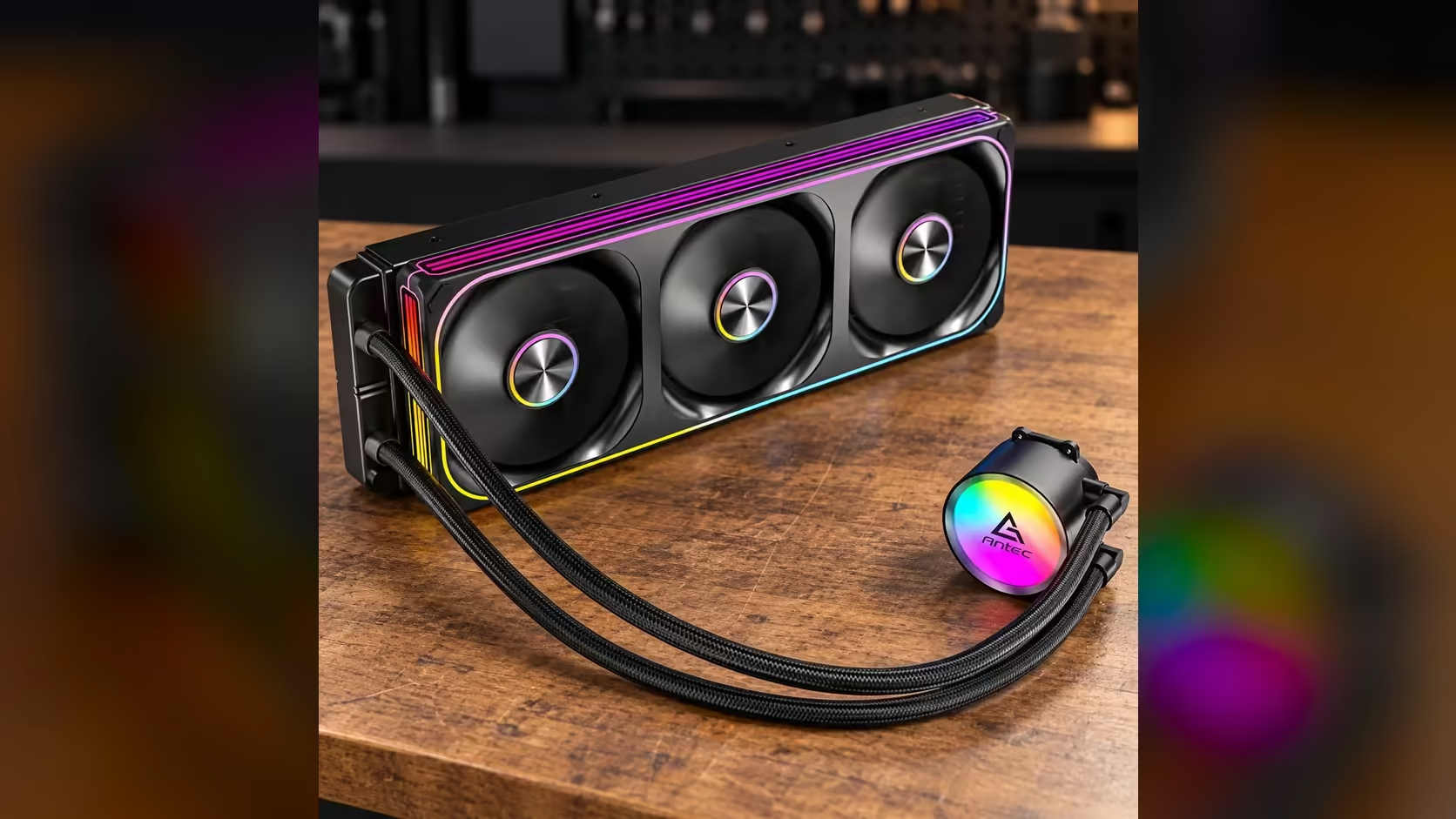
A 2700RPM pump turns its impeller 2700 times a minute, which is 45 complete turns every second. That speed keeps coolant moving round the loop so heat from the CPU block reaches the radiator, where the fans carry it into the room. The Antec Omni Matrix 360 at R999 runs its pump at 2700RPM, and a faster pump only helps until the radiator becomes the limit.
🔧 What 2700RPM actually measures
RPM counts complete turns per minute, so 2700RPM works out to 45 complete turns every second. The impeller inside the pump head does that turning, pushing coolant out of the pump, across the CPU block, through the radiator and back again. The loop runs whenever the PC is switched on, so the pump does not rest while the machine is working.
It helps to put that figure beside the rest of the cooler. The three 120mm fans on the Antec Omni Matrix 360 run between 800RPM and 1800RPM, so the pump turns at 1.5 times the top speed of its fans. The two numbers measure different things. A fan pushes air through fins, while a pump pushes a liquid through a closed circuit, so comparing them directly tells you little.
Pump speed also says nothing about how much liquid moves per hour. Flow depends on the impeller design and on how much resistance the loop presents, so two pumps with the same RPM can move different volumes. The pump head on this model carries its own ARGB lighting, which is a separate job from the pump speed. Lighting changes the colour of the cap and leaves the impeller turning at the same rate. Treat 2700RPM as one fact in a longer spec list, not a verdict on performance.
The first spec sheet most builders open is the one that lists the pump, so it is worth knowing what the number is not. It is not a noise rating, and it is not a flow rate in litres per hour. Read it as the speed of the impeller and nothing more.
🌡️ Where the heat actually goes
Heat follows a chain: the CPU die, the block sitting on it, the coolant, the radiator fins, and finally the air in the room. Pump speed controls how quickly coolant hauls heat from the block to the radiator. It cannot push heat past the end of that chain, which is why a faster pump stops helping once the radiator and fans become the bottleneck.
Each fan on this cooler is rated at 42.9CFM, so three of them together move about 129CFM on paper. That airflow pulls heat through the fins of a 360mm radiator, which is roughly 394mm long. A radiator that long needs a full-length slot in the case, and the fans must sit on the correct side so they push air through the fins rather than across them. Our CPU coolers range is the place to compare radiator sizes side by side before you settle on one.
Pump speed matters most when the loop is working hard for long periods, such as a rendering job or a long session in a demanding game. In those cases the pump keeps the block supplied with cool liquid, and the radiator sheds the heat it brings back. Short bursts of load are handled by the thermal mass of the block and loop, which is why a brief spike looks different from an hour at full load. If you are weighing a pump spec against a cheaper cooler, the liquid CPU cooler range puts the options next to each other so the trade-off is easy to see.
🔍 Checking the pump on your own PC
Once the cooler is installed, the simplest check is the hardware monitor in BIOS. Most boards list the pump header as a fan speed reading, often on a PC Health or Monitor tab. Start the PC, open that page, and note the reading at idle. Then run a short load test for five minutes while you watch the reading and the CPU temperature together, and you will see how the two move.
Under load, the pump reading should settle near the rated 2700RPM, although a board can report it a little differently from the spec sheet. A reading of zero is the figure to act on. It means the pump is not turning, the block has no path to send heat away, and the processor will climb in temperature until the board throttles it. Check that the pump lead sits in the header your board labels for a pump, not a generic fan header, then restart and check again before you change anything else.
Keep a note of the readings. A reading that drifts lower over several weeks can point to a pump that is slowing, and a note makes that pattern visible long before the CPU temperature shows it. Write down the idle figure, the load figure and the date, and repeat the check every few months.
☀️ Summer heat in a room without aircon
A cooler moves heat out of the case, and the radiator then hands that heat to the air in the room. In a Pretoria summer, a room without aircon often holds close to 30C well into the late afternoon, so the radiator starts from a warmer baseline than the same cooler would in a cool study. Pump speed cannot change that starting point.
What does change it is where the warm air goes. Keep the room door open to a cooler passage, shift the case off any window that takes the afternoon sun, and leave the case front clear so the fans draw cooler air in. Those small steps lower the baseline you are working from, and on a hot afternoon they often matter more than the pump figure on the box.
Frequently Asked Questions
Is a 2700RPM pump too loud for a quiet PC?
Not on its own. Pump noise usually comes from a loose mount or a tube that vibrates against the case, so tighten the bracket and check the tubing before you blame the rotation speed.
How do I check my AIO pump speed?
Open the hardware monitor in BIOS, or your board's utility software, and find the pump header reading. Check it with the CPU under load, because the idle figure tells you very little.
Does a faster pump always lower CPU temperatures?
No. A faster pump moves heat to the radiator more quickly, but the radiator and fans still have to shed it into the room. Once they are the limit, extra pump speed adds little.
What happens if the pump stops running?
The CPU keeps producing heat with nowhere to send it, so temperatures climb under load. The board may then throttle the processor to protect it, and the system will feel slow long before any damage is done.
Ready to compare AIO coolers?
Browse our CPU liquid coolers and check the radiator size against the case you already own before you order.