Acer's new esports display pushes the refresh-rate race into four digits. The Predator XB253Q U1 can reach 1,000Hz at FHD, but extracting value from that mode demands exceptional frame rates, the right connection and a game where milliseconds matter.
Quick Answer
The Acer Predator XB253Q U1 1000Hz monitor is a 24.5-inch, 1920 by 1080 IPS display with a claimed 0.3ms minimum response time. It is designed for elite competitive play rather than visual detail. South African stock and pricing are unconfirmed, while current gaming monitors already offer 360Hz to 500Hz options.
⚡ What 1,000Hz actually changes
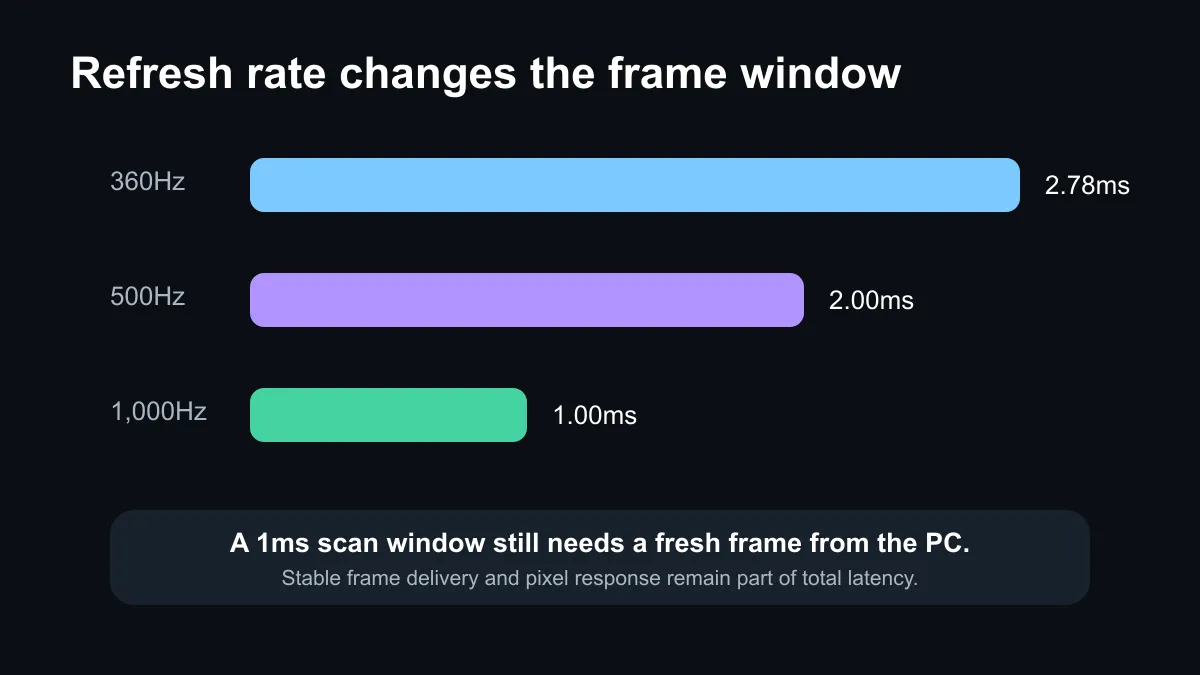
A 1,000Hz refresh cycle is one millisecond. For comparison, 500Hz is two milliseconds and 360Hz is about 2.78 milliseconds. The jump can reduce the delay between a newly rendered frame and the panel showing it, while also making motion samples more frequent.
Those numbers do not guarantee a one-millisecond response from click to photon. The PC must render a fresh frame, the game engine must process input, the display must scan the image and the pixels must complete their transition. Acer's 0.3ms claim is one part of that chain, not the total latency.
🎯 The frame-rate requirement
The fastest mode makes sense only when a system can sustain hundreds of frames per second. Counter-Strike 2, Valorant and similarly light competitive games are the likely targets. A cinematic title running at 120fps will not suddenly create 1,000 distinct frames because the monitor can accept them.
CPU performance, memory latency and low game settings become especially important at FHD. Even then, frame-time consistency matters more than a peak counter. A system that swings between very high and much lower rates may feel less predictable than a carefully tuned setup with a stable limit.
🖥️ Why Acer chose 24.5-inch FHD
The compact panel keeps the entire play area within easy view and reduces the rendering load compared with QHD or 4K. IPS technology should offer broader viewing angles than older competitive TN designs, although independent testing is still needed for contrast, overshoot and usable response modes.
Resolution is the obvious compromise. FHD at 24.5 inches is suitable for esports but gives less desktop workspace and fine detail than QHD. Buyers wanting one screen for competitive play, editing and general productivity should weigh that trade-off carefully.
💰 The South African baseline
Acer has not confirmed a local price or stock date. The launch material points to first-quarter 2027 availability in selected regions, so any rand estimate today would be speculative.
The captured catalogue offers a useful reality check. A 360Hz Alienware model was R6,999, a 500Hz Alienware was R12,999, and a 500Hz ASUS QHD QD-OLED was R23,899. Those are not direct substitutes, but they show how panel type, resolution and refresh rate interact with price. Browse current monitor deals and monitor best-sellers before deciding that the highest number is automatically the best purchase.
Frequently Asked Questions
Does the XB253Q U1 really run at 1,000Hz?
Acer says the display reaches 1,000Hz in its fastest FHD mode. Exact input and graphics requirements should be confirmed before purchase.
What size and resolution does it use?
It is a 24.5-inch IPS monitor with a 1920 by 1080 resolution, a familiar competitive-gaming format.
What response time is claimed?
Acer lists a 0.3ms minimum. Independent measurements are needed to judge average transitions and overshoot at usable settings.
Will every game look better at 1,000Hz?
No. The benefit narrows when the game cannot deliver frame rates close to the panel's fastest modes.
Is South African pricing available?
No local price or stock date was confirmed. The first announced regional timing begins in the first quarter of 2027.
Should a buyer wait instead of choosing 360Hz or 500Hz?
Only if the system, games and competitive goals can exploit the extra refresh. Existing high-refresh screens may offer better overall value.
Building an esports setup?
Match the monitor to the frame rates your PC can sustain, then compare panel quality, connections and ergonomics alongside refresh rate.