



650W PSU Planning for RTX 5090 Builds in SA
650W for RTX 5090 needs a full-build check, not a simple yes. Review GPU guidance, CPU draw, transient load, connectors, PSU quality, and upgrade plans before deciding.
Read moreThe armrest adjustments that matter are the ones that align the user's arms with the keyboard, mouse and desk. The E3 Air includes 360-degree omni-motion mech-armrests, while 4D and 2D labels on other chairs should be compared through their exact movement options.
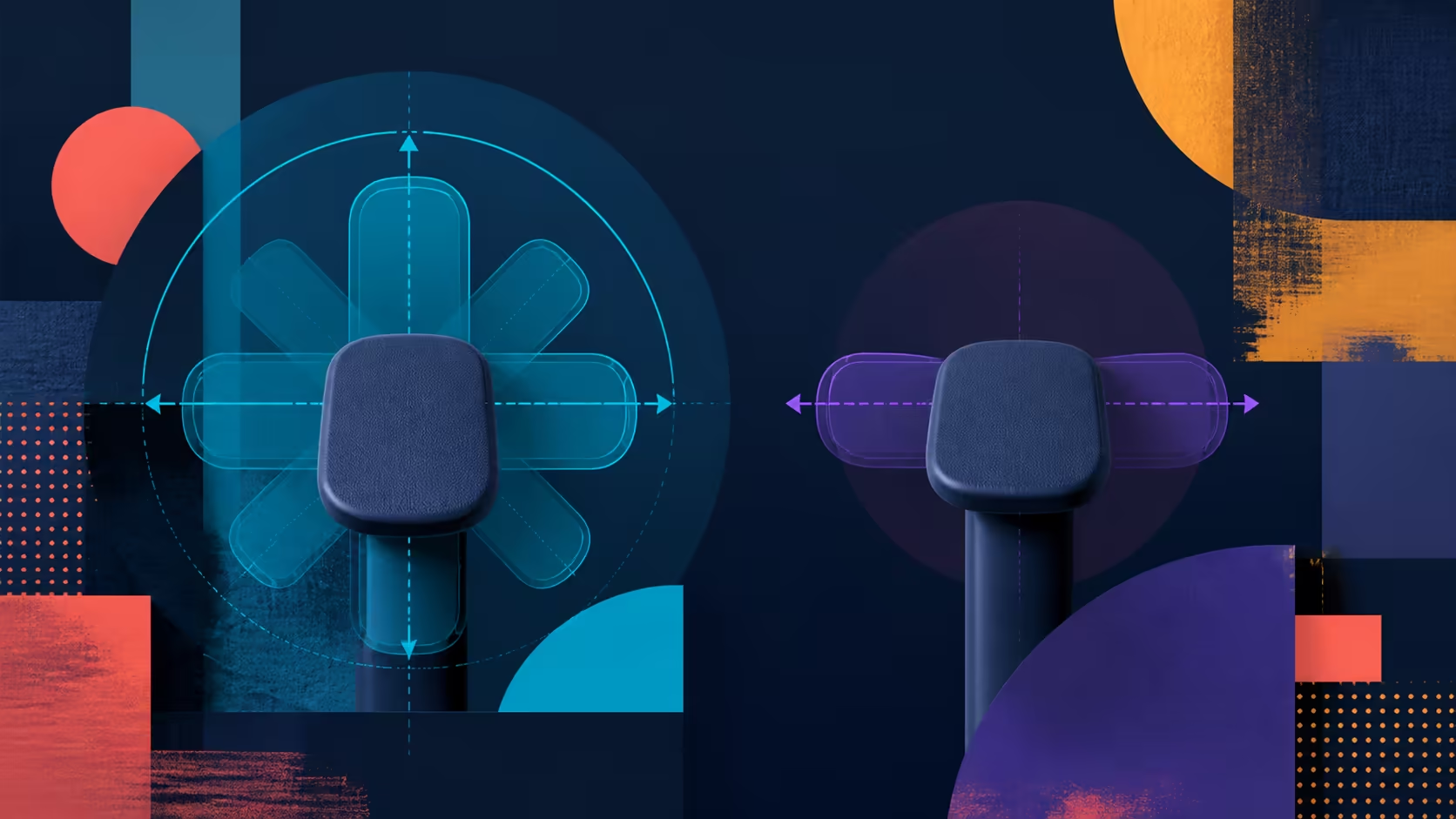
Dimensional labels can obscure the practical question: where must the forearm go to use the desk comfortably? A 4D versus 2D armrest comparison should identify the exact motions on each chair and match them to typing, mousing and clearance. Use the R7,399 E3 Air as the 360-degree omni-motion example.
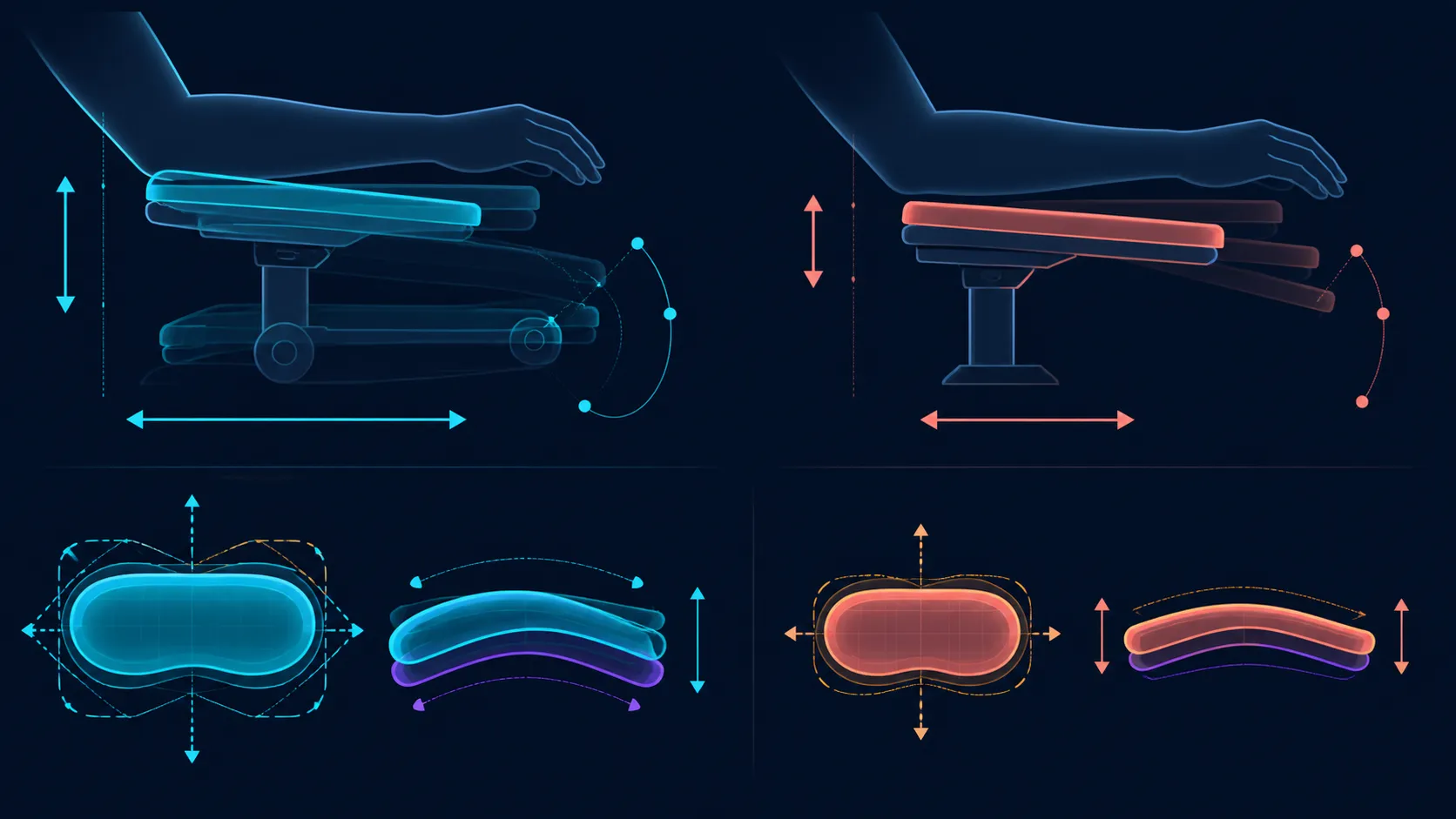
The E3 Air is a true 4D armrest chair, using XYZ alignment, 360-degree free-roam swivel and 40-degree synchro-tilt linkage.
Choose between 4D and 2D armrests by matching their real movements to the user's desk problem. The R7,399 E3 Air is a 4D design with XYZ alignment, 360-degree swivel and 40-degree synchro-tilt. More directions help only when useful positions remain easy to reset.
A 2D or 4D name counts types of movement, but the actual directions, ranges and control behaviour can differ by chair. Ask for the movement map of each candidate. Do not assume that a shared label means identical hardware or that a higher count includes the particular direction the user needs.
Create a problem statement first: perhaps the desk edge blocks a support, the mouse needs more lateral room or the chair must move closer to the keyboard. A useful dimension is one that addresses the written problem.
Compare HBADA office chairs through Evetech after measuring the desk opening and input positions.
Place the devices before adjusting the arms. Type a short passage, then perform the ordinary mouse pattern. Evaluate each side independently and watch shoulder position, elbow support and desk collisions. Visual symmetry is not the goal.
On the E3 Air, 360-degree omni-motion offers broad directional positioning. Keep travel distances and any particular control requirement separate, then save a simple reference for useful typing and mouse arrangements.
Armrests work from the posture established by the seat and back. The E3 Air has three-zone lumbar support wrapping across 80 degrees, a high-density cloud-like mesh seat and a 4D dual-axis headrest. Stabilise those before isolating arm movement.
No armrest configuration can promise to prevent wrist pain. Persistent discomfort needs appropriate assessment, and input technique plus desk geometry remain part of the picture.
Use the broader office-chair range at Evetech with the same task test. At R7,399, the right chair is the one whose actual movements solve the user's spatial requirements, regardless of whether the shorthand number is larger.
Rank the movements the desk actually requires before looking at dimension counts. This stops a sophisticated label from displacing the one direction that resolves a collision or reach problem. Test the chosen position while moving between ordinary tasks, not only during a brief typing pose. If several people share the chair, each needs a distinct arm reference because the same mechanical setting can solve one person's layout and create another person's reach.
Document any desk-edge collision alongside the task that causes it, rather than blaming the armrest label in general.
A 2D rival needs only two useful axes to fit the user, but the E3 Air adds linked movement as the chair reclines. Judge whether those extra positions support typing, mousing, mobile use and console play without forcing the shoulders upward.
The correct winner is the armrest whose useful positions are easy to find and repeat, not the label with the larger dimension count.
The 40-degree synchro-tilt movement deserves its own test because it changes arm support as the chair angle changes.
It uses 4D mech-armrests with 360-degree free-roam swivel, 40-degree synchro-tilt and XYZ alignment.
They indicate counted movement dimensions, but the buyer still needs the exact directions, ranges and controls for the candidate being considered.
No. Extra motion adds value only if it solves a real alignment or clearance problem and the preferred setting is practical to recover.
Fix the keyboard, mouse and chair relationship, then test one support during a repeatable task. Compare function rather than appearance.
That result is not guaranteed. Arm support changes alignment, while persistent wrist or arm symptoms should receive suitable professional attention.
For upper contact, the E3 Air headrest moves in 4D along dual axes. Configure that around the screen outside the armrest exercise.
The Cloud White E3 Air costs R7,399. Assess that amount against the full adjustment package and the movements the owner will genuinely use.
Ready to compare movements by the desk problem they solve? Explore Evetech office chairs with exact armrest directions and two input tasks on your checklist.
It uses 4D mech-armrests with 360-degree free-roam swivel, 40-degree synchro-tilt and XYZ alignment.
They indicate counted movement dimensions, but the buyer still needs the exact directions, ranges and controls for the candidate being considered.
No. Extra motion adds value only if it solves a real alignment or clearance problem and the preferred setting is practical to recover.
Fix the keyboard, mouse and chair relationship, then test one support during a repeatable task. Compare function rather than appearance.
That result is not guaranteed. Arm support changes alignment, while persistent wrist or arm symptoms should receive suitable professional attention.
For upper contact, the E3 Air headrest moves in 4D along dual axes. Configure that around the screen outside the armrest exercise.
The Cloud White E3 Air costs R7,399. Assess that amount against the full adjustment package and the movements the owner will genuinely use.
650W for RTX 5090 needs a full-build check, not a simple yes. Review GPU guidance, CPU draw, transient load, connectors, PSU quality, and upgrade plans before deciding.
Read more
How to fix FPS drops Windows 11 RX 9070 XT starts with GPU drivers, overlays, power plans, and frame pacing checks. For SA gaming PCs, verify chipset updates, HAGS, refresh rate, thermals, and per-game graphics settings.
Read more
How to fix FPS drops on X870E motherboard starts with BIOS, chipset drivers, PCIe settings, and memory stability. SA gamers can check EXPO, resize BAR, thermals, display refresh, and background apps before replacing components.
Read more
RTX 5060 is popular with SA students because it can fit gaming, coursework, and creative app needs in one setup. Compare total system price, cooling, RAM, storage, and screen quality before picking a desktop or laptop.
Read more
1440p is the sweet spot for SA gamers because it balances sharp visuals, high frame rates, and GPU cost better than 4K. It is a practical monitor target for players who want smoother upgrades without the heavier hardware demands of 4K.
Read more
RAM pricing for Midrand gamers can shift with exchange rates, supply, specs, and model tier. Treat the title as a buying prompt, then compare SA warranty, timing, and build priorities.
Read more
From 1 October 2026, WhatsApp Business Platform service replies in South Africa are expected to cost about $0.0076, or 12 cents, per delivered message.

DDR5-8000 RAM Kits pros and cons depend on the build, budget, and workload. Weigh gaming needs, platform fit, power, cooling, warranty support, and South African pricing context before shortlisting it.

Wi-Fi 6E vs Wi-Fi 6 depends on AAA single-player gaming needs, platform limits, and budget fit. Compare compatibility, latency, upgrade path, and real setup constraints before choosing for an SA build.

Ryzen 9 9950X3D dead pixel checks should isolate the panel first. Run colour fills, inspect the monitor menu, test another cable or input, and capture proof before linking it to the SA CPU upgrade.

YouTube will count public views from the first frame across video formats from 24 August, while earnings and eligibility remain tied to engaged viewing.

Canonical expects Ubuntu on WSL users to outnumber native Ubuntu desktop users before the end of 2026. The software is open source and runs inside supported Windows PCs.

Telkom's daily bundles pair WhatsApp access with 10 all-network voice minutes. The R15 option includes 300MB, while the R17 option uses a fair-use threshold.

A 10,000-hour test found similar image retention across older and newer OLED TVs, while newer panels were brighter and more efficient. Local OLED monitors started at R9,999.

Windows 11 update KB5121003 is linked to crashes in several multiplayer games on versions 24H2 and 25H2. Check the build, report the fault and avoid risky file or update changes unless the problem is confirmed on your PC.

Comsol's standalone 5G network covers about one million Gauteng homes and starts commercial ISP service in September. Early packages range from R275 to R875 a month, but coverage and fair-use rules still decide the real value.

Sennheiser's Momentum True Wireless 5 adds user-replaceable batteries, 12-hour playback and a $299.95 launch price. There is no confirmed South African date, so compare longevity with live earbuds from R199 to R2,999.

AVerMedia's GC531 and GC535 are professional HDMI capture devices for continuous streaming, with RGB24 capture up to 2K30 and 4K30. South African creators should compare them with live 4K capture cards from R2,099.