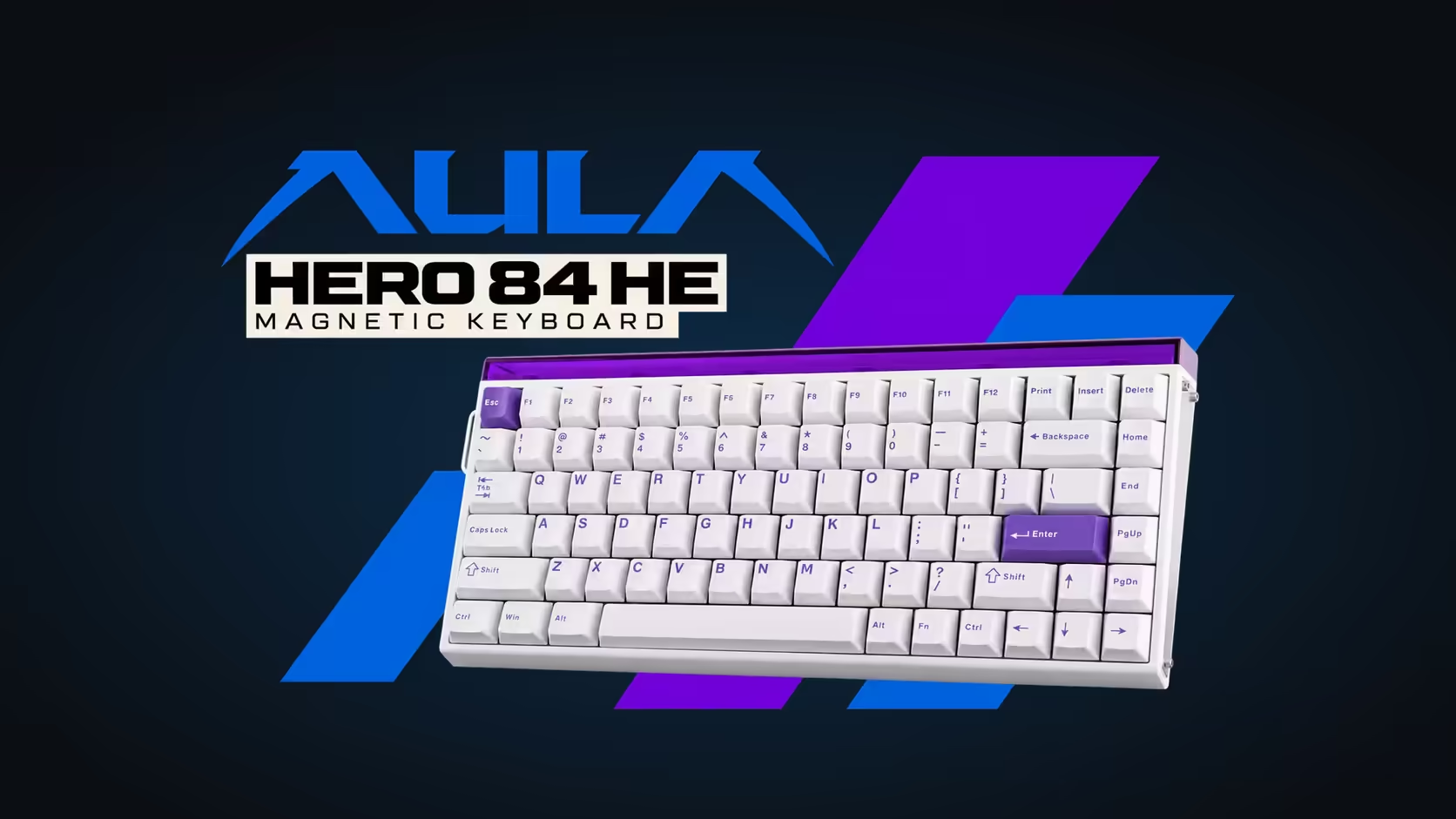
RGB on most keyboards is a single system: pick an effect and every LED follows it. The HERO 84 HE splits its lighting in two. Under the keys sits a normal per-key backlight, and across the top of the board runs a separate strip of 36 LEDs that AULA calls a neon light box. The useful part is that the light box and per-key RGB take separate settings, so one can be busy while the other stays calm.
Quick Answer
On the AULA HERO 84 HE, the 36-LED light box takes a mode, colour, animation speed and brightness of its own, none of which touch the south-facing per-key backlight under its 84 keys. That means the strip can run an animated effect while the keys hold a single static colour, or the strip can be dimmed right down while the keys stay lit for typing. You adjust both zones from AULA's browser driver. The keyboard costs R719 at Evetech.
🌈 Two lighting zones, two jobs
The per-key backlight
Each of the 84 switches is lit by a south-facing LED, and AULA quotes 16.7 million colours for them. The south-facing part simply tells you the light is mounted on the edge of the switch nearest your wrists. Its job is practical: making legends and key edges visible in a dim room, and marking out keys you use most.
The light box
The light box is a strip of 36 LEDs along the top edge. It does not light any keys, so it is purely atmosphere. Because it has separate controls, you can treat it like accent lighting in a room rather than part of the keyboard's function.
🎚️ What each zone can do on its own
Giving the zones different settings opens up combinations that a single-zone board cannot manage:
- A slowly shifting effect on the strip with plain white keys for work.
- A static purple strip to match the white and purple shell, with a livelier mode running under the keys.
- A bright strip for streaming or photos, with the key backlight lowered so legends stay readable without glare.
- Keys lit and the strip turned right down for late sessions when the room is dark.
Speed matters as much as colour. A fast-cycling strip in the corner of your vision can pull attention during a tense round; slowing its animation, or setting it static, keeps the atmosphere without the distraction.
🖥️ Where the settings live
Lighting is configured in AULA's web driver, alongside key remaps, Mod-Tap and Dynamic Keystrokes. Open it in Chrome, Edge or another Chromium-based browser on Windows or Mac while the board is plugged in.
A sensible routine is to set the per-key backlight around what you do most, typing or gaming, and then treat the light box as the part you change for mood. That way you are not rebuilding your whole lighting scheme each time you want a different look.
The HERO 84 HE comes in white with purple, which lends itself to purple or soft white on the strip, though nothing stops you picking a contrasting colour. Evetech lists the board under gaming keyboards, and a 2 Years Local Warranty covers it. A fresh lighting scheme sometimes prompts a fresh feel as well, and since the switches pull out, keyboard switches is worth a browse for compatible magnetic options. Evetech will show its price on the product page.
Frequently Asked Questions
Can the keys stay lit while the strip is dimmed?
Yes. The strip's brightness is set separately from the per-key backlight, so each can sit at a different level.
How many LEDs are in the strip?
36, running along the top edge of the board.
Which lighting helps you read the keys?
The per-key backlight. The strip lights no keys and is there for looks.
Is there a colour that suits the white and purple finish?
Purple or a soft white on the strip ties in with the shell, but any colour can be chosen.
How do I stop the strip distracting me mid-game?
Slow its animation, set a static colour or lower its brightness in the web driver.
Want lighting you can split between mood and function?
Explore Evetech's gaming keyboard range, including the HERO 84 HE with its separate light box.