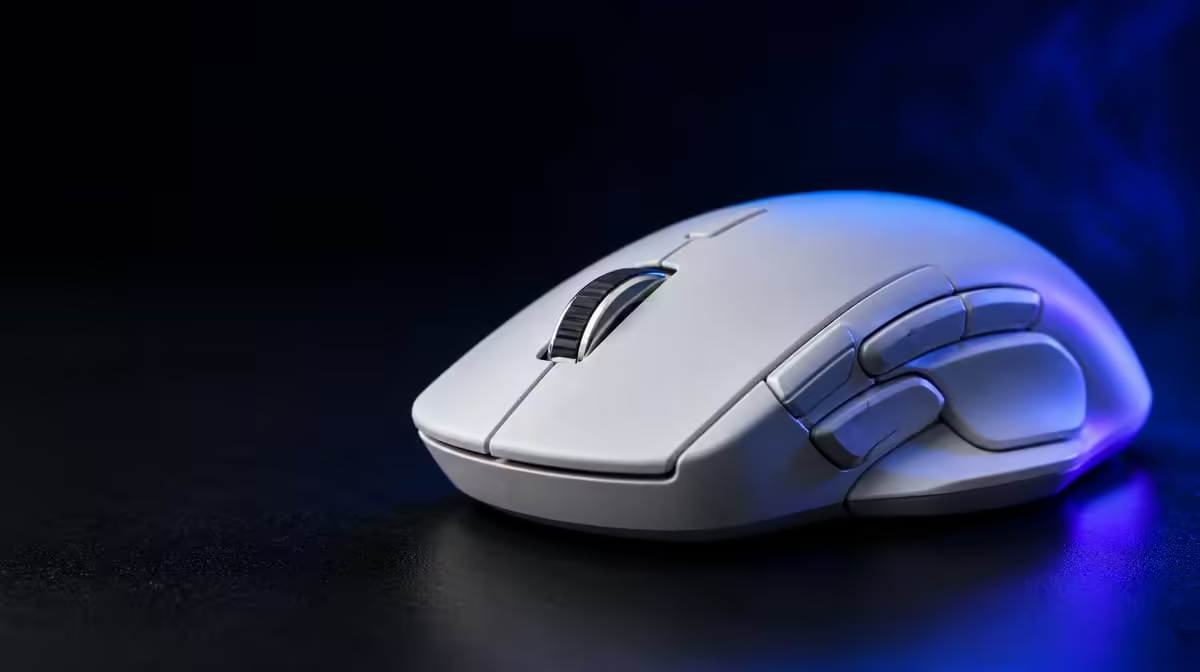
Extra mouse buttons help only when they shorten an awkward action without disrupting aim. To configure mouse buttons for different game genres, assign a small set of frequent commands, rehearse them and keep the same physical button serving related roles across profiles. The G305 X SUPERLIGHT supplies six programmable inputs for a focused map.
Quick Answer
Build separate FPS, MOBA and strategy profiles, starting with one or two high-frequency actions and adding bindings only after they become automatic. At R1,499, the G305 X SUPERLIGHT combines six programmable buttons with tri-mode connectivity and a Hero 44K sensor, so the control map should support rather than overload the aiming hand.
🔹 Start with physical reach
Hold the mouse naturally and press each programmable input without looking down. Note which buttons require a grip shift, extra finger tension or a pause. Frequently used actions belong on the easiest positions.
Evetech's Logitech gaming mice give players related layouts to compare after this reach test.
Keep a neutral layer
Reserve the essential click and movement functions. Do not bind every available input immediately. A simple default profile helps diagnose whether a mistaken action comes from the game or a complicated map.
🔹 Build an FPS profile
FPS bindings should reduce a meaningful keyboard reach without creating accidental presses during tracking. A utility, communication or weapon action may suit a reachable side button if the player can activate it without squeezing the mouse.
Test slow aim, rapid turns and repeated clicks after every assignment. Remove a binding that changes the grip during a firefight.
Compare alternative control shapes through Evetech's broad gaming mouse category.
🔹 Separate MOBA and strategy needs
MOBA actions may benefit from a few remembered item or communication commands, while strategy games can use camera or group controls. The map should reduce movement between keyboard zones rather than duplicate every command.
Use related positions for related tasks across games. This creates muscle-memory continuity and reduces mistakes when switching genres.
Rehearse outside ranked play
Run a low-pressure session and deliberately use every new button. If an action is forgotten repeatedly, return it to the keyboard or move it to an easier location.
🔹 Save and audit profiles
Record the game, connection, DPI, report rate and six-button map together. A profile can feel wrong because sensitivity or connection changed, not because the bindings did.
More than 130 rated battery hours are part of the mouse's wider package; actual endurance still depends on the configured mode and report behaviour. Review Evetech's accessory best sellers for broader context and check availability when ready to buy.
Remove stale assignments
After several weeks, delete bindings that are rarely used. A smaller map that remains automatic is more useful than six functions the player must remember consciously.
Design a button vocabulary
Assign a simple concept to each reachable input: movement support, communication, item use or interface navigation. Reuse those concepts across games even when the exact command changes. The physical button then retains a familiar purpose.
Avoid mapping two actions that are easy to confuse during stress. If adjacent buttons control opposite outcomes, test them repeatedly without looking at the mouse.
Build a MOBA test sequence
Choose one item action, one communication function and one camera or target command. Run a practice scenario that requires each in a fixed order, then mix the order. Remove any mapping that is slower than the keyboard after several attempts.
Do not assign a critical ability merely to fill an input. The mouse hand already controls aiming and movement; extra finger pressure can weaken both.
Build a strategy test sequence
Use commands that reduce long keyboard travel while keeping essential group selection and camera movement consistent. Rehearse a base-management routine and a combat transition.
A profile that works only in one calm opening may fail under a busy late-game situation. Test after the player is managing several tasks.
Keep productivity separate
Desktop shortcuts can make the six-button layout useful outside games, but they should live in a clearly identified profile. A browser or editing command accidentally active during play creates confusion.
Record the profile-switching method and verify it before a session. If the software or connection changes, confirm that the correct map remains active.
Review accidental inputs
After several matches, note every unintended button press and the grip position at the time. A command may be logically useful yet physically unsuitable for that input.
Move the action, reduce its frequency or return it to the keyboard, then repeat the same genre-specific routine. The winning layout minimises hesitation and mistakes rather than maximising the number of commands on the mouse.
Save the final map as a simple diagram. It should be understandable at a glance before the game starts.
Frequently Asked Questions
Must all six buttons be assigned?
No. Use only the inputs that improve frequent actions without disturbing grip.
What suits an FPS side button?
A high-frequency command that is easy to reach and does not change aiming pressure is a sensible candidate.
Should MOBA and strategy profiles be identical?
No, but related physical buttons can serve related task groups to preserve muscle memory.
Why test in a low-pressure session?
It lets the player rehearse every assignment without one forgotten binding deciding a competitive result.
When should a mapping be removed?
Remove it when it causes accidental input, grip changes or remains too difficult to remember.
Ready to build genre profiles that stay memorable?
Compare programmable gaming mice at Evetech, then assign buttons by reach, frequency and grip stability instead of filling every slot.