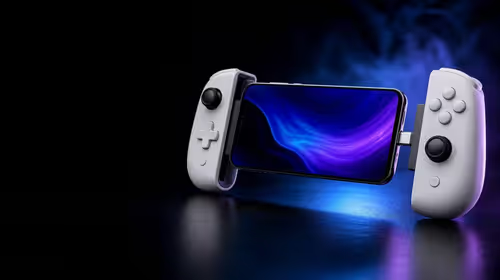
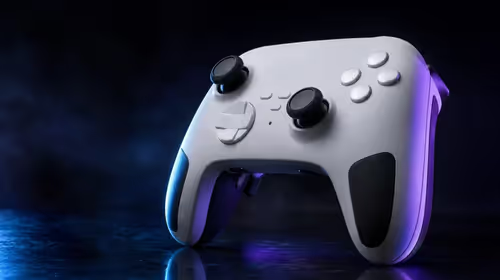
Accurate aim begins at neutral, not at maximum sensitivity. Configure the GameSir X5s Hall Effect sticks by checking that both axes settle cleanly, reducing deadzone in small steps and leaving game sensitivity until last. At R699, the X5s pairs anti-drift Hall sticks with analog triggers, but good magnetic hardware still deserves a careful baseline and repeatable test.
Quick Answer
Place the GameSir X5s at rest, confirm a stable centre, and lower deadzone gradually until unwanted movement appears, then move back one step. Tune in-game sensitivity only after the R699 controller's Hall sticks behave consistently at neutral and through a full sweep. Test the analog triggers separately because their travel serves a different input.
🎯 Establish a neutral reference
Before changing a setting, put the controller on a steady surface and keep both sticks untouched. Use the controller software or a game's input display, where available, to observe the centre. The aim is not to force a perfect-looking number; it is to see whether the reading settles consistently when your thumbs leave the controls.
Repeat the check after moving each stick slowly around its full range. Let the stick return naturally rather than snapping it back with a thumb. If the centre is repeatable, save that result as the baseline. If the reading changes only after a particular direction or edge movement, note the pattern before compensating for it.
Hall Effect sensing measures position magnetically, which reduces the contact-wear mechanism associated with traditional potentiometer tracks. That is why the X5s is described as having anti-drift Hall sticks. It does not make calibration irrelevant: software, physical condition and game settings can still affect what you see on screen.
Players comparing control hardware can use the gaming controller selection at Evetech to place the R699 X5s beside other approaches without treating a single specification as the whole answer.
📐 Reduce deadzone without chasing zero
A deadzone ignores a small area around the stick centre. Too much can make the first part of a movement feel unresponsive; too little can allow tiny neutral variation to move the camera or character. The useful setting is the smallest stable value for that controller, connection and game, not necessarily the lowest number a menu permits.
Lower the deadzone one step, release the stick and watch the result. Then make slow movements near the centre, where small corrections matter most. Repeat the sequence in several directions. If the view creeps while the controller is untouched, move back to the last stable setting rather than hiding the problem with a dramatic sensitivity change.
Keep inner deadzone, outer response and game sensitivity separate in your notes. Those controls can influence one another, yet each answers a different question. Neutral stability belongs to deadzone. Reaching full input belongs to the outer range. The speed of the on-screen response belongs largely to the game's sensitivity or curve.
This order avoids a common trap: increasing sensitivity to recover movement lost to an oversized deadzone. That combination can feel slow at first and suddenly fast once the stick crosses the ignored centre.
🕹️ Tune aim with repeatable movements
Once neutral input is stable, pick a training area or calm game scene and use the same movement several times. Make a broad turn, stop on a visible point, then try a small correction. The Hall sticks should support consistent input, but your chosen sensitivity determines how that movement translates in the game.
Adjust one game setting at a time. A moderate starting sensitivity makes overshoot easier to read than an extreme value. If small corrections feel too abrupt, reduce the relevant sensitivity slightly. If large turns require excessive stick travel, raise it carefully without sacrificing the centre control you just established.
Do not copy another player's values blindly. Hand movement, screen size, game response and preferred aim style differ. A useful profile is one you can repeat under pressure, not one that produces the most impressive menu number.
The X5s also includes 6-axis gyro, so motion aiming may be layered onto stick control in supported games. Configure the sticks first. Otherwise a tilt response can be mistaken for stick instability, especially while you are checking a stationary reticle.
The wider gaming accessory category can help you consider the rest of the mobile setup after the controller response is settled.
🧪 Test triggers as a separate control
The X5s uses analog triggers as well as Hall Effect sticks. Both can report graduated input, but they do not share the same job or necessarily the same game settings. A stick moves across two axes; a trigger travels along one input. Testing them together makes it harder to tell which control needs attention.
Choose an action that visibly responds to partial trigger travel if the game supports it. Press slowly, observe the progression, release completely and repeat. The result should feel consistent across several presses. If the game treats the trigger as a simple on-or-off command, that behaviour may come from the title's input design rather than the controller.
Save a stable default profile before experimenting with mappings, Turbo or ABXY changes. Software customisation is valuable because it can align controls with a game, yet a saved baseline gives every later adjustment a safe comparison point.
At R699, the GameSir X5s puts Hall sticks, analog triggers and customisation in an accessible mobile controller. Its value is realised through a measured setup: centre first, deadzone second, game feel third and extra inputs last. For a quick view of popular supporting gear, browse Evetech accessory favourites after the control profile is dependable.
Frequently Asked Questions
Does anti-drift mean I can ignore calibration?
No. Hall sensing reduces contact-related wear, but neutral behaviour still depends on the complete controller, software and game setup. A short centre check is worthwhile before changing aim settings.
Why should sensitivity be adjusted after deadzone?
Deadzone determines where movement begins, while sensitivity shapes how strongly the game responds. Fixing the starting point first prevents one setting from masking a problem in the other.
Should the analog triggers use my stick values?
Not automatically. Triggers and sticks represent different inputs, so test trigger travel with a suitable action and tune only the settings that the game exposes for it.
What does the Hall-equipped X5s cost?
The GameSir X5s costs R699. That price includes its anti-drift Hall sticks and analog triggers as part of the controller's control set.
Ready to tune aim from a reliable baseline?
Browse Evetech's gaming controller range, compare the control hardware, and choose a model that supports the measured setup you prefer.