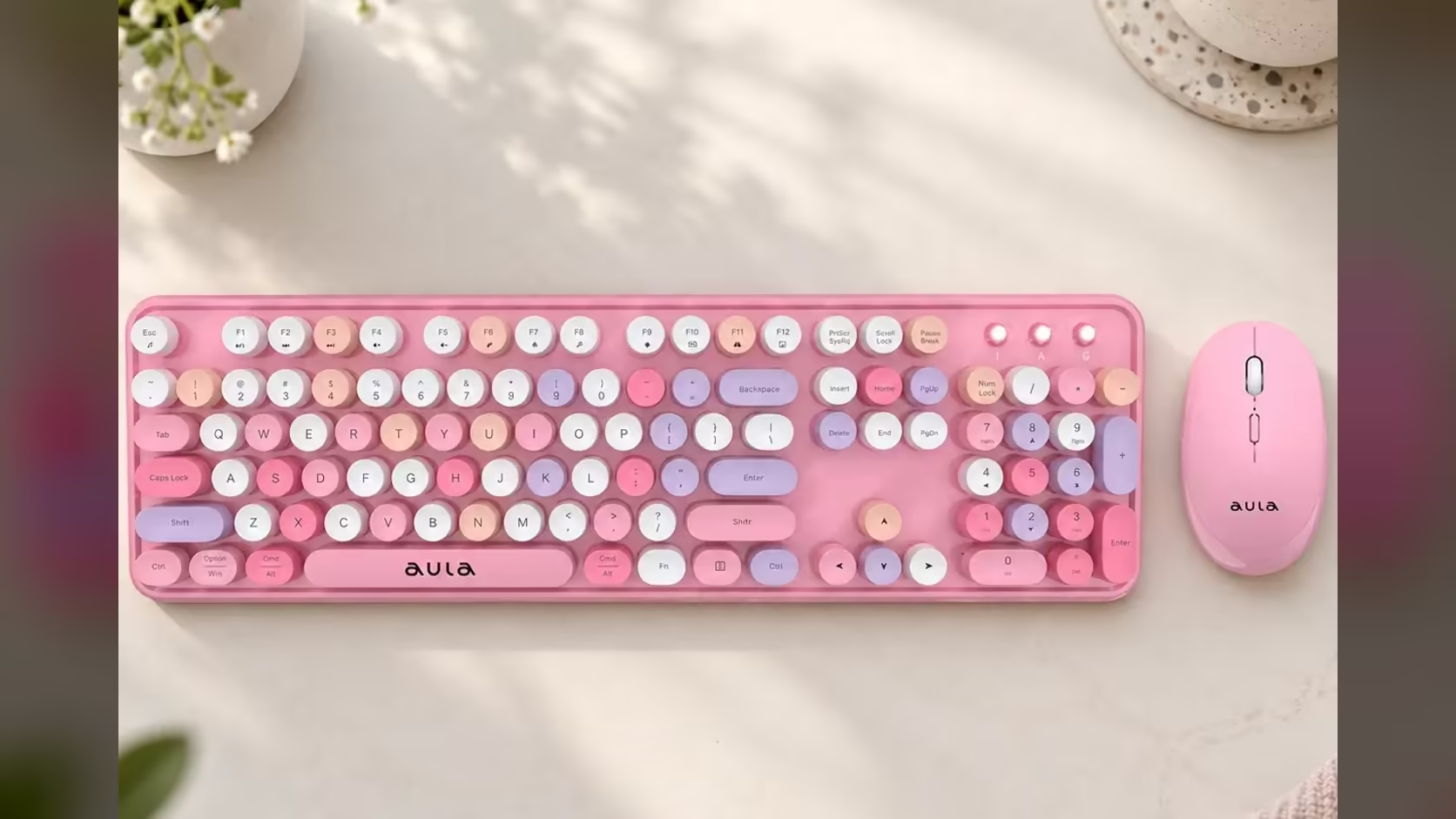
Every keyboard that lives near a kitchen table eventually collects a small museum of crumbs, hair and the odd biscuit fragment. On most boards that debris hides in narrow slots between square caps. The AULA AC306 is different: its round, floating keycaps sit above the base with open gaps around each one, which makes the mess easier to see and easier to reach. Here is a safe routine for cleaning floating keycaps on the AC306 without taking anything apart.
Quick Answer
Switch the AULA AC306 keyboard off, tip it upside down and tap it gently to shake loose crumbs, then brush or blow air between the round keycaps. Floating keycaps sit above the membrane with open gaps around them, so debris is easy to spot and reach. AULA gives no instructions for removing the keycaps, so skip prying them off and clean around them instead. The AC306 set is an R239 buy at Evetech.
🔍 What "floating keycaps" means here
On many keyboards, the keys sit inside a raised frame so only their tops show. On a floating design, the caps rise above a flat base with nothing around them. The AC306 uses round, retro-style floating keycaps over AULA's upgraded membrane, which gives it that typewriter look.
For cleaning, that layout is a real help. There is no frame for crumbs to hide under, and you can see straight down to the base between the keys. Most everyday debris can be dislodged without removing a single cap.
🧹 The routine, step by step
Before you start
- Switch the keyboard off with its on/off switch. That stops random key presses from typing into an open document or waking the computer while you clean.
- For a deeper clean, take the AA battery out too, so the board is fully without power.
- Clear a space and lay down a sheet of paper or a towel to catch what falls out.
Shake and tap
- Hold the keyboard upside down over the paper, with a firm grip on both ends.
- Tap the back gently a few times and tilt it from side to side. A lot of loose crumbs fall straight out.
Brush and blow
- Turn it the right way up. Use a soft, dry brush, such as a clean paintbrush or a soft toothbrush, and sweep between the round caps, working in one direction across the rows.
- For finer dust, a can of compressed air or a small hand blower works well. Hold it at an angle and use short bursts rather than one long blast.
- Finish by wiping the tops of the keys with a cloth that is barely damp, never wet. Let everything dry before switching back on.
⚠️ Why not pull the keycaps off?
AULA does not publish steps for removing the AC306's keycaps, and a membrane board is not built with swappable parts in mind. Prying at a cap without knowing how it is fixed risks bending or breaking the part underneath. Because the floating design already leaves the gaps open, the brush-and-air routine reaches almost everything anyway. If something is truly stuck under a key, work around it with the brush and air rather than forcing a cap.
What about a spill?
Act fast and keep it simple:
- Switch the keyboard off immediately and take out the AA battery.
- Turn the board upside down so liquid drains away from the inside rather than further in.
- Blot the surface with a dry cloth. Do not use a hairdryer on a hot setting.
- Leave it upside down to dry thoroughly, ideally for a full day, before fitting the battery again.
AULA does not describe the AC306 as spill-resistant, so treat any spill as a risk to the keyboard. Sugary drinks are the worst for leaving sticky keys behind.
🗓️ How often, and what to do if a key stops
For a home desk, a quick shake and brush every couple of weeks keeps things tidy, with a more careful clean every month or two. If you eat at the desk, do it more often.
If a key stops working after cleaning, check the simple things before worrying. Is the keyboard switched back on? Is the AA seated correctly? Is the low-power light showing? The board has Num Lock and Caps Lock indicators as well, which confirm it is talking to the computer through its shared 2.4GHz receiver. If a single key still fails, that is a matter for the 1 Year Local Warranty through Evetech.
The AC306 comes in four colours, including pink and brown, and Evetech groups it with the keyboard and mouse combos. If you want a keyboard on its own for a work desk, look at the office keyboards.
Frequently Asked Questions
What are floating keycaps?
Keys that rise above a flat base with no frame around them, leaving open gaps between each round cap.
Why switch the keyboard off before cleaning?
It stops stray key presses while you clean, and removing the battery makes it completely safe.
Can I pull the round keycaps off to clean underneath?
AULA gives no removal steps, so it is safer to clean around them with a brush and compressed air.
Which tools work best for the gaps?
A soft dry brush, compressed air in short bursts and a barely damp cloth for the tops.
I spilled a drink. What now?
Switch off, remove the battery, turn the board upside down to drain, blot it dry and let it dry fully before use.
How often should a home keyboard be cleaned?
A quick shake and brush every couple of weeks, more often if you eat at the desk.
Who helps if a key stops working?
Check the switch, the battery and the indicator lights, then contact Evetech about the warranty if the fault remains.
Time for a keyboard that is easy to keep clean?
Have a look at the combo sets at Evetech and find a quiet keyboard with a layout that suits your home desk.