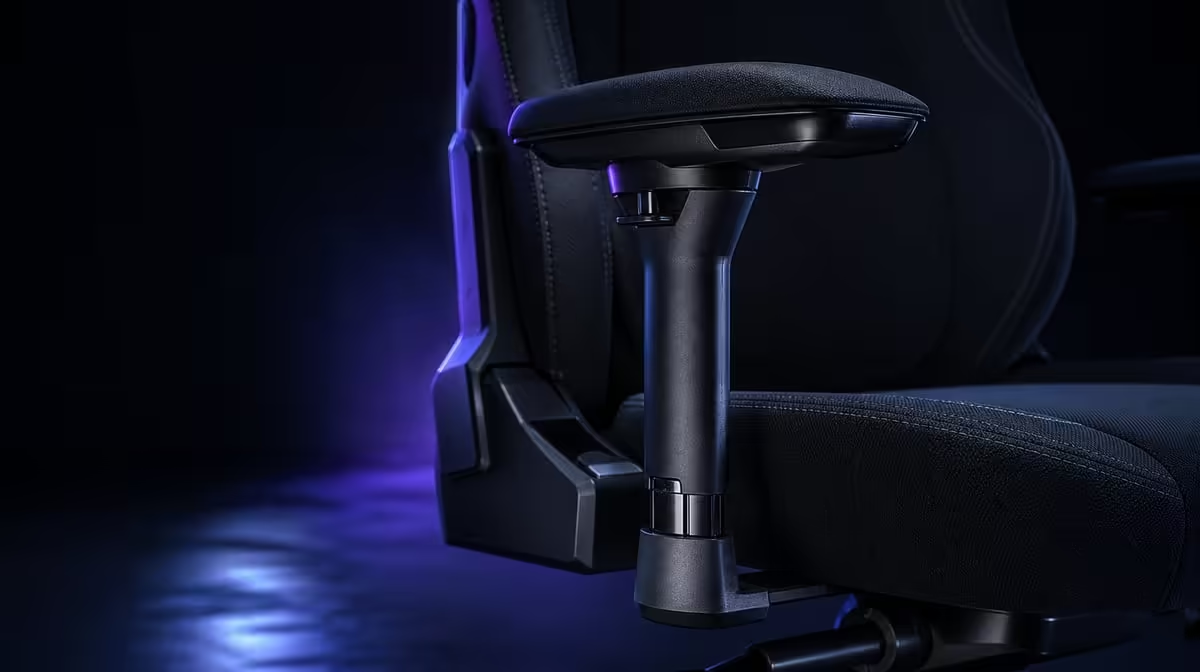
Shoulder and wrist fatigue can build when the forearms lack support or the controls sit beyond easy reach. To reduce fatigue with 4D armrests, first settle the torso, then bring the pads and desk equipment towards naturally bent elbows. The R8,599 noblechairs HERO Black Edition uses enlarged four-way supports for this fine positioning.
Quick Answer
Set the HERO armrests beneath relaxed forearms, keeping shoulders down and wrists close to a neutral line with the keyboard or mouse. Adjust height, depth, width and angle only to solve a specific mismatch. At R8,599, the enlarged pads provide a broad support area, but movement and good desk reach remain essential.
🪑 Establish the torso before the arms
Sit back and tune the HERO's lumbar support until the lower back meets the backrest without being pushed forward. The elbows move relative to the desk when the torso changes, so armrests should follow this step.
Bring the keyboard and pointer close enough that the user does not leave the backrest. A chair cannot remove fatigue created by a distant control surface.
Let the shoulders drop and the elbows bend naturally. This is the reference position for raising or lowering the pads.
Evetech's noblechairs gaming chair selection keeps the HERO comparison product-specific.
↕️ Set height and width
Raise each pad until it meets the forearm without lifting the shoulder. Lower it if the user shrugs or feels concentrated pressure.
Adjust width so the elbows remain near their natural line beside the torso. Pads too far apart can make the arms reach outward; pads too close can crowd the body.
Use each side independently. The mouse arm can need a different position from the keyboard arm.
Check desk clearance after both settings. The chair should approach the controls without the armrests striking the edge or trapping the user away.
Move the chair through the range used to sit down and stand up. A saved pad position is impractical if it repeatedly catches the work surface. Adjust depth or chair distance while preserving relaxed shoulder height.
Notice where pressure lands. The enlarged pad should meet the middle forearm area rather than concentrating force at the wrist or elbow. Slide the support until contact feels distributed.
↔️ Follow the control position
Move the pads forward or backward to support where the hands work. Keyboard and mouse tasks usually place the forearms differently from a controller held closer to the body.
Refine pad angle after height and location are stable. The surface should follow the forearm rather than twisting it.
The HERO's enlarged supports provide more contact area during small movements. They should support the forearm, not press directly into the wrist or lock the elbow.
Create one reference for desk work and another for controller use. A photograph can help a shared user restore the approximate pad position without treating it as a universal setting.
Check the keyboard angle and mouse location after the pads are correct. The controls should meet the hands; the wrists should not bend simply to maintain forearm contact.
Compare other support designs in Evetech's gaming chair category.
🧪 Test fatigue through a normal block
Type, use the pointer and play with a controller long enough to observe the first compensation. Look for raised shoulders, bent wrists, elbows leaving the pads or the torso leaning forward.
Change only one direction and repeat. A controlled adjustment makes it clear whether the pad or the desk equipment needed movement.
Stand and move during long sessions. Arm support can reduce an avoidable load, but it cannot remove every cause of fatigue or make stillness harmless.
Repeat the test after a break and after changing tasks. If fatigue returns only in one application or control position, adjust that layout rather than disturbing the whole chair.
Persistent shoulder or wrist pain needs appropriate professional assessment. Armrests can refine support, not diagnose or treat an underlying issue.
The HERO's breathable covering, steel frame and up-to-150kg user design belong to the wider R8,599 package. They do not choose the forearm position.
Compare premium chairs through Evetech's seating above R4,000, then check current availability after the full desk trial.
Finish the armrest build with a movement audit rather than a static photograph. Type a paragraph, move between mouse targets and then hold the controller as you normally would. Watch for the elbows drifting away from the pads, the wrists bending to compensate or the shoulders creeping upward. Change only one armrest direction at a time so the cause of any improvement stays clear. The enlarged HERO pads should give the forearms room to settle while the four-way controls follow the task. If the desk edge interrupts that path, solve clearance with depth or chair position before adding height.
Write down the working positions and repeat them after standing. A setup that can be restored quickly is more useful than an unusually precise arrangement that disappears every time the chair moves. Breaks, relaxed grip and sensible input placement remain part of the solution; the armrests support the chain but do not replace movement.
Frequently Asked Questions
How can armrests contribute to shoulder fatigue?
Pads that sit too high or too far away can make the shoulders lift or arms reach outward.
Where should the elbows rest?
Keep them naturally bent beside the torso, with the forearms supported rather than forced.
What do four directions change?
They refine height, forward-back location, width and angle for different controls.
Why are enlarged pads useful?
They provide a wider contact area as the hands make small movements.
How should the wrists approach the desk?
Keep them near a neutral line rather than bending sharply up or down.
Can armrests remove all fatigue?
No. Desk reach, task intensity, movement and individual factors still matter.
When should the setting change?
Retune when the control type or desk layout changes and the forearms no longer land naturally.
Should the pads press into the wrists?
No. They should support the forearms while leaving the hands free to approach the controls.
Can a shared chair keep one armrest position?
It can, but each user should verify relaxed shoulders and natural elbow contact rather than assuming the saved setting fits.
Ready to make arm support follow the task instead of forcing the shoulders to compensate?
Compare Evetech gaming chairs and tune the HERO's enlarged pads with your full desk setup.