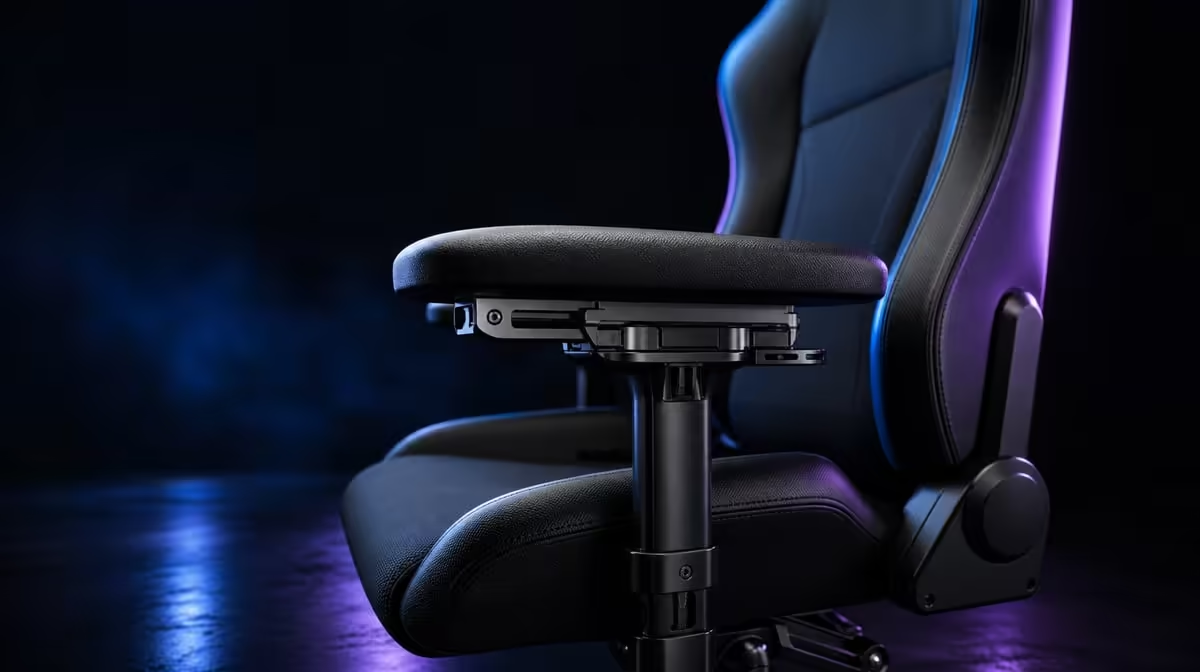
Four-way armrests become ergonomic through a sequence, not a maximum setting. To set up 4D armrests for gaming, find relaxed shoulder height, place the pad beneath the working forearm and tune each control profile around desk clearance.
Quick Answer
Raise the HERO TX pads to meet naturally bent forearms, then adjust forward-back reach, inward-outward placement and angle for the controls. The enlarged surfaces provide more landing area. At R7,899, they add value when the chair stays close enough to the desk and settings can be restored.
↕️ Find working height
Sit fully into the cold-foam seat and allow the shoulders to drop. Bend both elbows and bring each support upward until it just meets the forearm.
Type or play for several minutes. Lower the pad if the shoulder rises or the wrist bends upward.
Evetech's noblechairs gaming chair page gives buyers relevant adjustment comparisons.
Set sides independently
Mouse and keyboard use can create different positions. Keep the torso centred while adjusting each arm.
Do not use a large mismatch to compensate for controls placed badly.
Let the cushion settle
Wait until seated height feels stable before the final armrest pass. Recheck after thirty minutes.
Cold-foam contact can change the elbow relationship from the first instant.
↔️ Refine reach and spacing
Move the pads towards the portion of the forearm that needs support. Keep the elbows close enough for the torso to remain relaxed.
Adjust width so the pads neither squeeze the body nor sit beyond useful contact.
Test desk approach
Move the chair towards the keyboard and check collision. Retract a pad before accepting a gap that pulls the body forward.
The backrest should remain available during active controls.
Build a controller profile
Hold the controller normally and notice the narrower forearm path. An inward or changed-angle position may suit it.
Save this separately from the keyboard-and-mouse profile.
🔄 Use angle as refinement
Rotate the pad only after height and reach are close. Follow the line from elbow to hand and test the wrist through actual movement.
An enlarged surface should provide broad contact without blocking the mouse path.
Explore Evetech's wider gaming-chair range when another pad geometry fits the desk better.
Make one change at a time
Complete a short task after every adjustment. This preserves the cause of improvement.
Large simultaneous changes create a profile that cannot be reproduced.
Include the memory headrest
Lean back with the chosen arm profile and see whether head contact arrives naturally. A relaxed viewing mode may need another reach setting.
Keep it distinct from the focused work arrangement.
🧪 Verify and record
Type, move the pointer and use a controller. Note shoulder height, pad-edge pressure, wrist angle and desk access.
The 150kg maximum does not predict armrest fit. Test body proportions directly.
See where R7,899 sits among Evetech's well-liked chair listings. When the headrest choice is settled, confirm the model is still available.
Save four axes
Write height, reach, spacing and angle for each side and task. Shared users should keep separate profiles.
Practise restoring the setup after another person changes it.
Add movement
Release the forearms, stand and reset during long sessions. The pads provide support, not immobilisation.
Return and confirm that the saved profile still meets the arms.
Check pad-edge pressure
Use each control for ten minutes and note whether an enlarged pad edge presses into the forearm. Shift reach or angle in one small step.
Broad pads still require the arm to land in the right area.
Coordinate screen distance
If the user leans towards small text, improve monitor distance or scale before changing arm support. A visual problem can pull the shoulders forward.
Recheck the pad profile with the torso back.
Test warm-session clothing
TX fabric and sleeves can alter how the body moves as the arms use the supports. Run the setup in normal clothing.
Keep material feel separate from forearm geometry.
Review shared access
Let another user change all four axes, then restore the original notes. Time the return and complete a short task.
Repeatability determines whether the adjustment range remains useful in a shared chair.
Inspect the final seated base
After every profile passes, return attention to feet, seat pressure and back contact. The arms should not shift the body to one side.
Stand and sit again to confirm the arrangement is easy to recover.
Operate the chair controls correctly
Use premium stainless-steel levers only for their intended chair adjustments. Stop instead of forcing an unfamiliar action.
Armrest setup should not become a mechanism experiment.
Compare late-session position
Repeat the three-task circuit after a longer block and movement break. Note shoulder or wrist drift.
Update only the profile that changed.
Keep the price in view
At R7,899, count the tasks that need 4D movement. A user with one fixed control position may value another feature more.
Finish with desk-entry repetition
Move in, complete a short task, roll out and return three times. The pads should clear the desk and meet the arms again.
Repeatability turns the saved profile into daily ergonomics.
Frequently Asked Questions
What is the first 4D armrest setting to find?
Find height from relaxed shoulders and naturally bent elbows.
How should forward reach be adjusted?
Move the pad beneath the working forearm without pulling the elbow behind the body.
Why would the pads move inward or outward?
Spacing helps match elbow position and different control layouts.
When should the armrest angle change?
Change it after height and reach, using the wrist and forearm path as the guide.
What do enlarged HERO TX pads contribute?
They provide a broader contact area for the forearms.
Ready to turn every armrest axis into a useful control profile?
Browse Evetech's gaming-chair selection with your desk clearance and input positions measured.