Start with where the ad appears. That tells you which setting to check when you search how to stop ads on my phone. An alert with a site name in your notification shade needs a different setting from an advert that covers the home screen. Record what was open when it happened, then change just the app or permission that can cause that behaviour.
Quick Answer
On Android, check whether the ad comes from a website notification, a browser pop-up or an installed app. Turn off the site's notification permission or check the app responsible for ads outside the browser. These checks cost R0 and work without installing another app to investigate.
🌐 Deal with ads from a web page
Look for the site or browser name attached to the alert. A site notification can arrive even after you've left the page, so check the browser's site notification list for the sender. Revoke just that permission where possible. If it is a pop-up while browsing, check the browser setting for pop-ups and redirects. Those controls have different jobs.
Test the same browser on a page you trust. Ads placed inside a page as part of its design may still appear when pop-ups are blocked. Judge the result by the behaviour you were trying to stop, such as a new tab opening by itself or a site sending more alerts. Avoid tapping offers to clean your device that appear in a page or unexpected notification.
📱 Check if another app is responsible
If an ad appears over the home screen or after opening unrelated apps, check the recently installed list. Think about when the ads started and which apps changed around that time. On a Galaxy phone, follow the device's instructions for identifying which installed app is showing the ad. Menu wording can differ by phone maker and software version.
Remove a suspect app only when you recognise it and know what you installed it for. Save any files it holds first. If the problem goes away after removing it, keep an eye on the original trigger before changing anything else. If you can't identify an app from the timing or settings, use the phone maker's support for the model before downloading another cleaning app.
🔒 Make the fix easy to check
Write down a couple of normal actions that used to trigger the behaviour. Open the browser, return to the home screen and try the app where the ad appeared. Telling support which of those actions still triggers a full-screen ad is more useful than sending a sketch of every setting you've changed. There may be more than one source, so compare one step at a time.
If ads interrupt setup on a newly purchased phone, use the device's current documentation to check notification or app settings. A change to Wireless Routers won't remove ads that an app displays on the phone. Use All Accessories for the hardware you need around the device if you decide to set it up at a desk, and solve the ad problem at its source in the phone settings.
Frequently Asked Questions
How do I stop ads when opening apps?
Check recently installed apps and establish which one displays the ad before you remove it.
Why do browser ads arrive when the browser is closed?
A website can send alerts after you grant its notification permission. Revoke the permission for the site.
How do I stop pop-ups on a Galaxy phone?
Identify whether the ad is from a browser or an installed app, then use the applicable setting on your exact model.
Will the pop-up blocker remove all adverts on a website?
It targets separate pop-up windows or redirects. An ad built into the page can still appear.
Should I install a cleaner advertised by a pop-up?
Avoid those links. Use your browser and phone's built-in settings to investigate first.
Will using a different Wi-Fi network stop app ads?
Changing routers won't remove an ad shown by an installed app. Check the app that displays it.
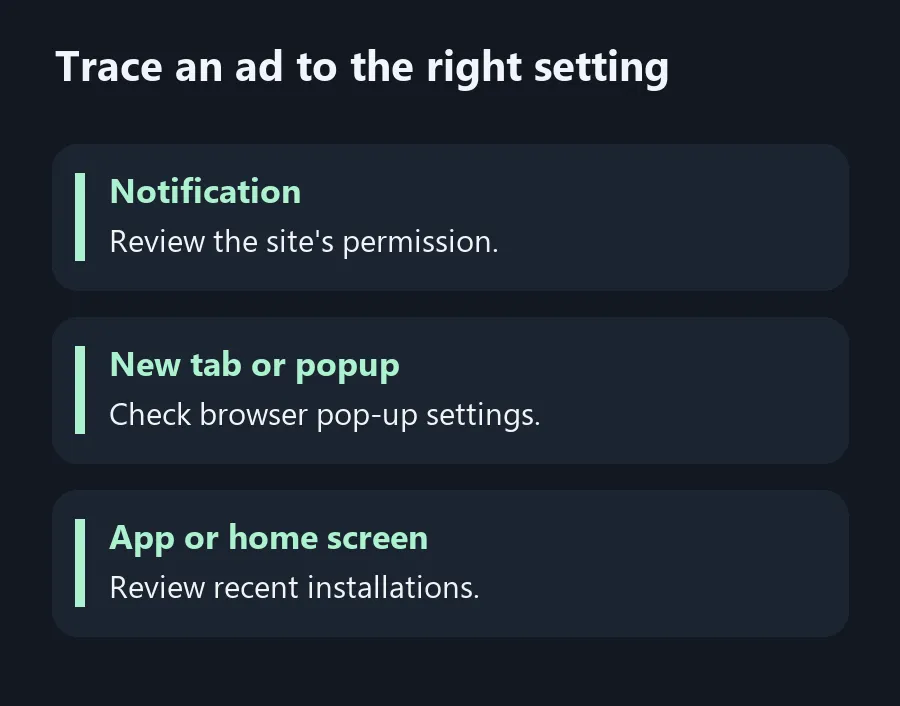
Trace an ad to the right setting
Use the source of the ad to decide which permission or app to change.