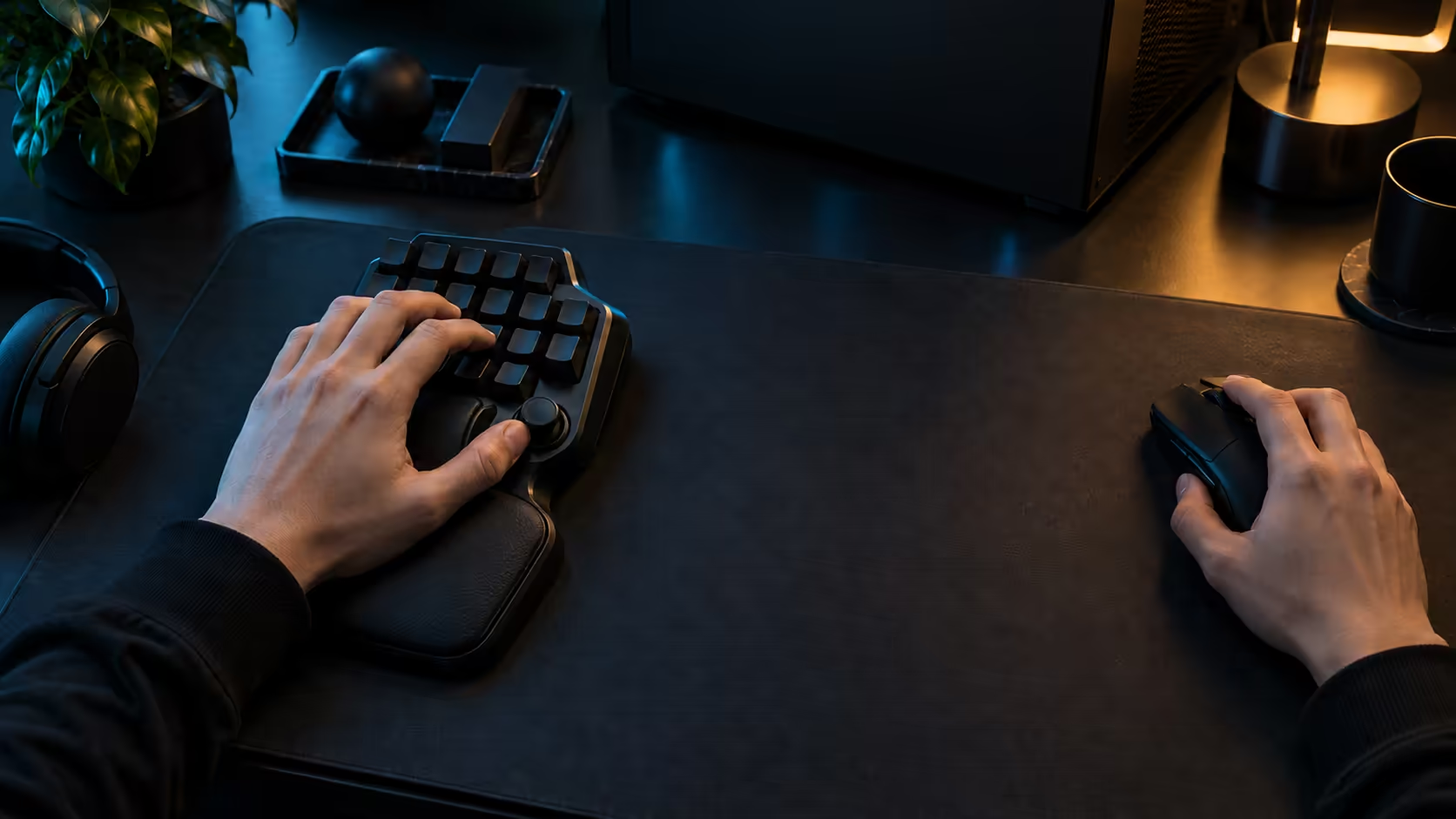
Most keypad buyers compare the wrong things first. They look at the number of keys, the colour, or the brand name on the box, and leave the specs that decide daily comfort until after they have paid. A better shortlist starts with five checks: the actuation range, Rapid Trigger, the number of programmable controls, the wrist support, and the fit with the desk you actually have. Run those checks against the Razer Tartarus V2 Pro and you can decide in one sitting whether it earns its place.
Quick Answer
Check the actuation range, Rapid Trigger, the number of programmable controls and the wrist support before anything else. The Tartarus V2 Pro lists 0.1mm through 4.0mm actuation, Rapid Trigger, 31 programmable controls and an adjustable wrist rest, and Evetech's price is R4,799 including VAT. Weigh those specs against your current binds rather than against the keypad's looks, and the decision gets much simpler.
📋 Five checks before you pay
Start with a simple list of five. First, the actuation range, because it decides how light a press can be and how deep a key must travel. Second, Rapid Trigger, which decides how soon a key can fire again. Third, the number of programmable controls, which decides how many binds you can keep off the main keyboard. Fourth, the wrist support, which decides how long a session feels comfortable. Fifth, the fit with your desk, which decides whether the keypad works in the room you have. Five checks, each scored yes, no or unsure, take about 15 minutes.
Give each check a yes, no or unsure. A keypad that scores no on the first three is a poor fit for a movement-heavy game, and one that scores no on wrist support will ache in long sessions. The fifth check is the one most buyers skip, and it is the one that costs the most when the keypad arrives and does not fit.
🔍 Actuation: what 0.1mm-4.0mm covers
Depth runs from 0.1mm to 4.0mm on the switches. A setting near 0.1mm registers almost the moment a key begins to move, which suits a light, repeated tap. A setting near 4.0mm needs a deliberate press, which suits a key you never want to fire by accident. A sensible start is a shallow setting on movement keys, somewhere around 1.0mm, with a deeper one on abilities.
Check the range against your habits. Press your current keyboard's movement keys and note how far they travel before they fire, which is usually close to 2mm on many mechanical boards. Then compare that with the range you need on the keypad, and decide whether the extra control is worth paying for. If you rarely change the depth of a key, the range matters less than the other four checks.
🧷 Controls and the bind count
Count your binds before you compare controls. Write down every action you use on the keyboard, the mouse and any other device, then mark the ones you press during a typical session. The Tartarus V2 Pro's 31 programmable controls are useful only if your list is longer than the space on your main keyboard, so the count tells you whether the extra controls will earn their place. Count your binds against the 31 controls before you decide. A 10 minute count is enough to decide.
Be honest about overlap. If your binds sit on keys you already reach easily, a keypad may not add much. If your binds are crowded into the same few keys and you keep reaching across the board, the 31 controls are a clear benefit. Use the count to decide, not the keypad's marketing.
🤚 Wrist support and long sessions
The keypad ships with a fully adjustable rest, so buying another is optional. Adjust it until the wrist rests near level with the keys, and test it for a full 60-minute session before you judge it. If your wrist aches after 30 minutes, adjust the height by a small step and test again, rather than deciding the keypad is wrong.
Long sessions expose poor support faster than short ones. A keypad that feels fine for 15 minutes can pinch the wrist by the end of a three-hour evening, so judge the rest on the length of the session you actually play.
Fit the keypad to your desk
The last check is the room. Many desks in Pretoria flats and Johannesburg res rooms look bigger online than they measure in person. Measure the clear space between keyboard and desk edge in centimetres, and confirm the keypad has clear space under your left hand. If the rest hangs over the edge, the keypad will not sit square and the wrist will drop with every press.
Dust is part of the fit as well. Highveld grit collects between the keys within days, so confirm you can clean the keypad weekly without moving the whole setup. A keypad that is hard to clean is one you will stop using.
Frequently Asked Questions
Which check should I do first?
Start with the bind count, because it tells you whether a keypad will earn its place at all. The other checks only matter once you know you need the extra controls.
Is 0.1mm up to 4.0mm a wide enough range?
For most players it covers both light movement taps and deliberate ability presses. Test the shallow and deep ends in a training room before you decide the range is enough.
Does the wrist rest need replacing?
Not to begin with. The Tartarus V2 Pro includes an adjustable rest, so test it for a full session first and adjust the height before you consider another one.
What is the price?
Evetech prices the Tartarus V2 Pro at R4,799 VAT-inclusive. Set that against the bind count and the desk fit, since those decide whether the figure is justified for your setup.
The gaming keyboard shelf shows the keypad alongside other options, and the desk accessories for keyboards has the cleaning and desk add-ons.
Ready to run the five checks on a keypad?
Browse our gaming keyboards, then compare the controls and the wrist support before you choose.