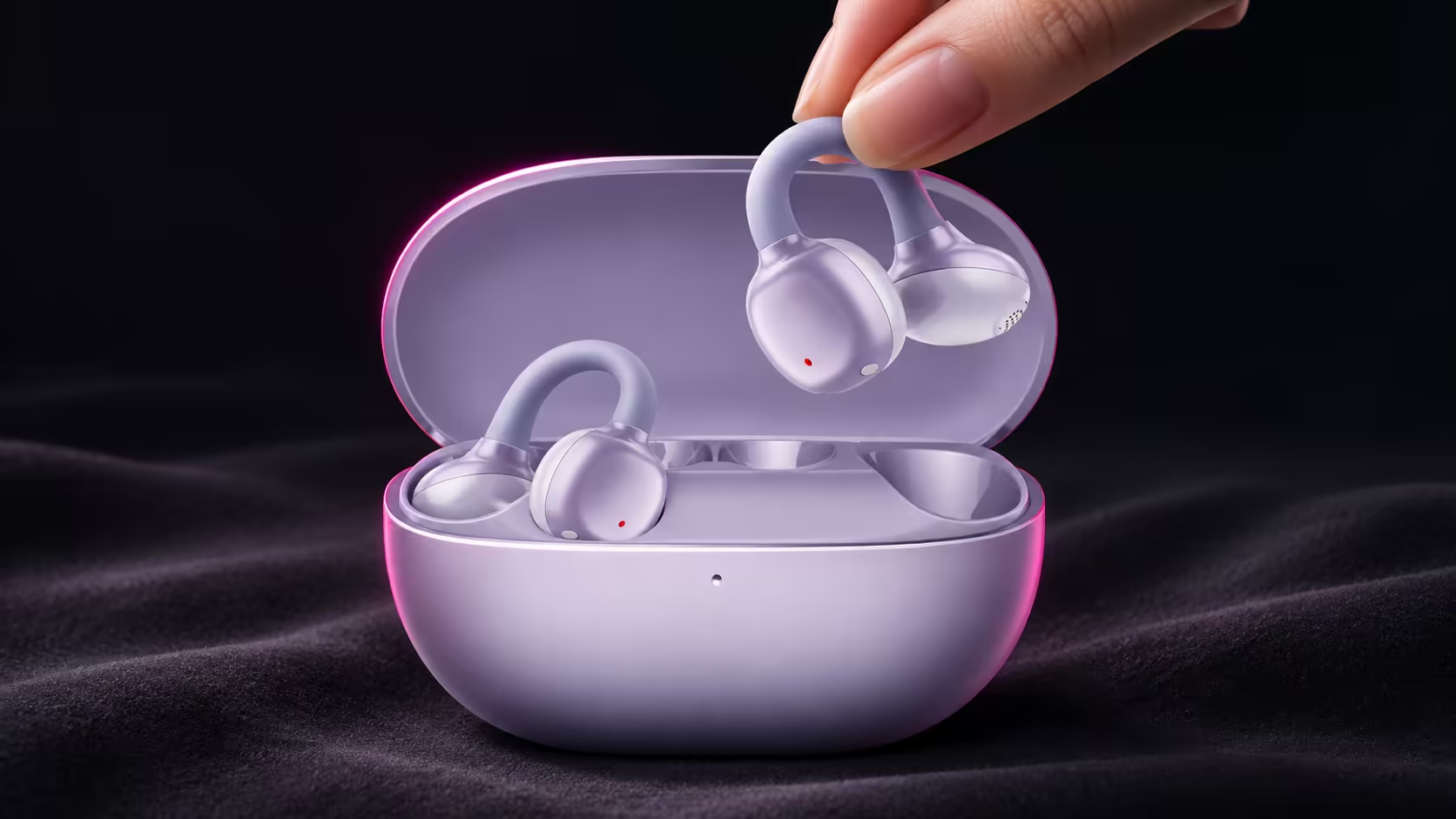
The names are close enough to miss the change when you are shopping quickly. In an AirClip-Pro vs AirClip comparison, both are open-ear clip-ons with touch controls. Look first at the source devices you want to use, because the Pro's clearest difference is the way it can stay connected to two of them.
Quick Answer
Promate lists Bluetooth 6.0 and two-device multipoint for AirClip-Pro. The original AirClip lists Bluetooth 5.4. Both models use 12mm drivers and have the same headline claims of up to 6 hours per charge and 28 hours including the charging case, so the Pro is easier to justify for switching between sources than for those shared figures.
🔗 Compare the pairings you actually use
Imagine moving from an audio recording on your laptop to a call on the phone. If you do that often, the Pro's documented two-device multipoint can keep both connected and save a trip back to the Bluetooth menu. Check the instructions to add the second device, then test a call while laptop audio is playing. How the audio switches and resumes can differ with the equipment and apps.
If the phone is your main source during a walk between lecture halls, the original AirClip's Bluetooth 5.4 may already cover your routine. The newer Bluetooth version on its own gives little guidance about how useful two active connections will be to you. Choose by the feature and the way you use it.
When comparing Evetech wireless earbuds, distinguish a list of devices the buds remember from those they can keep connected together. Multipoint also leaves open which device takes over when something begins playing. It is worth testing the two devices that matter rather than assuming every combination behaves the same way.
👂 Look at the similarities in how they fit
Both models use an open-ear clip design. The earbud rests around the ear and directs sound towards the canal. If you are coming from an in-ear design, try wearing a clip when stationary first and pay attention to how it rests alongside glasses or hairstyle. Even a design built for the same job can feel different between wearers.
The driver diameter is listed as 12mm on both. That figure describes a part of the design. It cannot establish how the two sound to you, whether they leak the same amount into a quiet room, or how the bass feels with the buds in position. Try a track and a voice recording you know in a quiet space, then compare in a room with some background sound.
If you work in a space where you want to keep more sound out, consider the fit and isolation of headphones separately. Leaving the ear canal open is a reason to choose the AirClip shape. It can also mean that nearby conversations and other sounds remain easy to hear while you listen.
🔋 Check the case as well as the earbuds
Promate lists up to 6 hours from the buds and up to 28 hours in total including the charging case for each model. The case numbers are useful if you break up listening throughout the day. For one uninterrupted campus day of recordings, plan around the bud runtime and where you can take a charging break.
Use each model's instructions for charging both buds and case. Return the buds to their seats and verify they are making contact, especially after wiping them down following exercise. Check the case separately so a short break actually adds charge. Listening time can change with how you use calls and volume.
The published specifications also list IntelliTouch on both models. Learn the control map for the one you use rather than transferring a gesture immediately from an older pair. Start with what you do most often, like play or pause, then try a call. Gesture preference is useful if you use a phone one-handed while moving between classes.
📝 Decide whether there is a feature you would use
If you already use AirClip comfortably with one device, make a list of what you want to change. If the problem is switching between a computer and phone on the same desk, the Pro's multipoint directly addresses it. If the concern is the stated driver size or total case runtime, the published headline figures give you little reason to replace the previous model for that detail alone.
If you are choosing a first clip-on pair, compare the fit and device connections first. Use familiar audio at a sensible level and see whether the sound meets your needs without turning it up in loud surroundings. Test a call in the room where you normally work before choosing on connection specs alone. A practical comparison gives you more to go on than the change in name.
Consider how often you let another device take over deliberately. Someone who starts the morning with a podcast on a phone and moves to a laptop for a meeting might use multipoint several times a day. Someone whose laptop speakers handle all their meetings might never need the switch. Try those two routines rather than assuming the feature matters merely because both devices are in the room.
Also check how easily you can tell that the second device has connected. A laptop can leave media on its speakers after pairing the earbuds, and an incoming call can select a different route from music. Familiarise yourself with each device's sound menu before deciding whether the change genuinely makes the desk simpler.
Frequently Asked Questions
Is the Pro's driver larger than the original AirClip's?
Promate lists 12mm on each. Listen to the two designs if you are making the choice for sound.
Do the headline battery figures change with the Pro?
Both list up to 6 hours on a bud charge and 28 hours with the case included. Your settings and listening sessions affect realised time.
Why is multipoint the major difference for a desk user?
It can keep the phone and laptop connected at once and let you switch between them. Check how your apps handle transitions when media or a call starts.
Does a clip-on sit inside the ear canal?
The AirClip family is designed to clip around the outer ear. Check the fit with any glasses or headwear you usually wear.
Choosing between the AirClip models?
Compare fit, call controls and device switching across earbuds at Evetech.