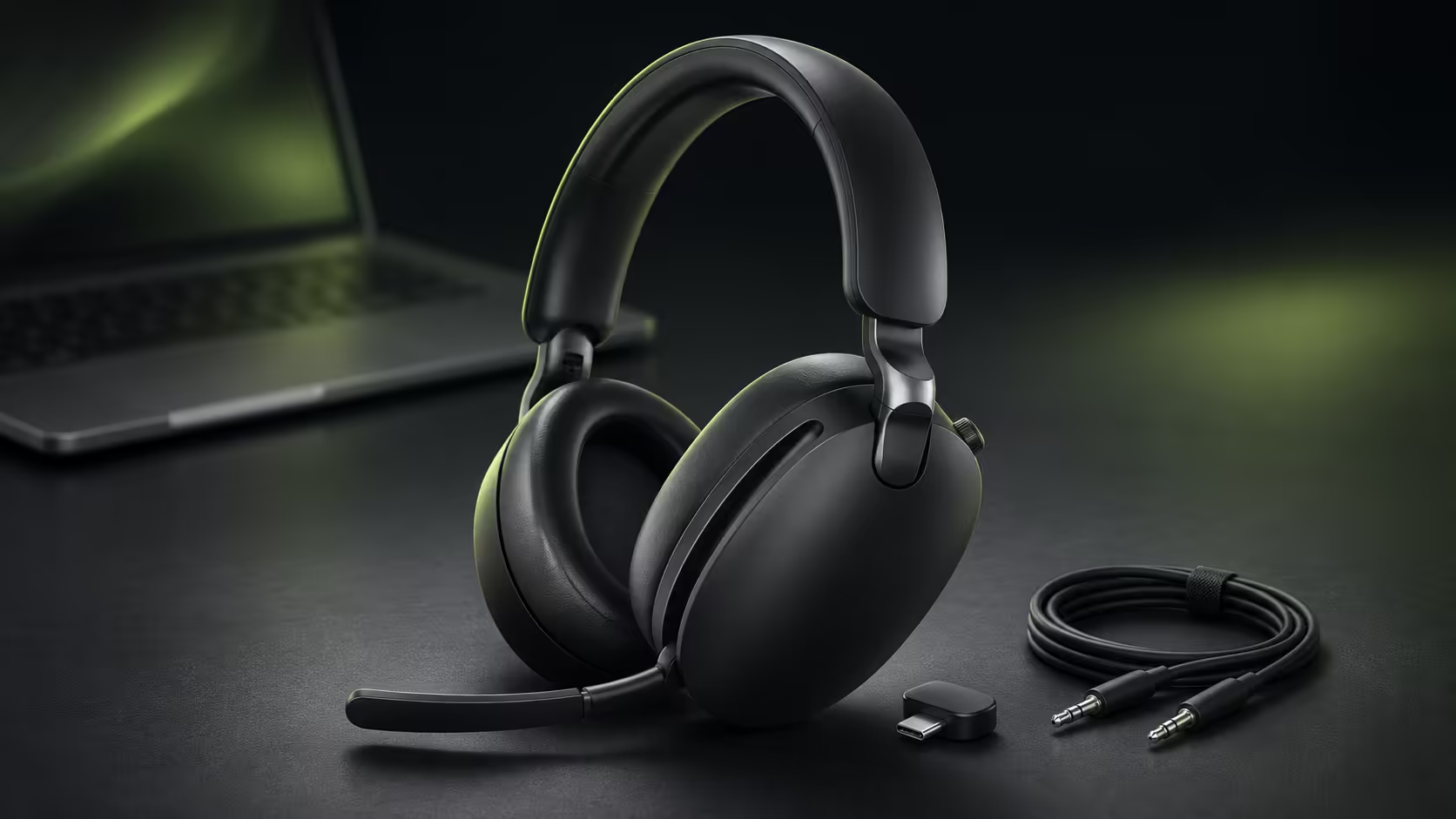
The Serene-2 connection modes suit three different setups. At a res room gaming desk you can devote a port to the dongle. On the move your phone may be simpler to use over Bluetooth. On a flight, the airline's entertainment output may require a cable. Check the source you will use and then choose the connection that fits.
Quick Answer
The Promate Serene-2 supports Bluetooth 5.4, a 2.4GHz dongle and a wired input. Try the dongle for supported gaming setups, where Promate quotes 30ms latency, and use Bluetooth for a compatible phone on the move. Use the wired input for a suitable audio source after testing the connection and checking the headset's power requirements.
🎮 Give the gaming setup its own test
Use the dongle on a supported device and select the Serene-2 as the audio output. Open a scene with an obvious sound tied to an action on screen and compare it with your normal Bluetooth setup. This makes it easier to notice the behaviour that matters to you without having to estimate milliseconds by ear. Promate's 30ms figure describes its dongle mode. Game, app and display settings can affect the total delay you experience.
Check whether the device you intend to use accepts the dongle and whether it exposes the headphones as both an audio output and microphone input. If you play with friends, test voice before starting a match. Choose the headset in the chat application if it has an audio menu separate from the game's audio settings.
For comparison, look at the connection modes listed on Evetech gaming and wireless headphones. A dongle can make sense when you have a compatible port available. If your device's ports are already occupied, check how you would connect it without getting in the way of a controller or charger.
📞 Try Bluetooth on the device that makes the call
Pair the phone or supported computer over Bluetooth and confirm that it chooses the Serene-2 for call audio. Make a short call from the place where you normally talk, then check whether the other person can hear you clearly. The position of the microphone matters, and reading the spec is easier to do before a call than while you are already in one.
The Serene-2 has a flip-to-mute mic with ENC. Practise lifting it to mute and returning it to the speaking position. Confirm in your call session that the other person hears you once you have unmuted. ANC changes what reaches your ear, while the microphone processing affects the sound the other person receives.
Bluetooth lets you leave the dongle at the desk. Keep track of which source is connected after you move between rooms. A pairing still listed on your phone does not tell you whether the phone is using it at the moment. Try the playback menu and call output selection if audio goes to a speaker instead.
✈️ Find out what the wired source expects
A seat screen or an older device may have a compatible audio output. Check what socket it uses and whether you need an adapter. Before travelling, connect the intended cable to a source you can test at home. Verify both channels and see how you control volume when using the wire.
The published Serene-2 information lists a wired input and leaves passive playback with a depleted battery unconfirmed. Charge the headset before a long trip and ensure any active functions you want to use work in the intended mode. Follow the airline's instructions on personal equipment during the flight.
If your phone will be the main source for downloaded media, test that phone with the planned connection while offline. That avoids learning at the airport that the cable needs a separate adapter or that a particular app needs internet access to play the material you selected.
🔋 Choose a mode to suit the place, then plan for power
Promate quotes about 100 hours with ANC off at half volume, and about 50 with ANC on. Those figures are useful for planning top-ups without assuming every setting uses the same amount of power. Check the battery before leaving for several sessions and keep your charging cable somewhere accessible.
In a shared room, a headset lets you listen and speak without putting audio through the whole space. If people later want to listen together, one of the wireless speakers suits that different job. Use the dongle where a supported device offers it, Bluetooth where direct pairing is convenient, and the cable where the source provides a usable output.
Make a note of how you return to the desktop after using the phone. Check the headset's mode selector and the output the computer last used. Try that change during a short break rather than when you are in a game or joining a call. Keeping the dongle with the desktop charger and the audio lead in a travel pouch makes it clear which accessory travels with you.
If you share the PC, agree on which output should be active when you leave the desk. The next person may expect sound from the speakers. That is a simple setting to check before you conclude that the computer lost the headset.
When you compare your sessions, keep notes on the source, connection and audio task. That gives you a short list of working combinations to return to after a software or hardware change.
Record whether the microphone was available as well as whether you could hear the sound.
Frequently Asked Questions
Does the 30ms figure apply to all modes?
Promate quotes it for the 2.4GHz dongle connection. Test how your full setup responds in the mode you plan to use.
Which connection should I try for a phone call?
Bluetooth is the natural starting point with a compatible phone. Confirm the call audio and microphone routes in the phone's settings.
Can I assume the wired input works with no battery at all?
The published listing does not say that. Test the intended setup and charge the headset before relying on it during travel.
What if the dongle is connected but I hear the computer speakers?
Select the Serene-2 as the output in the operating system and the game or call app. If the device does not recognise the dongle, check compatibility.
Choosing a connection for a desk, phone or seat screen?
Compare the listed headphone modes and source requirements at Evetech.