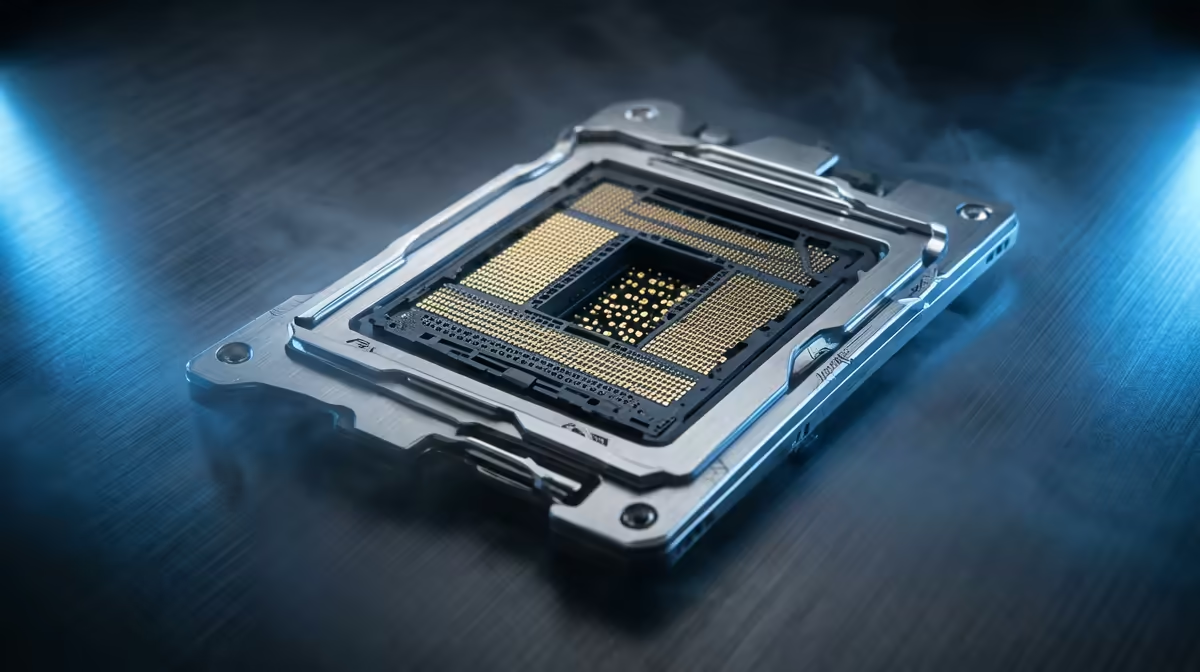
Sitting on a fresh LGA1851 board and hoping to slot in a Nova Lake chip down the line? The leaked socket images close that door before it opens. Intel's next platform moves to LGA1954, and a different notch arrangement means a Nova Lake CPU physically cannot drop into an LGA1851 socket. The good news is that the rest of your build is not wasted, and planning around this now saves a frustrating surprise later.
Quick Answer
No, you cannot upgrade an LGA1851 motherboard to Nova Lake. The chip uses the new LGA1954 socket with relocated alignment notches, so it will not seat in an LGA1851 board. You will need a new motherboard for Nova Lake, but you can carry over your DDR5 memory, your cooler in most cases, and your GPU and storage.
Why the socket change blocks the upgrade
CPU sockets use physical keying so a chip only fits one way and in one matching socket. The leaked Nova Lake images show LGA1954 with a notch placement that differs from LGA1851. That is not a minor revision: the alignment cut-outs and pin count are part of how the chip mechanically and electrically mates with the board. A different notch layout means the package will not sit down correctly, full stop.
This mirrors how Intel has handled platform transitions before. A new socket usually arrives with a new power delivery design, updated chipset features and revised signalling that an older board cannot supply. Even if a chip could be forced to fit, the surrounding board would not be wired for it.
What you keep and what you replace
The motherboard is the part you replace. Almost everything bolted around it survives the move.
DDR5 memory carries over
Nova Lake stays on DDR5, so the memory kit in your current LGA1851 build moves to the new board without a problem. Faster kits may unlock better support on the newer platform, but you are not forced to rebuy RAM just to make the jump. That is a meaningful saving given how much of a build's cost sits in memory.
Your cooler almost certainly fits
Cooler mounting is tied to the socket retention layout rather than the pin pattern, and Intel has kept mainstream desktop cooler dimensions consistent across recent generations. In most cases your existing air or liquid cooler will mount on the new board, possibly with a bracket Intel or the cooler maker supplies. Confirm the mounting kit before you buy, but you should not need a whole new cooler.
GPU, storage and PSU are unaffected
Your graphics card, NVMe drives and power supply have nothing to do with the CPU socket. They move straight across. The only spend that the socket change forces is the motherboard itself, plus the new CPU you were always going to buy.
Why a new socket usually means a new chipset
A socket change rarely arrives alone. New platforms typically introduce a fresh chipset with updated connectivity, revised lane allocation and tweaked power delivery to feed the new silicon. That is part of why the board, not just the socket, has to change: even a chip that could be forced to fit would not get the power phases or signalling it expects from older board electronics.
For buyers, the practical upshot is that an LGA1954 board is a genuinely new platform rather than a refreshed LGA1851. You may gain newer connectivity standards in the process, which is a reason to view the move as an opportunity to refresh the foundation of the build rather than a pure cost.
Don't overspend on a board for a future that won't come
A common mistake is buying a premium LGA1851 motherboard specifically to "future-proof" for a drop-in next-gen chip. The socket change removes that justification entirely. If you are buying an LGA1851 board today, buy it for the features you need right now, with the chips that share its socket, not for an upgrade path that the move to LGA1954 has closed off.
What this means for an upgrade plan
If you bought into LGA1851 expecting a drop-in Nova Lake chip later, recalibrate. LGA1851 is effectively its own generation, and the upgrade path within it is limited to chips that share that socket. That is worth knowing before you spend on a high-end LGA1851 board purely as a future investment.
For anyone deciding right now, the question is timing. If your current chip already meets your needs, there is no rush. If you are building fresh and want the longest runway, it may be worth weighing whether to buy in now or wait for the LGA1954 platform to arrive and assess it on its own merits.
Is it worth holding out for LGA1954?
That depends on how soon you need the machine and how demanding your workload is. Waiting buys you the newest platform and whatever generational gains Nova Lake brings, but it also means delaying. If you need performance today, a current Intel chip on its matching board still delivers, and you can browse what is in stock in the Intel CPU range to see where pricing sits before committing either way.
Planning the next build sensibly
A clean way to think about it: treat the CPU and motherboard as a paired purchase every couple of generations, and treat memory, storage, cooler and GPU as the parts that survive multiple upgrades. That framing stops you overpaying for a board on the assumption of a drop-in upgrade that the socket change has ruled out.
If you want a sense of complete systems built on current Intel platforms, the best-selling PC list is a quick reference for how popular configurations are specced right now, which helps when you are sizing your own parts.
Frequently Asked Questions
Can I put a Nova Lake CPU in my LGA1851 board?
No. Nova Lake uses the LGA1954 socket, and the different notch placement means the chip will not physically fit an LGA1851 socket. A new motherboard is required.
Will my DDR5 RAM work with Nova Lake?
Yes. Nova Lake continues on DDR5, so your existing memory carries over to the new LGA1954 board. You do not need to repurchase RAM to upgrade.
Do I need a new CPU cooler for the new socket?
Most likely not. Cooler mounting has stayed consistent across recent Intel desktop generations, so your current cooler should fit, possibly with a supplied bracket. Check the mounting kit compatibility before buying.
Why does Intel change the socket so often?
New sockets accompany new power delivery, chipset features and signalling that older boards cannot provide. The physical keying prevents a chip from being installed in a board that cannot properly support it.
Should I buy LGA1851 now or wait for LGA1954?
If you need performance today, a current Intel platform is fine and fully capable. If you can wait and want the longest upgrade runway, holding for LGA1954 lets you assess Nova Lake on release. There is no drop-in path between the two.
Planning your next Intel build? Compare current processors and platforms in the Intel CPU range at Evetech, and pair the right chip with a board that matches the socket you actually intend to run.