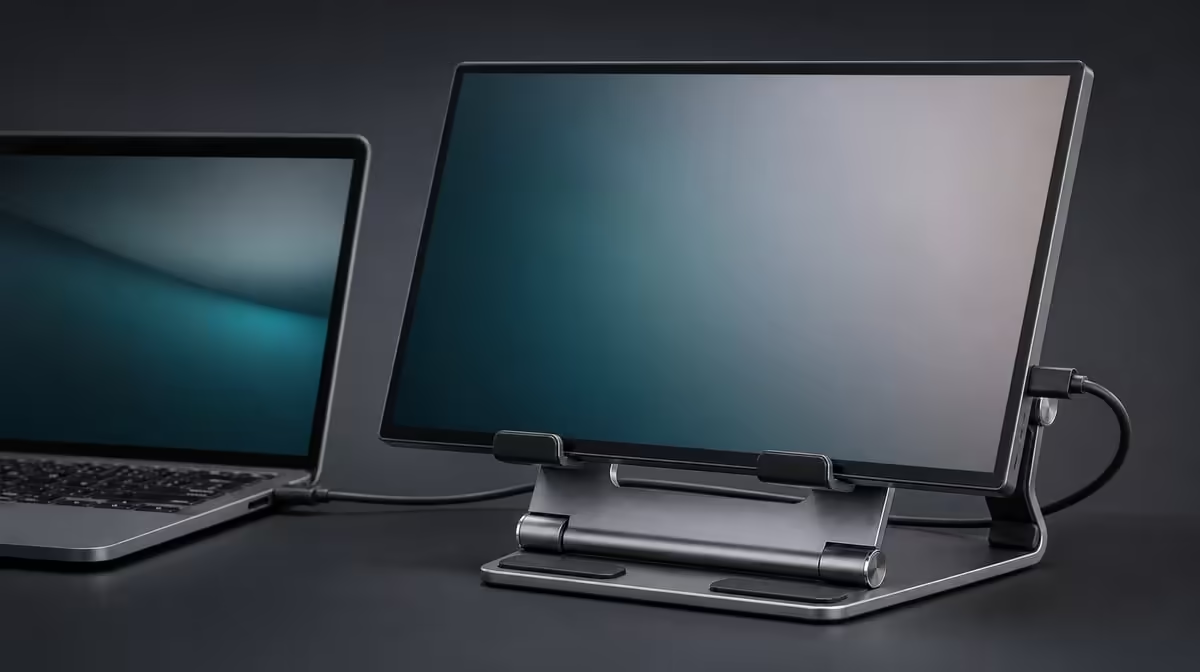
Anti-slip rubber works at the boundary between a device and everything holding it. Anti-slip rubber support explained covers two jobs: adding grip and cushioning hard contact. The R599 UPERFECT UStand uses rubber around its aluminium structure, while centring, surface choice and arm geometry still determine whether a 7-15.6-inch device is secure.
Quick Answer
The UStand's all-around anti-slip rubber can reduce sliding and separate a portable screen from the hard frame. It is included in the R599 stand. Keep it clean, check that the exact device or case meets it evenly and reject any setup that still creeps, rocks or tips; rubber cannot correct poor balance or make an unsuitable load safe.
🛡️ Give grip a clean surface
Rubber increases friction when its surface and the desk or device are clean. Dust, grit and fabric between the contact points can change that result.
Inspect the unloaded UStand before mounting. Look for debris, a lifted edge, damage or a pad that no longer meets the surface evenly.
Use a gentle dry cleaning method on accessible areas. Do not apply oils, polish, adhesive or an improvised coating.
Clean the desk footprint as well. A perfect pad on a loose sheet of paper still moves with the paper.
Compare complete contact designs through Evetech's monitor accessory range.
📱 Check the device interface
Place the screen centrally and observe where its edge meets the rubber. Contact should be broad enough to avoid balancing on one narrow corner.
A case can change thickness, surface texture and port clearance. Test the case that will remain attached during use.
Controls should remain clear. Rubber pressing a power or volume button is not useful contact even if the device appears secure.
At portrait orientation, the screen may meet different areas. Support it during rotation and repeat the contact inspection.
The confirmed 7-15.6-inch range says nothing about load. Obtain the device weight independently and keep the first position close to the base.
Browse Evetech's portable display options, then use the chosen model's physical details in the fit check.
⚖️ Keep rubber in its proper role
Grip resists small sliding forces, but the base and arm must still place the device centre over reliable support.
If an edge lifts as the 135-degree arm extends, shorten reach. Adding more rubber or pressing the base down would not fix the leverage.
Connect cables after the mechanical position passes. A taut lead can exceed the grip and make the stand creep.
Do not use rubber condition to infer capacity. A clean pad cannot approve an unknown device weight or make every 15.6-inch screen suitable.
Test normal desk activity, including typing and any intended touch. Observe whether the device or base moves rather than judging grip with the setup untouched.
🧳 Inspect contact through travel
Fold the UStand only after removing the screen and cables. Keep rubber away from keys, grit and sharp chargers in the bag.
At another desk, let the stand return to normal room conditions and inspect it before use. Surface material and cleanliness can differ.
Tripod mode creates new contact points. Test each support on the floor or table and keep cables from pulling one side.
Selfie-stick mode changes the rubber's role at the device while the user's hand supplies the main support. Reject the mode when grip or leverage feels uncertain.
Record the successful screen, case, orientation and surface. A later case or device change requires another contact approval.
At R599, the combination of aluminium and all-around rubber is a useful value point. Evetech's popular accessory page can help with the wider setup after the interface remains stable.
Diagnose sliding in layers. Test the clean unloaded base, add the centred device at short reach and connect one cable only after the first two stages remain still.
If movement begins when a lead is attached, change the route before blaming the rubber. The pad cannot overcome constant pull from behind a desk.
If movement begins after arm extension, return the centre closer to the base. More friction is not the right answer to excessive leverage.
If the device shifts inside the support, inspect case geometry and the exact areas touching rubber. A narrow raised edge can reduce usable contact dramatically.
Record whether portrait or landscape passed. Rotation can move different device surfaces onto the contact and change the result without altering the rubber itself.
Shared desks should be cleaned before the stand arrives. Residue, paper or a soft desk mat changes the interface and may make a known setup behave differently.
After travel, inspect for compressed grit before opening. Clean both the stand and the destination surface while the device remains safely stored.
Tripod support points deserve individual attention. One dirty or obstructed foot can introduce rocking even when the other two grip well.
For handheld use, the anti-slip layer helps retain the device, but the user's hands control the system. Stop when leverage makes the grip uncertain.
Do not interpret a worn appearance alone without behaviour. Observe whether contact remains even and stable, then stop if damage or movement suggests the interface is no longer dependable.
Keep a photo of the approved screen and case. A replacement case with a smoother or thicker surface requires new testing before the old result can be trusted.
The R599 UStand gains value from combining rubber with aluminium and adjustable geometry. None of those parts should be judged separately from the others during real support.
Add a contact map to the setup record. Mark the base pads touching the desk and the device-facing areas holding the screen in landscape and portrait.
If one patch never makes contact, investigate geometry rather than assuming all-around rubber is contributing equally in that position.
Test the clean map after cables are added. A lead can rotate the stand slightly and reduce contact on one side without causing an immediate fall.
Use the same map at the next travel desk. Different surface finish may change grip, but the device should still meet the intended support areas.
For tripod form, draw the three support points separately. Each needs clean, level contact and enough clearance from movement around the setup.
When another case is fitted, create a new map. Do not overwrite the old one until the revised screen position passes normal work.
The strongest R599 rubber claim is precise: it assists grip and cushions contact within an approved geometry. It does not guarantee capacity or rescue a failed mode.
Frequently Asked Questions
How does anti-slip rubber increase grip?
It adds friction at clean contact points between the stand, device and surface.
What protection does the softer layer add?
It separates the screen from direct hard-frame contact and cushions the interface.
Can dirty rubber become less effective?
Yes. Dust, grit or residue can alter grip and introduce abrasive particles.
Does rubber correct poor balance?
No. Device centring, base geometry, reach and cables remain essential.
How does a case affect contact?
It can change thickness, texture, port clearance and which parts of the device meet the rubber.
What wear should owners watch?
Look for damage, lifting, uneven contact or movement that did not occur in the recorded setup.
What price includes all-around rubber?
The R599 UPERFECT UStand includes its aluminium frame and anti-slip contact.
Ready to inspect the surfaces doing the quiet support work?
Compare Evetech monitor accessories and test the UStand's rubber through clean contact, centred placement and real cable forces.