A fabric surface can feel less sealed through long play, but body warmth still comes from the room, clothing, activity and uninterrupted contact. Breathable fabric for long gaming sessions should be judged through repeated warm-condition use instead of treated as an air-conditioning feature.
Quick Answer
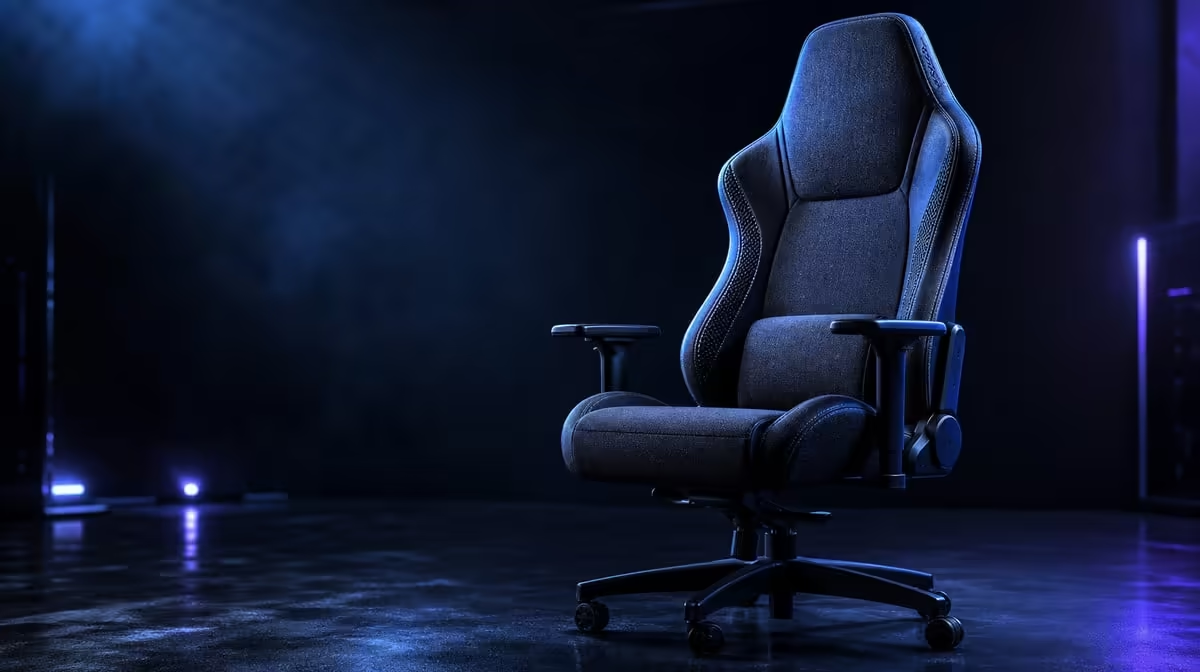
The HERO TX uses premium TX fabric, giving the body a textile contact surface during extended gaming. At R7,899, that material can suit players who prefer a less sealed feel, while cold-foam support, ventilation, clothing and movement breaks still determine the complete comfort result.
🌡️ Test contact after the opening minutes
Use the chair in the room and clothing normally chosen for gaming. Record seat and back contact after ten, thirty and sixty minutes.
Initial temperature says little about a long session. Continue until the textile has been under normal body contact and the game has created its usual activity.
Evetech's noblechairs gaming-chair selection provides relevant fabric and support comparisons.
Keep the room visible
Note ambient conditions and normal ventilation. Fabric can change the interface with the body, not the surrounding air.
Repeat during another regular warm period before making a South African climate claim.
Separate seat and back
The torso and legs create different contact areas. One can feel comfortable while the other becomes warm.
Record them independently so a material preference has a clear location.
Include normal clothing
Test the layers worn most often, including a cooler-weather option where relevant. Clothing can dominate the way textile contact feels.
The chair does not need to feel identical in every outfit to remain a good choice.
🧵 Pair fabric with the cushion beneath
TX upholstery shapes immediate feel and movement. Comfortable cold-foam manages pressure below it. Keep the two layers distinct in the notes.
A user who perches, reaches or leans can create extra contact unrelated to the covering. Bring controls closer and settle the torso before comparing.
Map pressure during gaming
Use keyboard-and-mouse play and controller play. Notice whether the pelvis shifts or the front seat edge becomes more visible.
Stand between modes and see whether broad support is easy to recover.
Compare another real covering
Use the actual PU or other chair under similar room, clothing and duration. Construction varies.
The HERO TX textile wins when the user prefers this repeated result, not because fabric is declared universally cooler.
Accept the cleaning routine
Lift loose dust gently, use suitable minimal-moisture methods and let the chair dry fully. Keep liquids from soaking into the cushion.
Long-session value includes caring for the surface that receives those hours of contact.
💪 Reduce heat created by poor reach
Set the enlarged 4D pads around relaxed forearms and move the keyboard, mouse or controller within comfortable distance. A user pulled forward creates more torso contact and shoulder work.
During a relaxed lean, let the memory-style rest receive the head instead of pressing backwards to find it.
Compare the wider South African gaming-chair range when another adjustment system better fits the desk.
Save task-specific profiles
Keyboard and controller positions can need different pad spacing and angle. Record both.
A recoverable profile lets the user change activity without accepting a warm, awkward compromise.
Check the 150kg maximum
Confirm the limit for every intended user, then assess fabric and cushion fit. The capacity figure does not predict thermal comfort or proportions.
Keep safety and surface preference as separate pass conditions.
Use controls correctly
Operate the premium stainless-steel levers through their intended adjustments and stop if an action is unclear.
The component material does not prove overall service life or justify force.
📅 Build a long-session rhythm
Use natural game boundaries as movement cues. Stand, walk, release the arms and change visual focus before returning to the saved setup.
No upholstery eliminates perspiration or makes continuous sitting consequence-free.
For a final price sense-check, browse Evetech's leading gaming chairs. Confirm the R7,899 selection is live after completing the monitor-and-seat trial.
Compare the final hour
Return to the seat, back, shoulder and fabric notes after sustained use. A weakness missed in the first half hour may become obvious once the user tires.
Reset the workstation before deciding that material alone caused the change.
Review across several days
Run work, gaming and passive viewing in similar room periods. Record warmth, support and care effort.
A multi-day pattern is more trustworthy than one unusually hot or cool session.
Price the complete package
Remove cold-foam, fabric preference, 4D support and memory contact from the value sheet one at a time. Note which loss changes play.
The R7,899 HERO TX earns its place when several real functions join the preferred textile surface.
Preserve the climate card
Write room period, clothing, task, movement breaks and surface result. Revisit it when seasons change.
This keeps the buying decision adaptable without rewriting personal observations as universal facts.
Compare active and passive heat
Play an action-heavy game, then use the chair for quieter viewing under similar room conditions. Activity can change body warmth and movement.
Record which task produces more contact discomfort instead of assigning every difference to fabric.
Review the cold-foam after warmth builds
Notice whether pressure remains broad when the surface feels warmer. Shift position and return after standing.
Separating thermal contact from seated support produces a more useful long-session verdict.
Include shared gamers
Let each person run the same warm-session sequence in their normal clothing. Keep notes separate.
One user can prefer TX fabric while another values a different surface, even in the same room.
Check the chair after fabric care
Once an approved spot method has dried fully, repeat the normal contact test. Make sure no residue changes feel or clothing movement.
Care success is part of ownership, not a guarantee that future stains behave the same way.
Review screen and control distance
Move the display and inputs so the user can stay back without craning. Reaching can create extra torso contact and perceived heat.
Repeat the temperature notes after posture stabilises.
Finish a complete evening
Use the chair from the first game through the final break, including mode changes and fabric observations. Count interruptions caused by warmth, pressure or setup.
The textile earns R7,899 value when the full evening remains comfortable and the maintenance routine is acceptable.
Check the final game after cleaning
Once an approved spot-care method has dried fully, play a representative block and compare clothing movement and warmth with the original note.
This confirms that the ownership routine preserves the surface experience the buyer valued.
Save a shared-room profile
Record room period, clothing, armrest setup and break timing for each user. Do not average different warmth preferences.
The fabric choice is stronger when the household can restore and understand its own conditions.
Frequently Asked Questions
How can fabric change warmth at contact points?
Its textile surface may feel less sealed against the body than some coverings.
Which covering is used on the HERO TX?
It uses premium TX fabric upholstery.
Can breathable fabric cool the surrounding air?
No. Ambient conditions still determine room temperature.
Why do clothing layers matter on a fabric chair?
They change the interface between the body and textile.
How do breaks improve temperature comfort?
They interrupt continuous contact and allow position changes.
Can fabric eliminate perspiration during gaming?
No. Material alone cannot eliminate the body's heat response.
Ready to compare long-session fabric in your real gaming room?
Browse Evetech's gaming chairs with clothing, task, movement and care included in the trial.